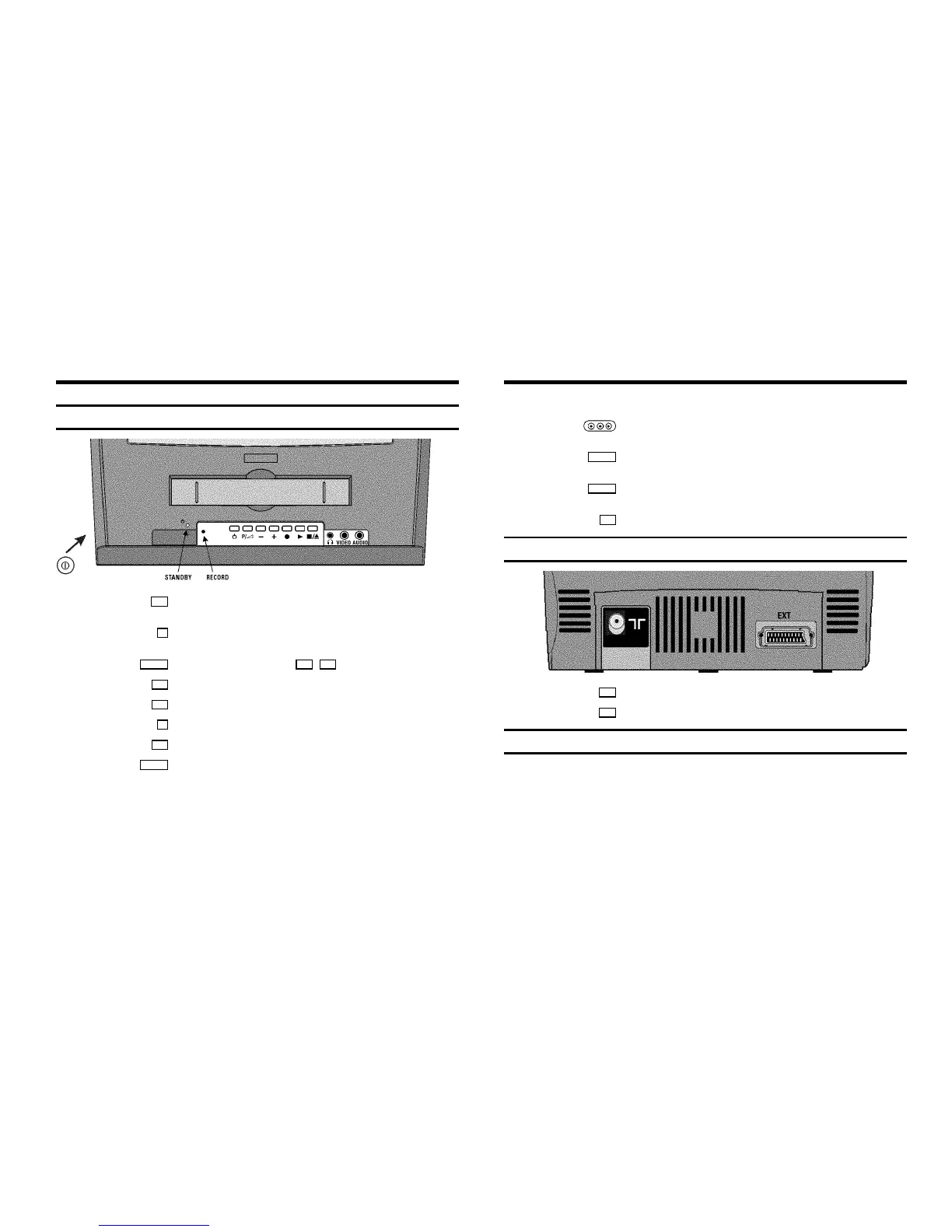
Front of the set
8 Power switch: To switch off the machine
Caution: If you switch off using the power switch, TIMER-recordings are not possible!
m Standby : Switch machine off, cancel current function.
Press for more than 3 seconds: cancel current recording
P /S Volume: In connection with the button q , r to regulate the volume
r
Programme number minus: previous programme number
q
Programme number plus : next programme number
n
Record: To record the programme currently selected
G
Playback: To play a recorded cassette
?
Pause/Stop, eject cassette: To stop the tape; when STOP is pressed, the cassette will be
ejected from the machine
Sockets on the front :
white socket
AUDIO
Audio input socket : To connect a camcorder or video games (audio)
yellow socket
VIDEO
Video input socket : To connect a camcorder or video games (video)
small socket
w
socket for headphones : To connect headphones
Back of the set
2 Aerial input socket: To connect the aerial cable
EXT
Scart socket: To connect a satellite receiver, decoder, video recorder, etc.
The control lights at the front of the machine
STANDBY 5 Standby light: lights up when the TV-Video Combi has been switched on by means of the
main switch; it blinks when a button is pressed on the remote control
RECORD 5 Recording light: lights up during recording, Timer recording; blinks when timer recording is
unable to start











 To Next Page