12 190CW9 LCD
Mechanical Instructions
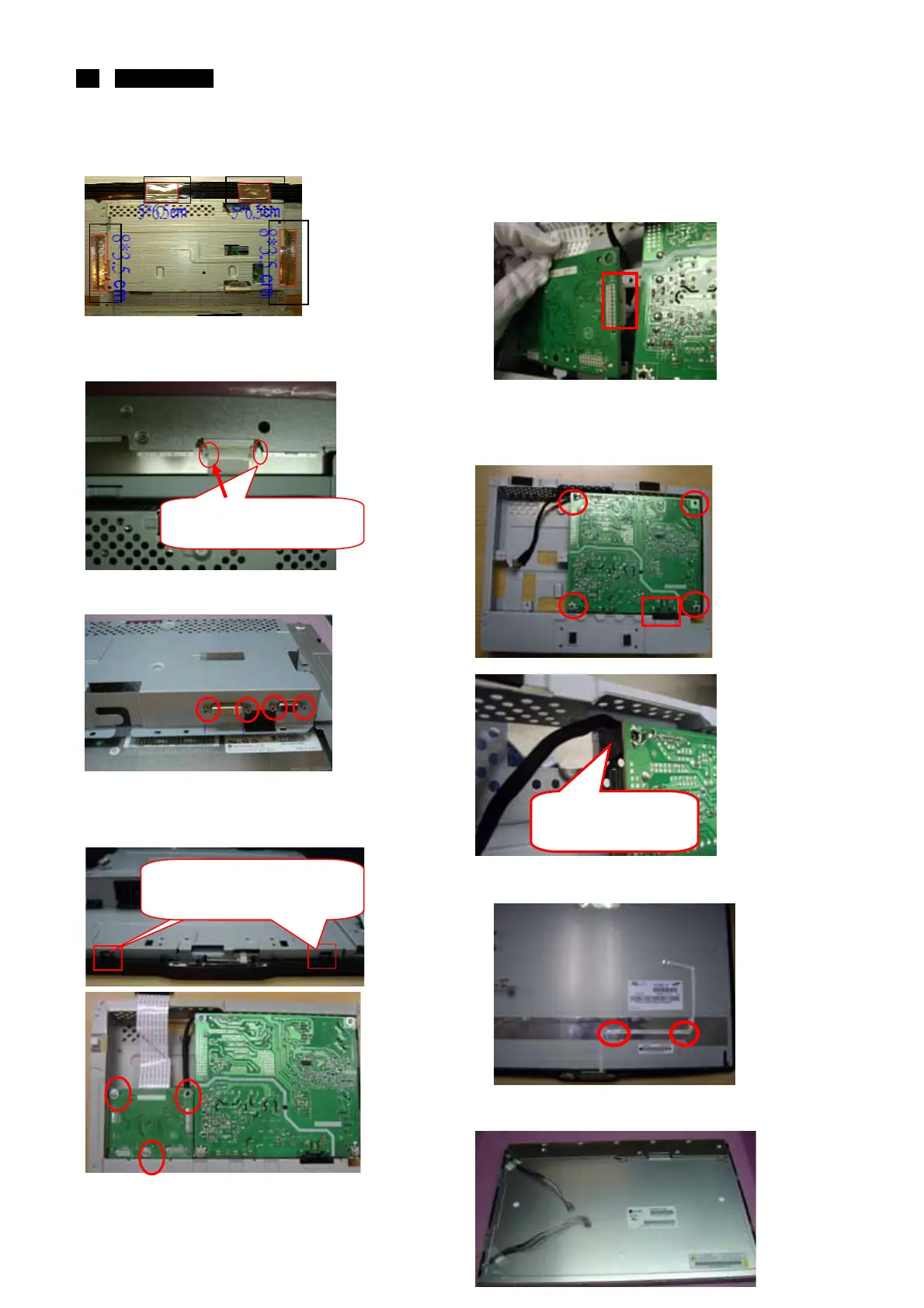
Take off the Tape AL*4
Unlock the LVDS-FFC by using two hands(see
note).
Disassemble the hexangular screws*4
Turn over the Main-BKT.
Disassemble the I/F board
3screws
Uplift the I/F. Pull out the cable of Power board in I/F
Board. Take the I/F Board from Main-BKT and then
put it on the cushion
Disassemble the AC-Socket from the P/B and The
main-BKT. Disassemble the I/F board
4 screws Take the Power Board from Main-BKT
and then put it on the cushion
Take off the tape below of the LED/B FFC.
Take off the BZL of from the panel .
Take off the mylar-AL from the panel.
The locking-latch of
LVDS cable’s housing
Take up the SHD come from this
two rib of the BZL.
Let the wire walk
out from the rib
http://www.wjel.net



 To Next Page