190CW9 LCD 11
Mechanical Instructions
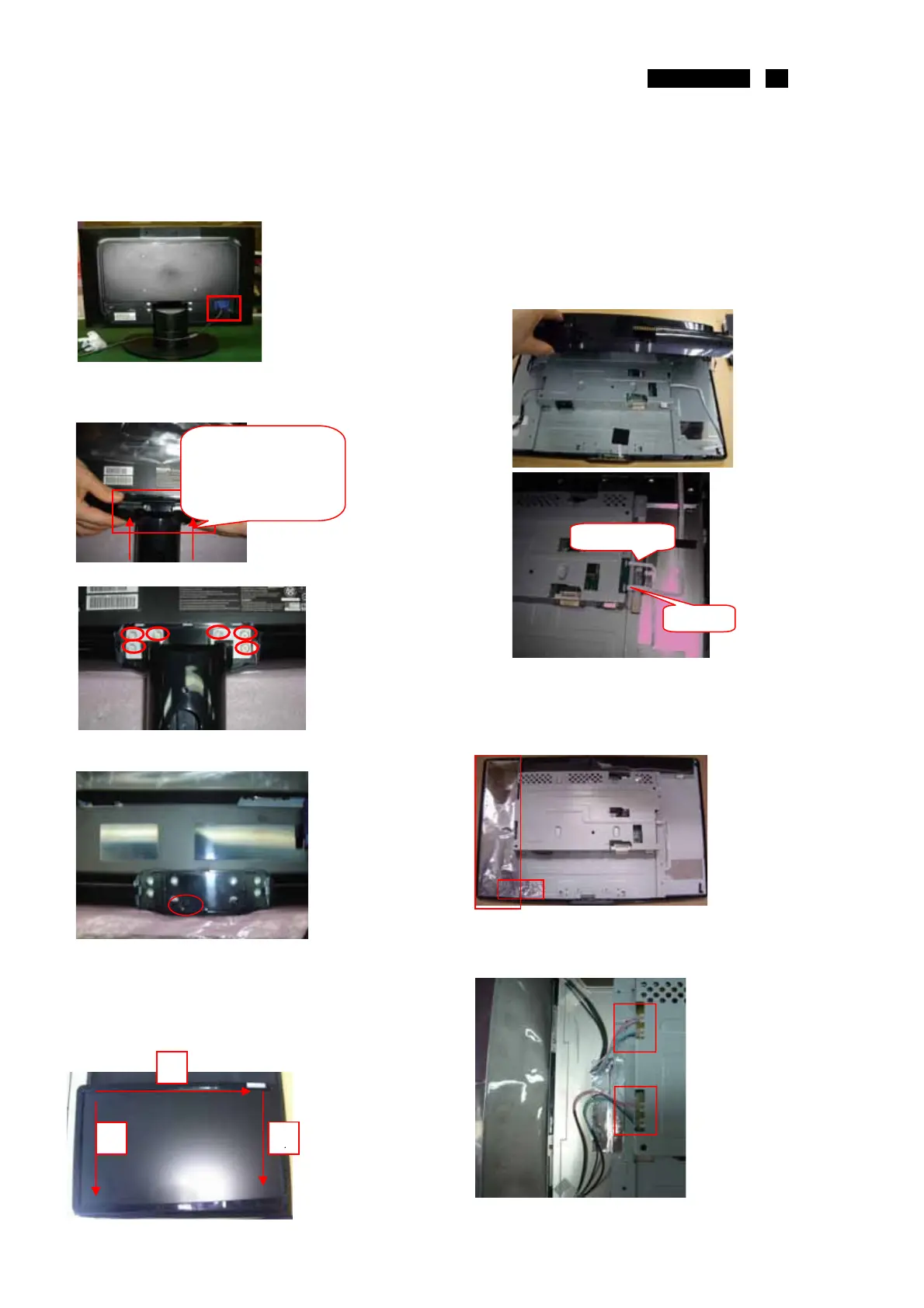
Disassemble the Signal cable
2 screws Bring the signal cable
Disassemble the stand
Disassemble the stand
1 holder Of the column
6 screws Bring the stand
Disassembly the screw*1 of the RC
disassembly the bezel from the monitor, notice
the disassembly orde
1.Top (1) parts of bezel
2.Left (2) parts of bezel
3. UP-Right (3) parts of bezel
1.turn over the monitor ,
2.take up the RC from the bottom size.
3. Tear off this one acetic tape of C/B FFC
4.Tear down the FFC of the C/B and LED Board in
I/F
5.Take off the Rear cover from the monitor
1.Take off the Tape AL with the SHD and the
Mylar-AL.
2.Tear off the top and the bottom size tape below of
the Mylar-AL
Pull out these lamp wires.
4 lamp Wires Take off the Tape AL*1
Disassemble it
With driver like
Ϙԫϙ
1
2
3
C/B
LED/B FFC
http://www.wjel.net



 To Next Page