19B4LP LCD 11
Philips Pixel Defect Policyġ
Philips' Flat Panel Monitors Pixel Defect Policy
Philips strives to deliver the highest quality products. We use some of the
industry's most advanced manufacturing processes and practice stringent
quality control. However, pixel or sub pixel defects on the TFT LCD panels
used in flat panel monitors are sometimes unavoidable. No manufacturer
can guarantee that all panels will be free from pixel defects, but Philips
guarantees that any monitor with an unacceptable number of defects will be
repaired or replaced under warranty. This notice explains the different types
of pixel defects and defines acceptable defect levels for each type. In order
to qualify for repair or replacement under warranty, the number of pixel
defects on a TFT LCD panel must exceed these acceptable levels. For
example, no more than 0.0004% of the sub pixels on a 19" XGA monitor may
be defective. Furthermore, Philips sets even higher quality standards for
certain types or combinations of pixel defects that are more noticeable than
others. This policy is valid worldwide.
Pixels and Sub pixels
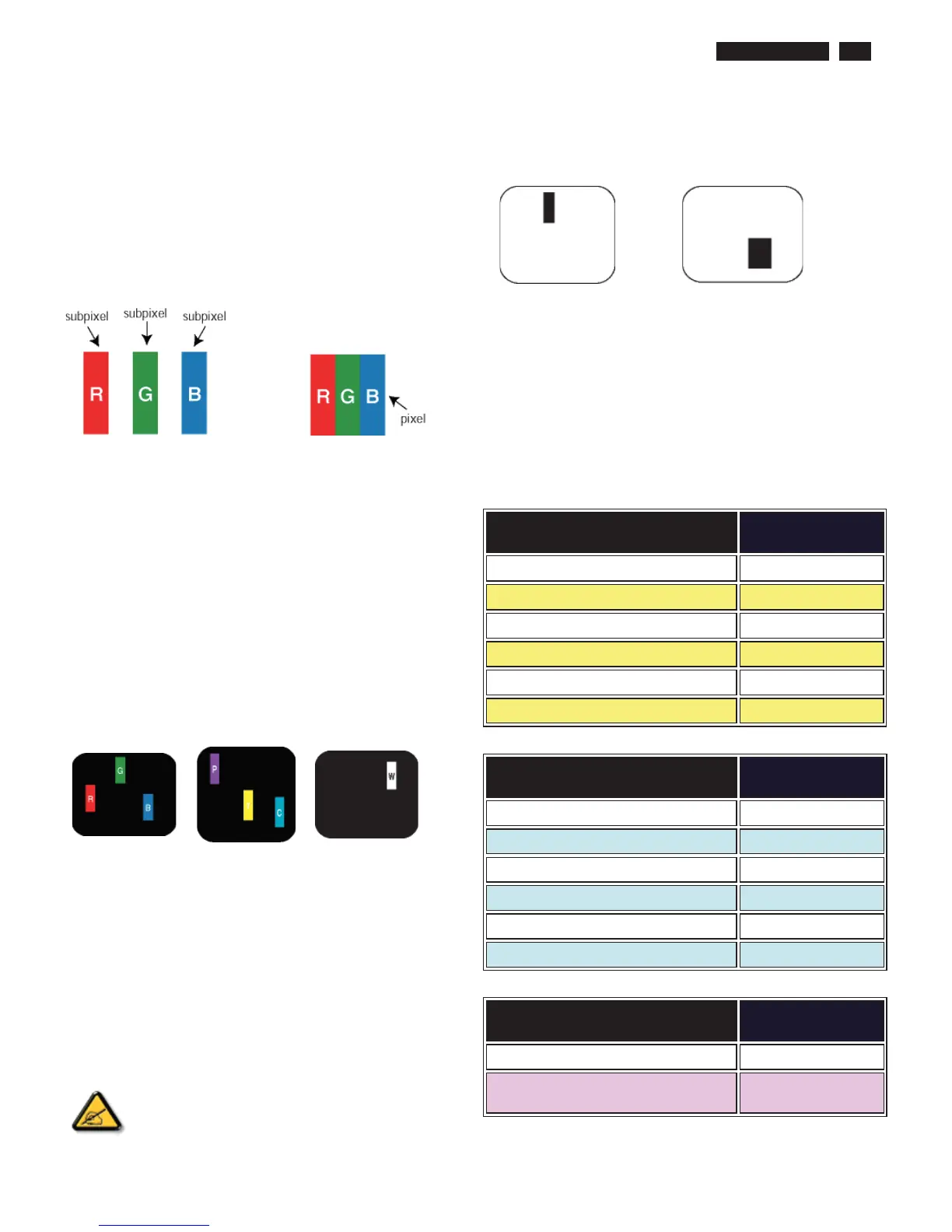
A pixel, or picture element, is composed of three sub pixels in the primary
colors of red, green and blue. Many pixels together form an image. When all
sub pixels of a pixel are lit, the three colored sub pixels together appear as a
single white pixel. When all are dark, the three colored sub pixels together
appear as a single black pixel. Other combinations of lit and dark sub pixels
appear as single pixels of other colors.
ġTypes of Pixel Defects
Pixel and sub pixel defects appear on the screen in different ways. There are
two categories of pixel defects and several types of sub pixel defects within
each category. ġ
Bright Dot Defects Bright dot defects appear as pixels or sub pixels that are
always lit or 'on'. That is, a bright dot is a sub-pixel that stands out on the
screen when the monitor displays a dark pattern. There are the types of
bright dot defects:ġ
ġ
ġ
ġ
One lit red, green or
blue sub pixelġ
Two adjacent lit sub
pixels:
- Red + Blue =
Purple
- Red + Green =
Yellow
- Green + Blue =
Cyan (Light Blue)!
Three adjacent lit sub
pixels (one white
pixel)ġ
ġ
A red or blue bright dot must be more than 50 percent brighter
than neighboring dots while a green bright dot is 30 percent
brighter than neighboring dots.ġ
Black Dot Defects Black dot defects appear as pixels or sub pixels that are
always dark or 'off'. That is, a dark dot is a sub-pixel that stands out on the
screen when the monitor displays a light pattern. These are the types of
black dot defects:ġ
ġ
ġ
One dark sub pixelġ Two or three adjacent dark sub pixelsġ
Proximity of Pixel Defects
Because pixel and sub pixels defects of the same type that are near to one
another may be more noticeable, Philips also specifies tolerances for the
proximity of pixel defects.
Pixel Defect Tolerances
In order to qualify for repair or replacement due to pixel defects during the
warranty period, a TFT LCD panel in a Philips flat panel monitor must have
pixel or sub pixel defects exceeding the tolerances listed in the following
tables.ġ
BRIGHT DOT DEFECTSġ
ACCEPTABLE
LEVEL ġ
MODELġ
19B4LPġ
1 lit subpixelġ 3ġ
2 adjacent lit subpixelsġ 1ġ
3 adjacent lit subpixels (one white pixel)ġ 0ġ
Distance between two bright dot defects*ġ >15mmġ
Total bright dot defects of all typesġ 3ġ
BLACK DOT DEFECTSġ
ACCEPTABLE
LEVEL ġ
MODELġ
19B4LPġ
1 dark subpixelġ 5or fewerġ
2 adjacent dark subpixelsġ 2or fewerġ
3 adjacent dark subpixelsġ 0 ġ
Distance between two black dot defects*ġ >15mmġ
Total black dot defects of all typesġ 5or fewerġ
TOTAL DOT DEFECTSġ
ACCEPTABLE
LEVEL ġ
MODELġ
19B4LPġ
Total bright or black dot defects of all
typesġ
5or fewerġ
Note:
* 1 or 2 adjacent sub pixel defects = 1 dot defect



 To Next Page