12
19B4LP LCD
Mechanical Instruction
Preparation before disassemble
1.Clean the room for disassemble
2.Identify the area for monitor
3.Check the position that the monitors be placed and the quantity of the monitor ;prepare the area for material flow;
according to the actual condition plan the disassemble layout
4.Prepare the implement, equipments, materials as bellow:
1) Press-fixture
2) working table
3) Screw-driver
4) knife*1
5) glove
6) cleaning cloth
7) ESD protection
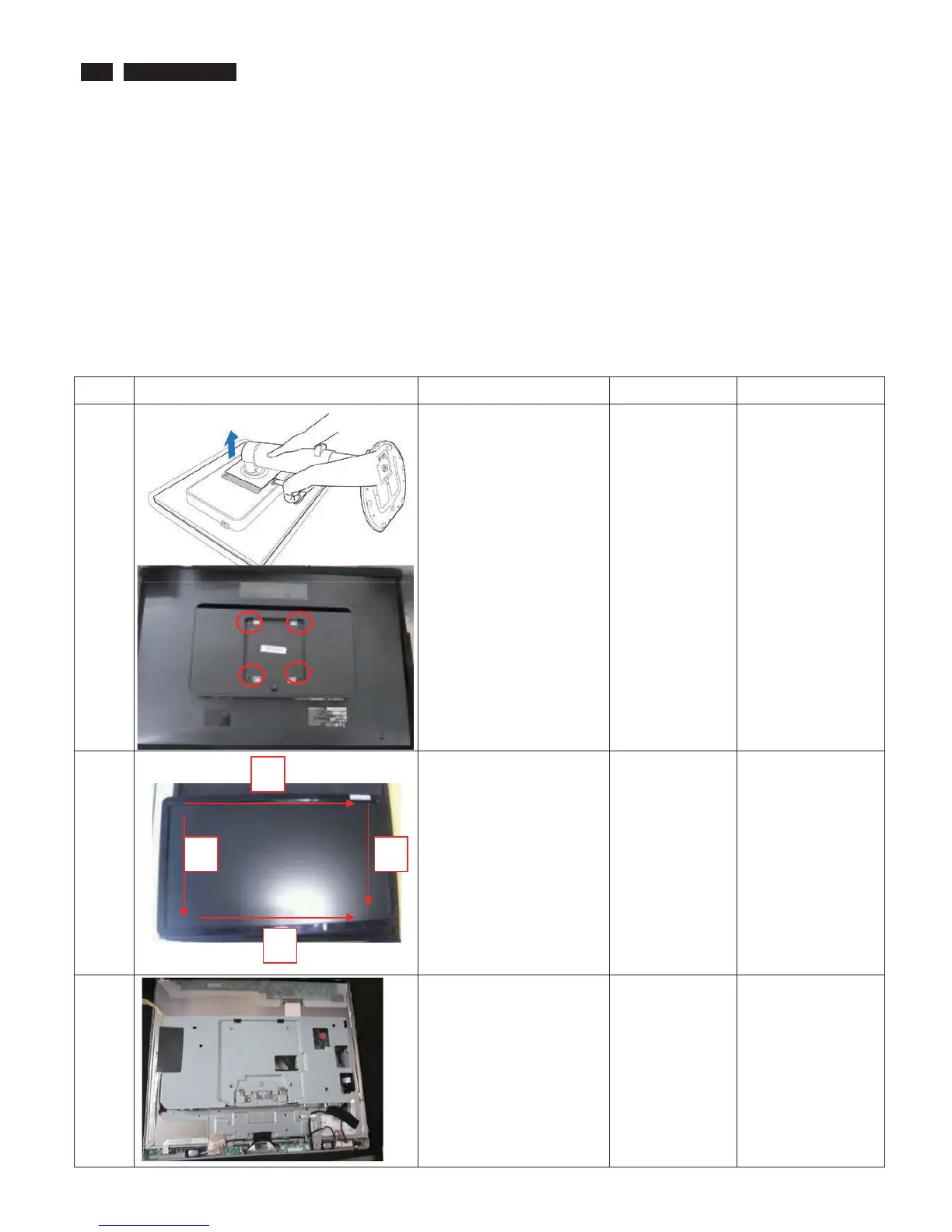
item picture Operation Tool Notes
1
1.Place the monitor face
down on a smooth surface,
taking care to avoid
scratching or damaging the
screen. Then lift the
monitor stand.
2. While keeping the
release button pressed, tilt
the base and slide it out.
3. Take off the Stand.
Disassembly 4 screws,
Screw-driver
2 Turn over the monitor ,
Bring the Bezel from the
monitor
When disassembly
the bezel ,
notice don’t bend
the C/B .
man must wear
glove
The purpose is
loose the BZL
3 Remove the RC cover
1
2
3
4



 To Next Page