Mechanical Instructions
EN 16 QM16.3A LA4.
2016-Jun-08
Table 2-1
4.3.3 AmbiLight Panel
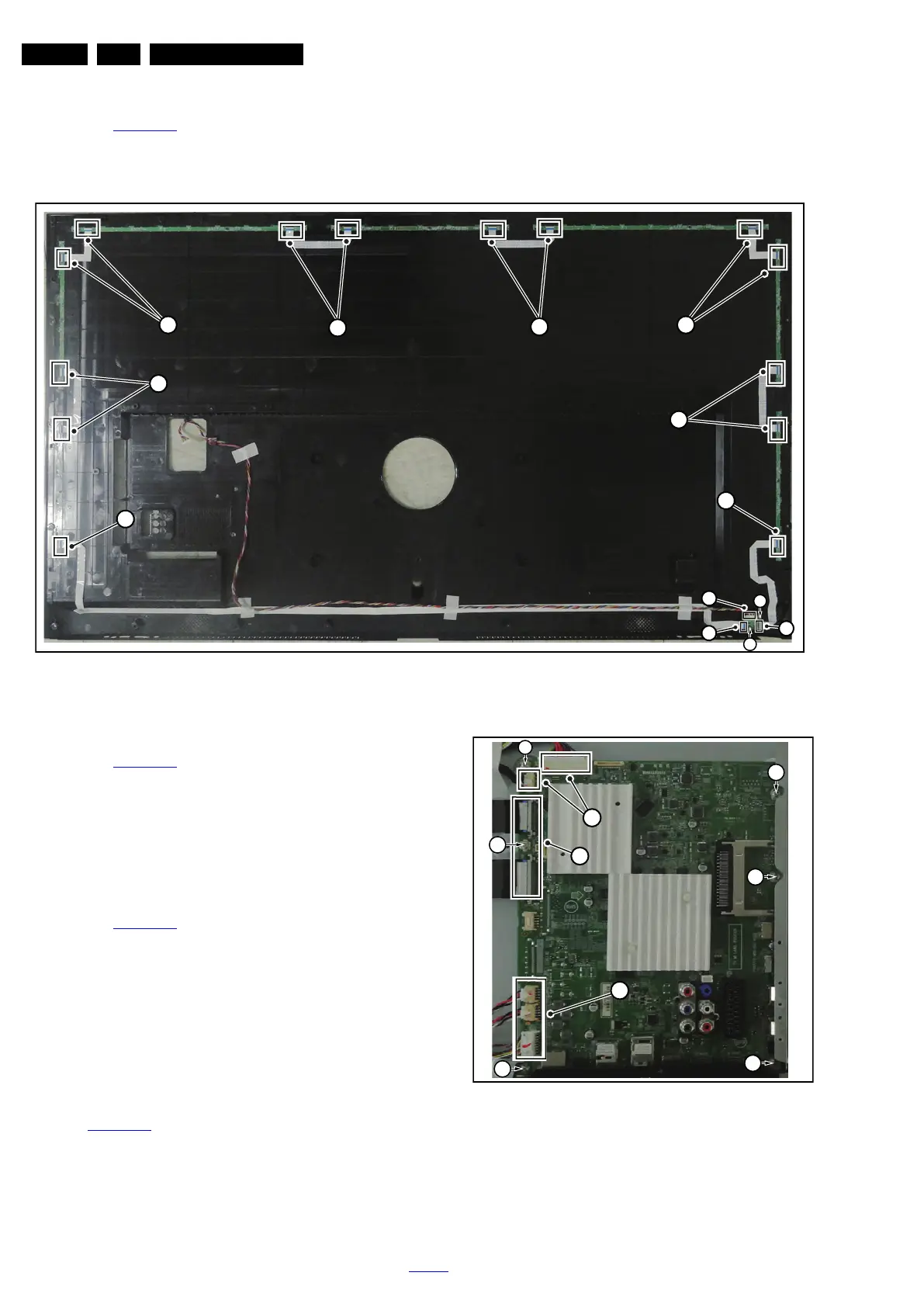
Refer to Figure 4-11
for details.
1. Gently release the clamps and unplug the connectors [5]
that secure the ambilight panels. Release the clips from the
FFC connector that connect with the Keyboard control
panel [4].
2. Lift the AmbiLight panel from the rear cover. Make sure that
wires and flat foils are not damaged while lifting the
Ambilight panel from the rear cover.
Figure 4-11 Ambilight and Keyboard removal
4.3.4 Keyboard Control Unit
Refer to Figure 4-11
for details.
1. Release the connector [2] from the SSB Board, then
release the connectors [3] from the Ambilight panel.
Caution: be careful, as these are very fragile connectors!
2. Remove all the fixation screws from the keyboard control
panel [1] and take it out from the Back cover.
When defective, replace the whole unit.
4.3.5 Small Signal Board (SSB)
Refer to Figure 4-12
for details.
Caution: it is mandatory to remount all different screws at their
original position during re-assembly. Failure to do so may result
in damaging the SSB.
1. Release the clips from the LVDS connector that connect
with the SSB [1].
Caution: be careful, as these are very fragile connectors!
Unplug the cable/flat foils connector.
2. Unplug all other connectors [2].
3. Remove all the fixation screws from the SSB [3].
4. Take out the SSB with I/O bracket.
5. The SSB can now be shifted away from side connector
cover, then lifted and taken out of the I/O bracket. Refer to
Figure 4-12
for details.
Figure 4-12 SSB removal
20150_104.eps
3
2
3
4
4
55
1
1
5
5
5
5





 To Next Page