BDL4988XC/49BDL3005X
7
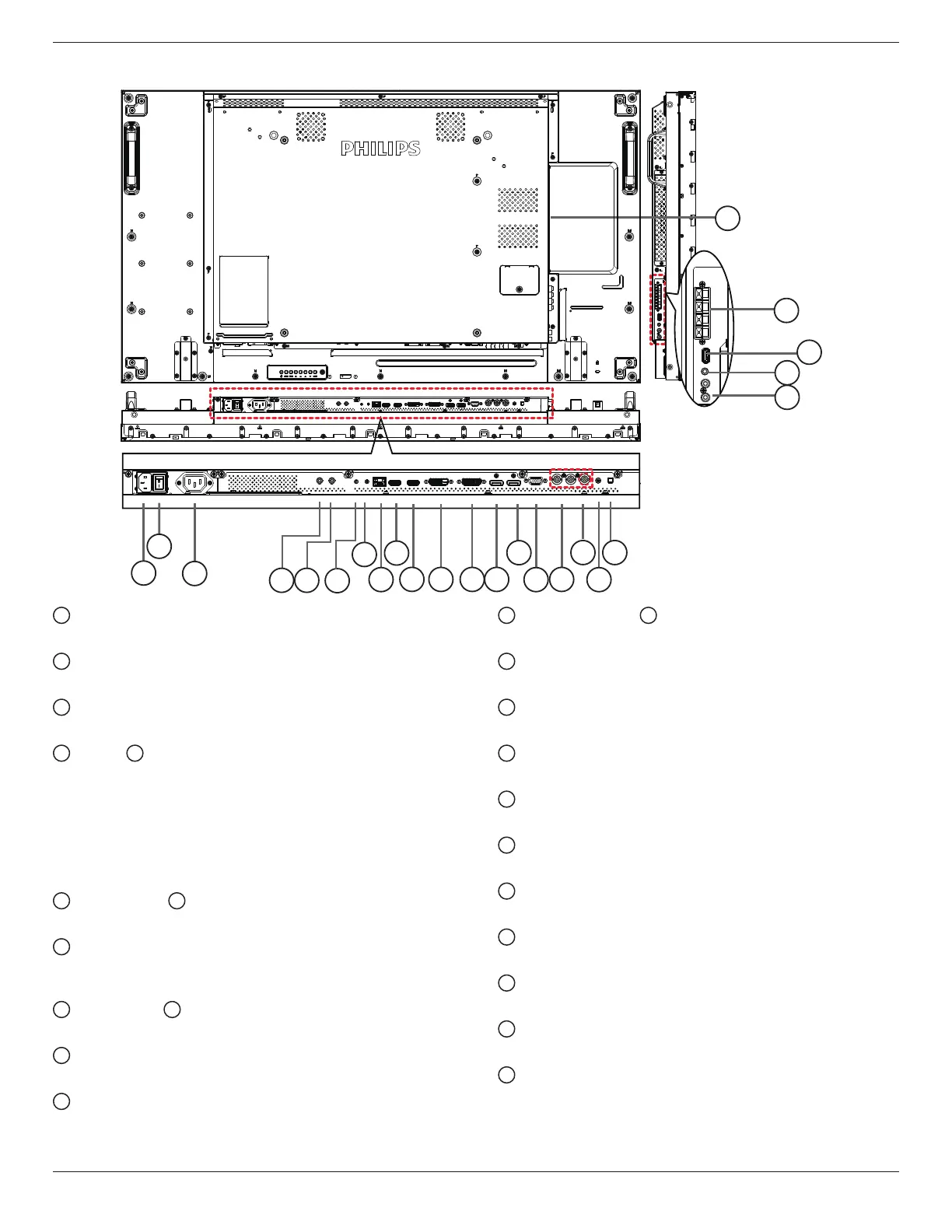
2.2. Input/Output Terminals
1
3
2
19
14
10
11 12
15
16
18
13
8
9
4 5
6
7
17
20
21
22
23
24
1
AC IN
ACpowerinputfromthewalloutlet.
2
MAIN POWER SWITCH
SwitchthemainpowerbetweenOn/Off.
3
AC OUT
ACpowersupplytotheACINjackofamediaplayer.
4
IR IN /
5
IR OUT
IRsignalinput/outputfortheloop-throughfunction.
NOTES:
• Theremote
controlsensorofthisdisplaywillstopworkingifthe
jack[IR IN]isconnected.
• ToremotelycontrolyourA/Vdeviceviathisdisplay,refertopage
16forIR Pass Throughconnection.
6
RS232C IN /
7
RS232C OUT
RS232Cnetworkinput/outputfortheloop-throughfunction.
8
RJ-45
LANcontrolfunctionforusingtheremotecontrolsignalfromthe
controlcenter.
9
HDMI1 IN /
10
HDMI2 IN
ConnecttoasourcedeviceusinganHDMIcable.
11
DVI IN
ConnecttoasourcedeviceusingaDVIcable.
12
DVI OUT / VGA OUT
DVIorVGAvideooutput.
13
DisplayPort IN /
14
DisplayPort OUT
DisplayPortvideoinput/output.
15
VGA IN (D-Sub)
VGAvideoinput.
16
COMPONENT IN (BNC)
ComponentYPbPrvideosourceinput.
17
Y/CVBS
Videosourceinput.
18
PC LINE IN
AudioinputforVGAsource(3.5mmstereophone).
19
SPEAKER SWITCH
Internalspeakeron/offswitch.
20
AUDIO IN
AudioinputfromexternalAVdevice(RCA).
21
AUDIO OUT
AudiooutputtoexternalAVdevice.
22
USB PORT
ConnecttoaUSBstoragedevice.
23
SPEAKERS OUT
Audiooutputtoexternalspeakers.
24
OPS SLOT
SlotforinstallingtheoptionalOPSmodule.
NOTES:AdvantechARKDS262andWinmateOMIS-OPSmodules
aretwomodulesrecommendedbythemanufacturer.Any















 To Next Page