75BDL3050Q
9
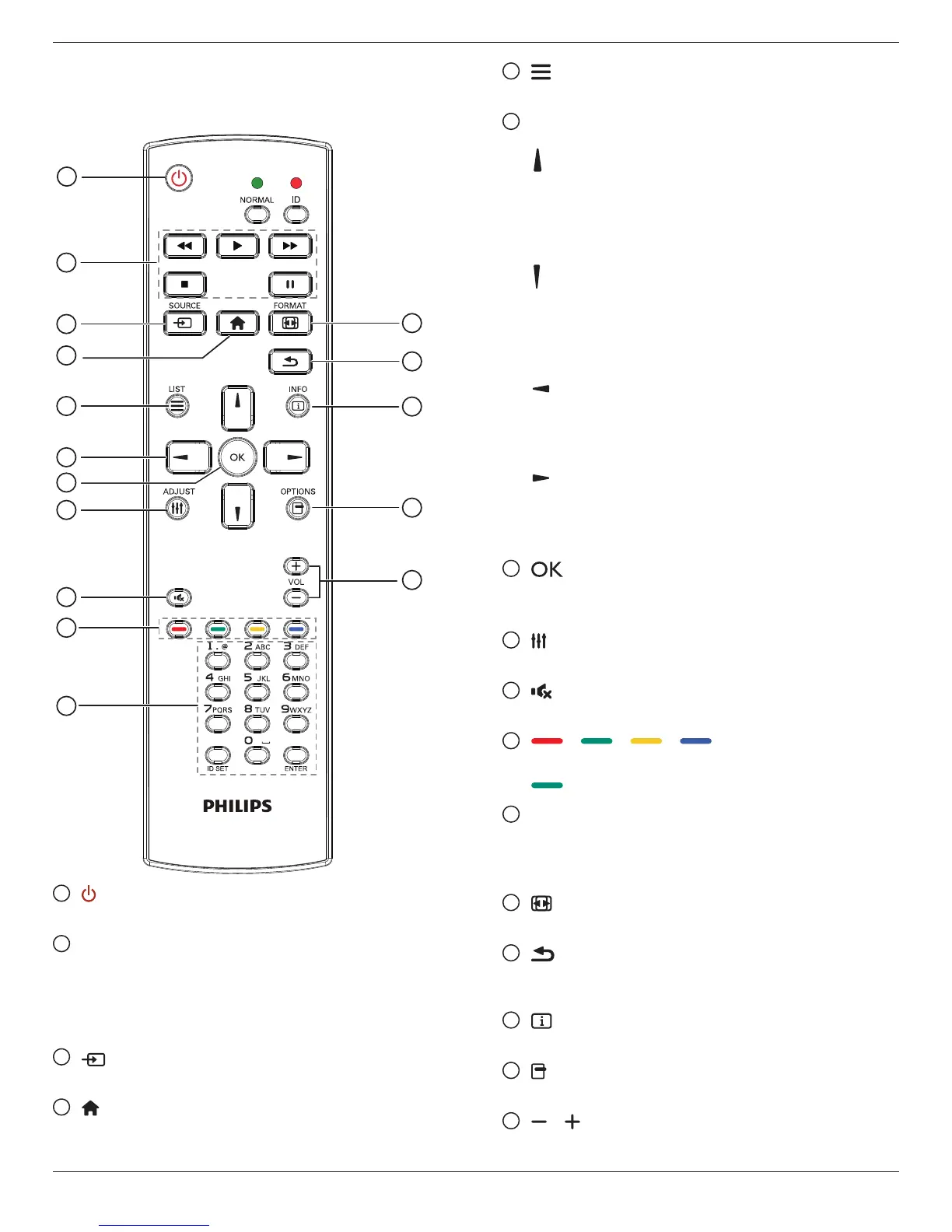
2.3. Remote Control
2.3.1. General functions
1
2
3
4
5
6
7
8
10
9
12
14
15
11
13
16
1
[ ] POWER button
PowerON/OFF.
2
[PLAY] buttons
Controlplaybackofmediales.(forMediaInputonly)
Freeze feature
Pause:Freezehotkeyforallinputscontent.
Play:Unfreezehotkeyforallinputcontent.
3
[ ] SOURCE button
Root Menu:GotoVideosourceOSD.
4
[ ] HOME button
Root Menu:GotoMainMenuOSD.
Others:ExitOSD.
5
[ ] LIST button
Nofunction.
6
NAVIGATION buttons
[ ]
Root Menu:GotoSmartpictureOSD.
Main Menu:Movethehighlightbaruptoadjusttheselecteditem.
IR Daisy Chain Menu:IncreasecontrolledGroupIDnumber.
[ ]
Root Menu:GotoAudiosourceOSD.
Main Menu:Movethehighlightbardowntoadjusttheselected
item.
IR Daisy Chain Menu:DecreasecontrolledGroupIDnumber.
[ ]
Main Menu:gotopreviouslevelmenu.
Source Menu:Exitsourcemenu.
Volume Menu:DecreaseAudioVolume.
[ ]
Main Menu:gotonextlevelmenuorsetselectedoption.
Source Menu:Gotoselectedsource.
Volume Menu:IncreaseAudioVolume.
7
[ ] button
Root Menu:GotoIRdaisychainOSDinPrimary/Secondarymode.
Main Menu:Conrmanentryorselection.
8
[ ] ADJUST button
GotoAutoAdjustOSDforVGAonly.
9
[ ] MUTE button
ToggleAudioMute/Unmute.
10
[ ] [ ] [ ] [ ] COLOR buttons
Choosetasksoroptions.(forMediaInputonly)
[ ]
HotkeyforWindowselectionfunction.
11
[Number/ ID SET/ ENTER] button
Entertextfornetworksetting.
PresstosetthedisplayID.Referto2.3.2. ID Remote Control
formoredetail.
12
[ ] FORMAT button
ChangeImageZoomMode[Full][4:3][1:1][16:9][21:9][Custom].
13
[ ] BACK button
Returntothepreviousmenupageorexitfromtheprevious
function.
14
[ ] INFO button
ShowInformationOSD
15
[ ] OPTIONS button
Nofunction.
16
[ ] [ ] VOLUME button
Adjustvolume.










 To Next Page