75BDL3050Q
21
12. MediaHotkey
Play:Playbackle.
Pause:Pausele.
Fastforward:forward10second.
Rewind:back10second.
Stop:Stopleandreturntostart.Ifthegifle,itlikethepause.
13. MediaformatpleaserefertoPage 49 Supported Media Formats.
14. HowtoeditplaylistviaFTP.
Step1.Createmediaplayertextle.
- Filename:mpplaylistX.txt,“X”meansplaylist
number(1,2,3,4,5,6,7).
Ex.mpplaylist1.txt,mpplaylist2.txt
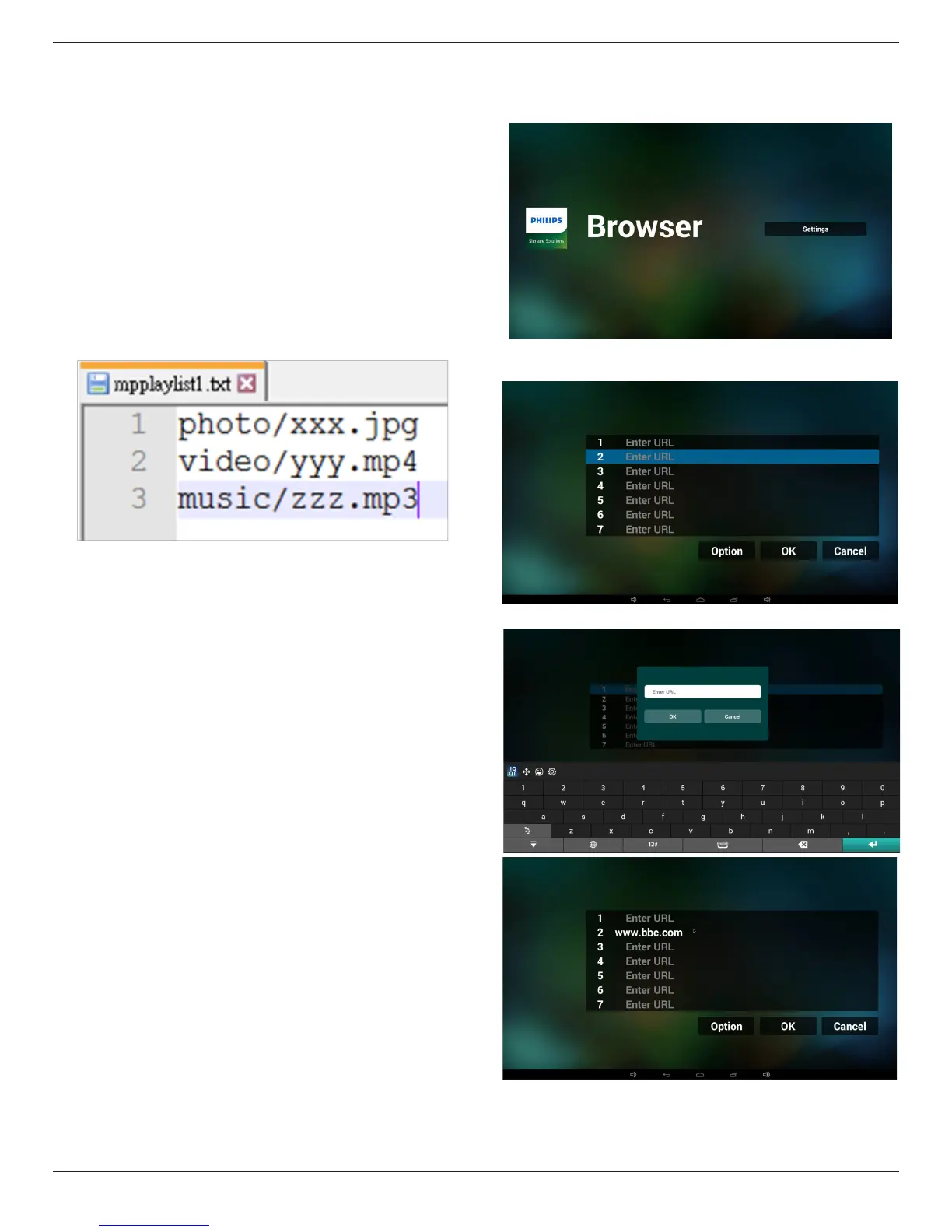
- Content:
Note:ifplaylistlecontainsvideoandmusic,whenthepdplays
musicle,thescreenwillbeblack.
Step2.CopympplaylistX.txtto“philips”folderofinternalstorage.
YoumayuseFTPtodothis.
- Filepath:/storage/emulated/legacy/philips
Ex./storage/emulated/legacy/philips/mpplaylist1.txt
Step3.Preparemedialesto“photo”,“video”and“music”folder
under“philips”folder,internalstorageonly.
- Ex./storage/emulated/legacy/philips/photo/xxx.jpg
/storage/emulated/legacy/philips/video/yyy.mp4
/storage/emulated/legacy/philips/photo/zzz.mp3
Step4.Startmediaplayerapp,itwillautoimportmediaplayertext
le.
PS.Oncetheplaylistle(text)isimported,ifanuserchangeplaylist
byremotecontroller,thischangewillnotbewrittentoplaylisttext
le.
4.5. Browser manual
1. HomepageofBrowserapp,thispagehasoneitem:“Settings”.
PressSettingsthenenternextpage.
2. Userscanchoose1~7.
Pressanyonewillshowadialog.
3. EnterurlandpressOKthendatawillsaveonList









 To Next Page