75BDL3050Q
36
4. PDFPlayer
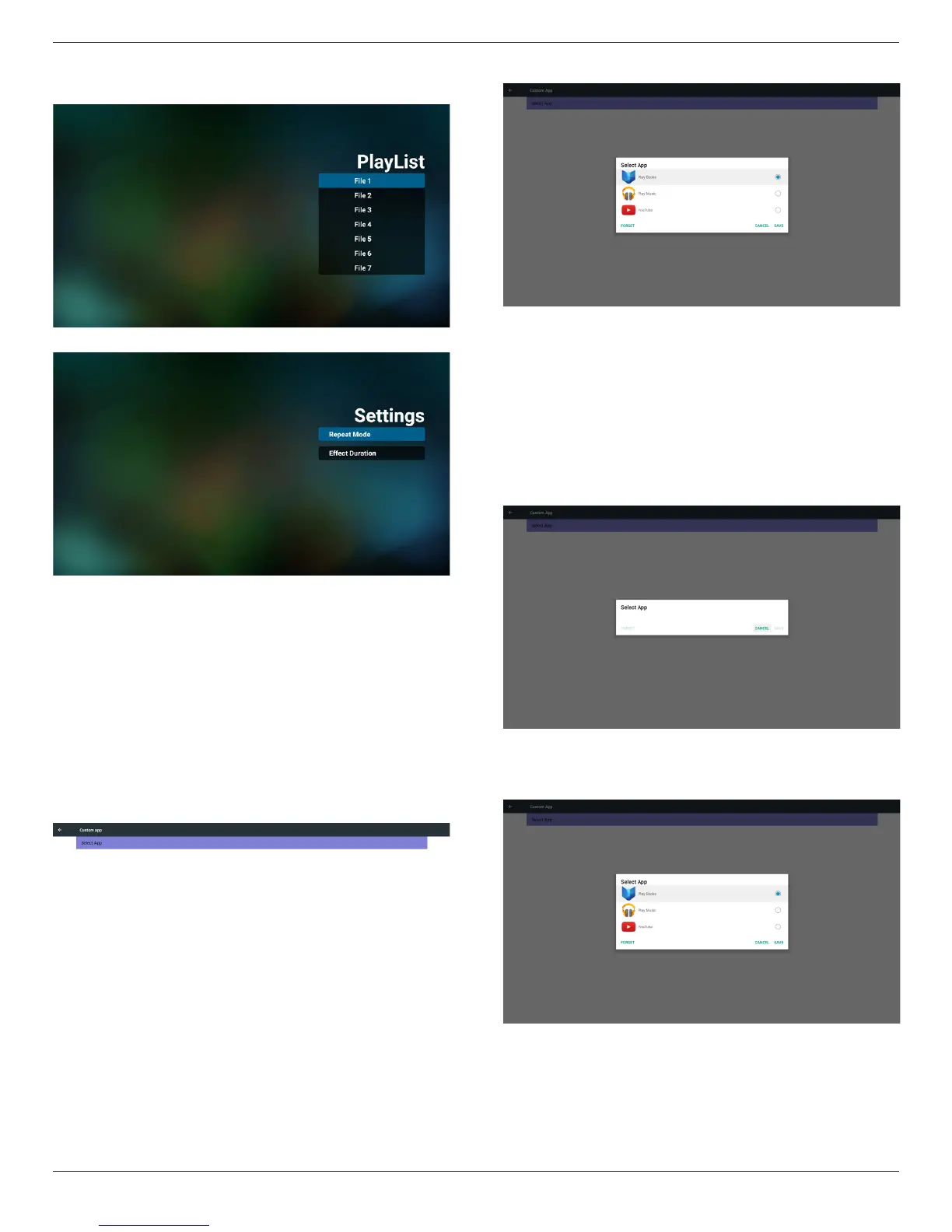
(1)OpenPDFPlayerPlayerListeditpage.
(2)OpenPDFPlayereffecteditpage.
5. CustomApp
UsercansetuptheapplicationforCustomerSource.
Note
(1)OnlydisplayUserInstalledapp.
(2)Willnotshowupsystempre-installapp.
ScalarOSDmenuoperation
RCU:Source->Custom
IfsetupcustomerAPK,PDwillopencustomerappwhenswitchsource
toCustomermode.
IfnosetupcustomerAPK,PDwillshowBlackscreenwhenswitch
sourcetoCustomermode.
Functionintroduction
(1)Save
SelectAppandpressSavekeytosaveit.
(2)Forget
PressForgetkeytocleanpreviousstoreddata
(3)Cancel
Nochange,closewindowdirectly
Ifnocustomerinstalledapk,thelistwillbeblank.
Nooptionforchoose.SaveandForgetkeywillbegrayand
unavailable.
Usercanselectcustomerinstalledapkinlist
NosetupCustomApp
Screenwillshowavailableappsandfocusonrstappitemautomatically.










 To Next Page