- 28 -
Video 68.5
o
F
Direct
Auto: Direct or Wi-Fi
>
Connection to Baby Unit
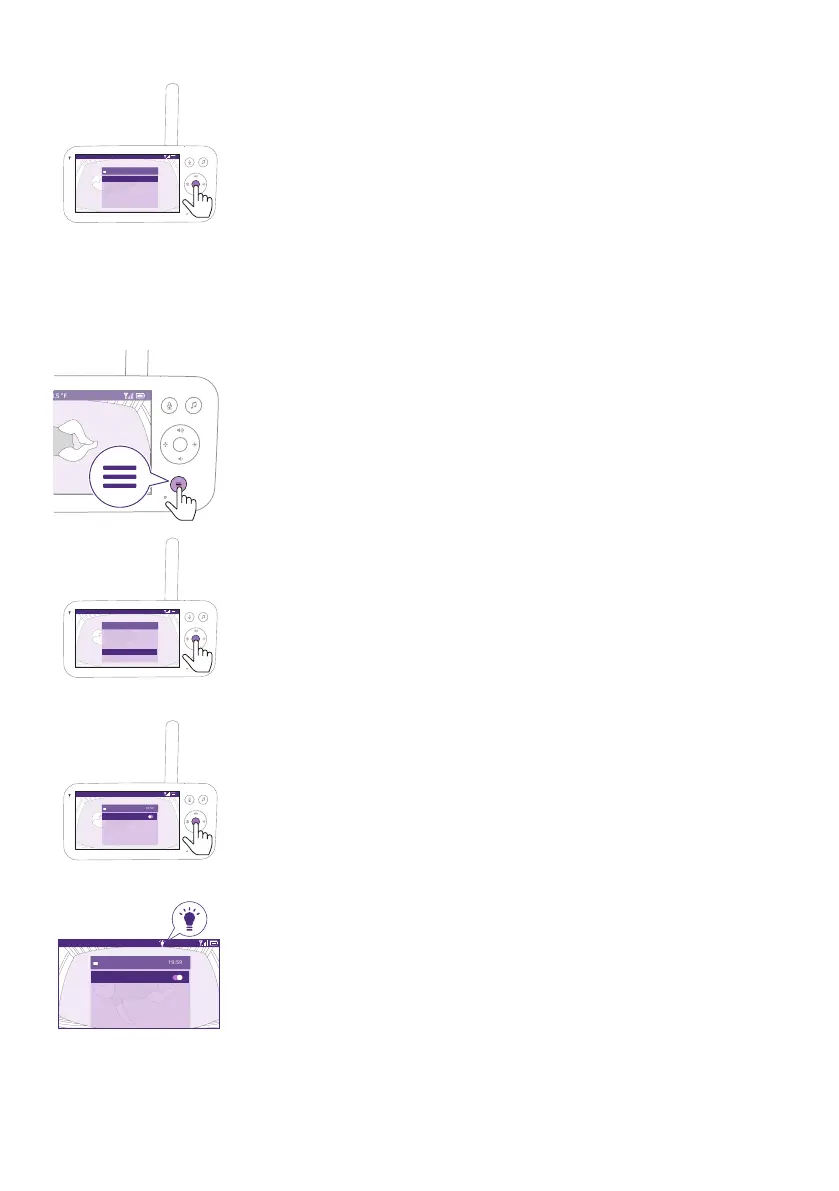
3 Press the top or bottom part of the control button and the conrm
button to choose the desired connection�
Nightlight
To activate the Nightlight function from the Parent Unit, follow the
instructions below:
1 Press the menu button on the bottom right of the Parent Unit�
Video 68.5
o
F
>
SenseIQ
Cry translation
Connection to Baby Unit
Nightlight
Zoom
Menu
2 Select ''Nightlight'' and press the conrm button to enter the
Nightlight feature�
Video 68.5
o
F
Nightlight
On/Off
Brightness
Timer
5 min
low
3 Press the conrm button to switch on and o the Nightlight feature.
Video 68.5
o
F
Nightlight
On/Off
Brightness
Timer
20 min
low
The display shows a light icon in the status bar when the Nightlight is
on�











 To Next Page