- 16 -
1
2
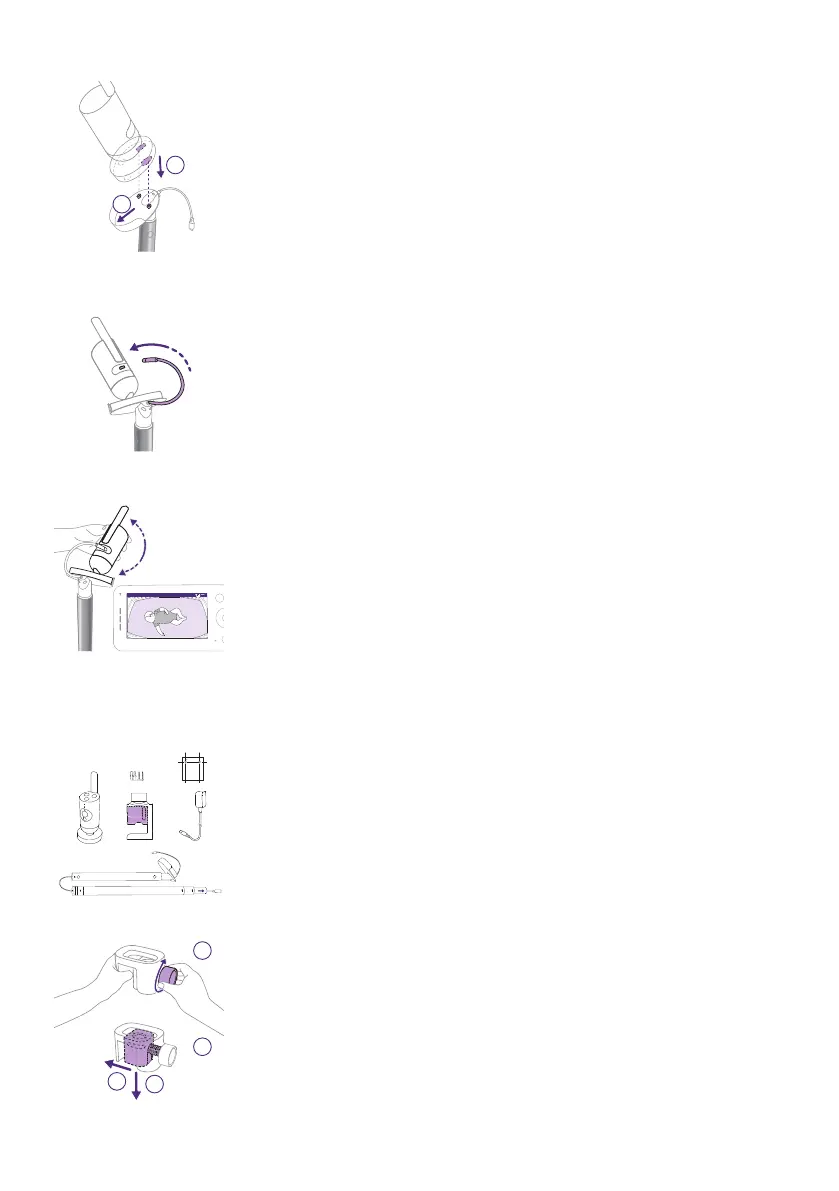
10 Attach the Baby Unit to its cradle by aligning the pegs to the holes at
the bottom of the Baby Unit and pushing down�
11 Slide the Baby Unit forward to lock it into place and connect the USB-C
power cable into the back of the Baby Unit�
12 Tilt your Baby Unit slightly up, down, right, or left to ensure the
mattress becomes entirely visible with your baby in the center�
Use your Parent Unit or Baby Monitor+ app to ensure the Baby Unit is
in the best position� Adjust the Baby Unit to see your baby’s mattress is
centered and level on the screen�
Wall mount
2 x Φ6
1 Take out the 2-in-1 mount, clamp, power adapter, screws and anchors,
wall mount template, and the Baby Unit.
1
2
2a
2b
2 Remove the wall mount bracket from the clamp by turning the knob
counterclockwise with one hand while guiding the bracket out with
the other hand�











 To Next Page