- 40 -
Privacy mode
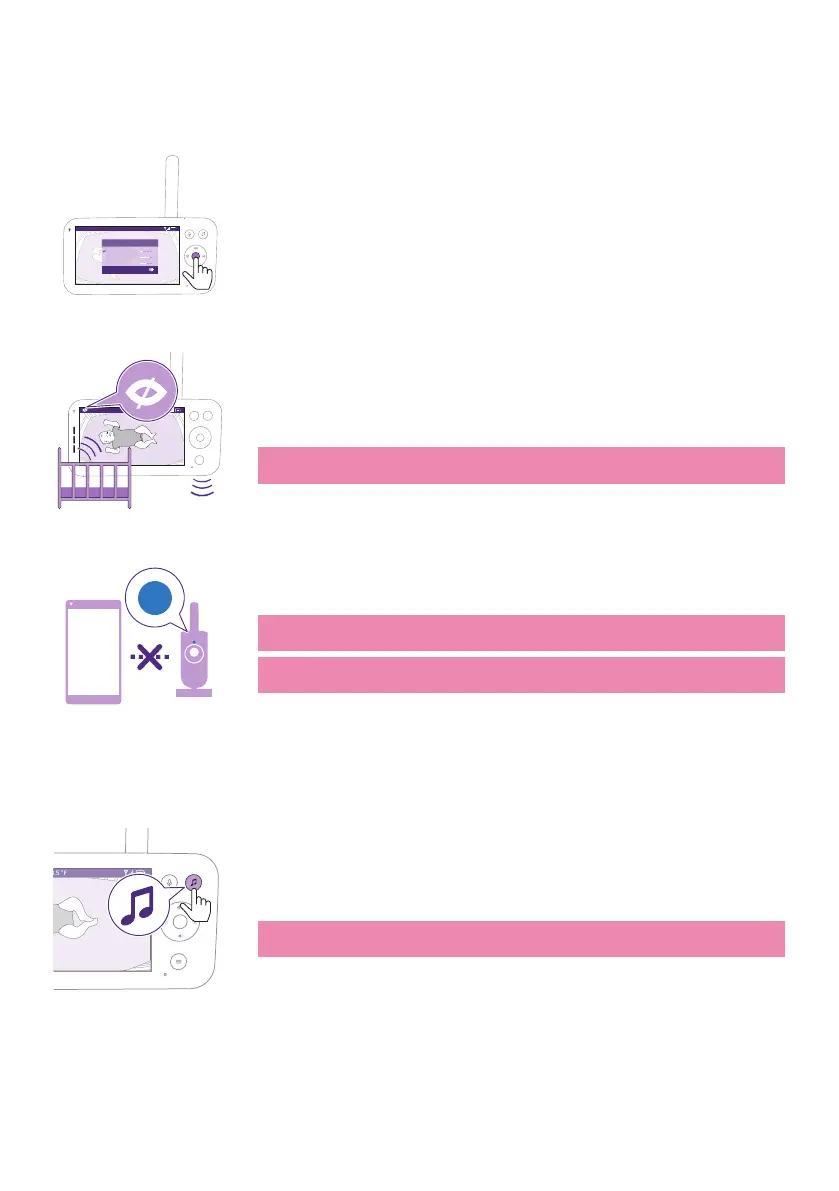
Privacy mode allows you to temporarily disable the camera's live feed
to the app� You can still monitor your baby from the Parent Unit in the
selected mode�
Video 68.5
o
F
Modes & Volume sensitivity
Video
Audio
Eco
Privacy
Baby Unit is not accessible through the Baby Monitor+ App
1 Press the mode button on the top left of the Parent Unit�
2 Press the bottom part of the control button to switch to Privacy mode�
3 Press the conrm button to activate the Privacy mode�
68.5
o
F
Video
When the Privacy mode is activated:
1 You can still monitor your baby from the Parent Unit�
Note: When the display is on, the privacy mode indicator is shown in
the status bar. The status bar is not visible when the display is o.
App
2 You cannot monitor your baby from the app�
Note: The status light of the Baby Unit turns blue. You will receive a
push notication from the app.
Note: When you try to monitor via the app it will display that the Baby
Unit is in Privacy mode�
Soothing sounds
To activate it from the Parent Unit, follow the instructions below:
1 Press the soothing sounds button on the Parent Unit to open the
menu�
Note: Pressing the button while the menu is already open, will close
the menu�










 To Next Page