- 41 -
Video 68.5
o
F
Lullabies and sounds
Play
Select sound
Volume
Timer
>
6/8
20 min
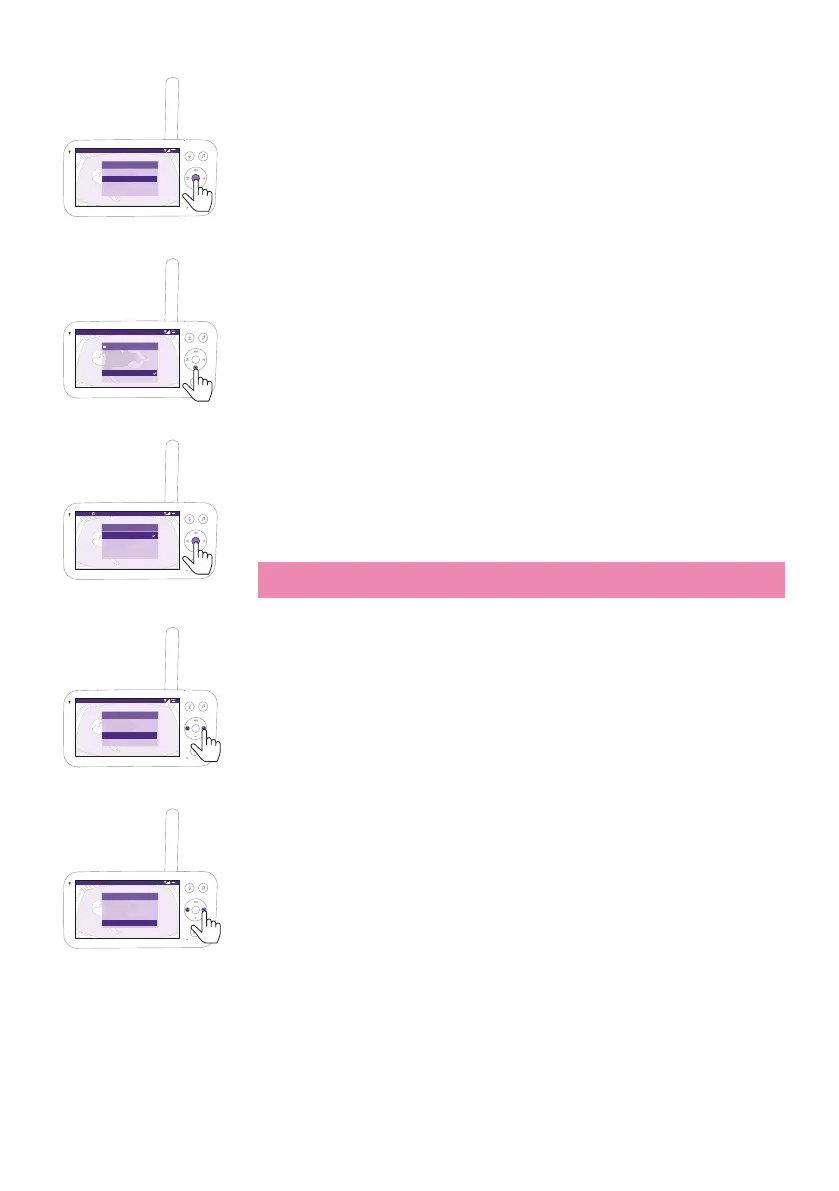
2 Press the bottom part of the control button to scroll down to ''Select
sound'' menu item, press the conrm button to enter the soothing
sounds list�
Video 68.5
o
F
Select lullaby or sound
All lullabies
Baa Baa Black Sheep
Brahms’ Lullaby
Golden Slumbers
Rock-a-bye Baby
3 Press the top or bottom part of the control button to scroll through
the list�
4 Press the conrm button to select or deselect the one you want to
play. You can also select ''All lullabies'' to playback the rst 5 lullabies.
Video 68.5
o
F
Soothing sound
Stop
Select sound
Volume
Timer
5/8
10 min
Rockabye....
5 Navigate to ''Play'' and press the conrm button to start playing the
selected sound�
If you want to stop, press the conrm button again.
The status barof the Parent Unit shows the name of sound thatis
being played�
Tip: Long-press the soothing sounds button to start or stop playing the
selected sound�
Video 68.5
o
F
Soothing sound
Play
Select sound
Volume
Timer
6/8
10 min
><
You can set the volume level of the sound or lullaby from the Parent
Unit�
Press the left or right part of the control button to choose the volume
level�
Video 68.5
o
F
Soothing sound
Play
Select sound
Volume
Timer
6/8
15 min
><
You can set a timer for the soothing sound to stop� Do this from the
Parent Unit�
Press the left or right part of the control button to choose the time you
prefer�













 To Next Page