- 31 -
Temperature alert
The temperature sensor enables you to monitor the temperature in your
baby's room�
Note: The current temperature in your baby's room is shown in the
status bar of the Parent Unit�
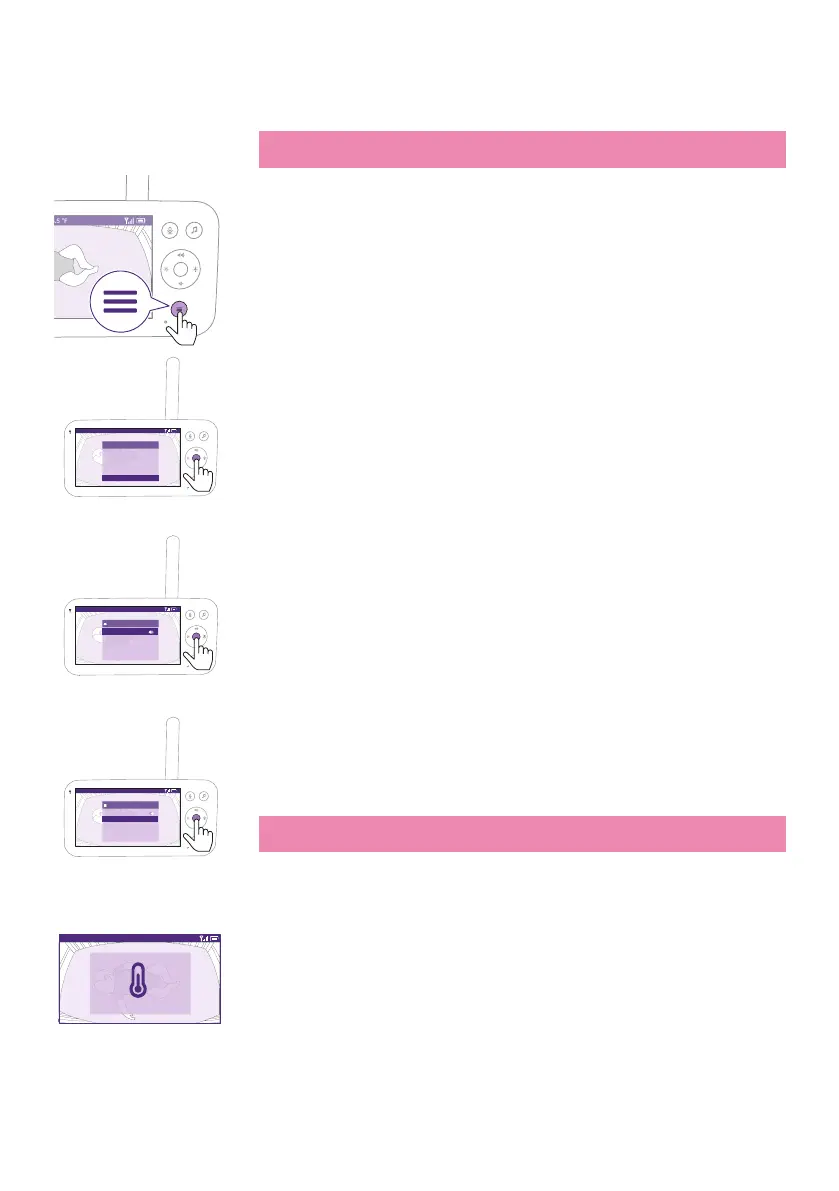
1 Press the menu button on the bottom right of the Parent Unit�
Video 68.5
o
F
>
Temperature alert
Cry translation
Connection to Baby Unit
Nightlight
Zoom
Menu
2 Select ''Temperature alert'' and press the conrm button to access the
temperature alert feature�
Video 68.5
o
F
Temperature alert
Switch on
High
Low
Set Unit
20
16
°F
3 The temperature alert can be set on or o, press the conrm button to
turn it on or o.
Video 68.5
o
F
Temperature alert
Switch on
High
Low
Set Unit
20
16
°C
4 To change the maximum and minimum temperatures for the
temperature alert, select the desired temperatures in the temperature
menu�
Tip: You can switch the temperature unit between C (Celsius) and
F(Fahrenheit) by selecting the unit option.
Video 68.5
o
F
High temperature alert
5 Press the left part of the control button to save the new setting and
return to the main menu�
The Parent Unit shows this alert when the measured temperature goes
outside the range between the minimum and the maximum values.











 To Next Page