- 37 -
Modes and sensitivity
This baby monitor has three dierent modes that allow you to choose
how you want to monitor your baby: Video, Audio, Eco.
The sensitivity level of the Baby Unit denes what you hear through the
Parent Unit. When the level is set to high, you will hear many sounds,
including soft background sounds. When the sensitivity level is set low,
you will hear only the louder sounds�
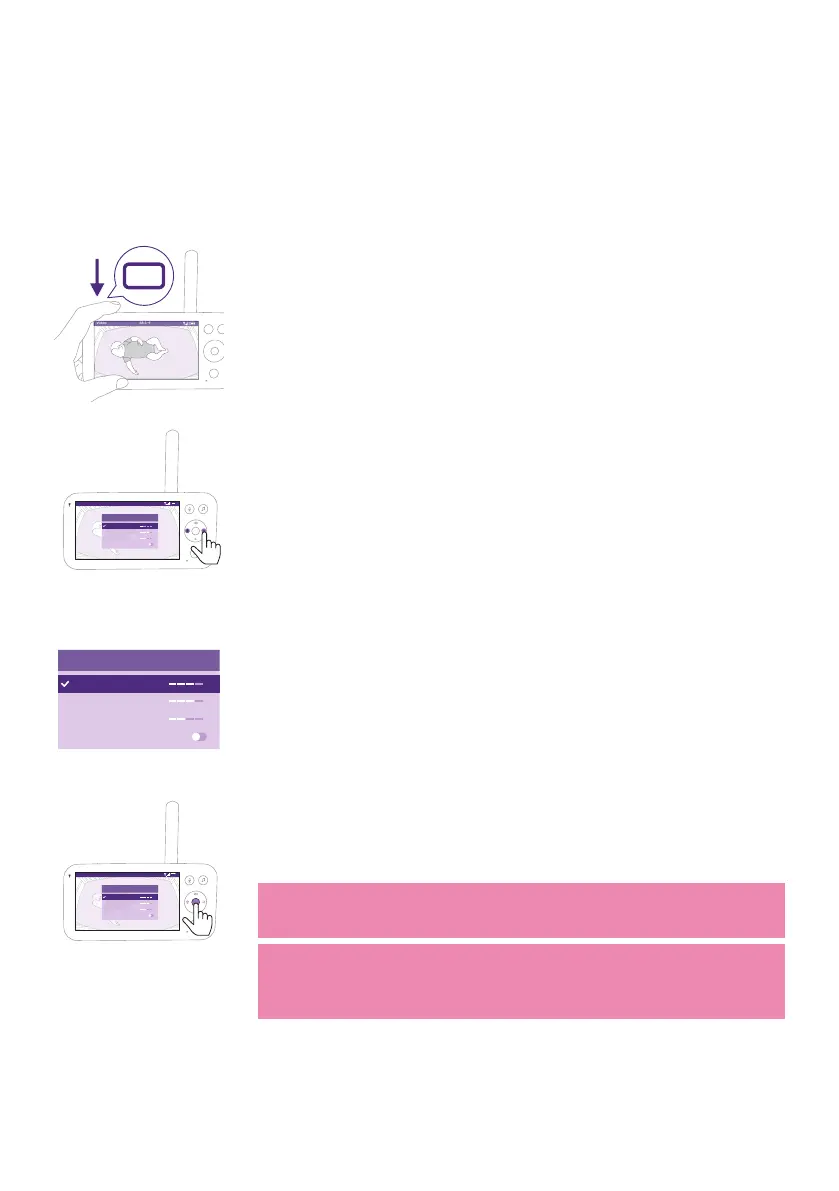
With the baby monitor on, press the mode button on the top left of
the Parent Unit, press the top or bottom part of the control button
to switch between these dierent modes, and then press the conrm
button to select the desired mode�
Video 68.5
o
F
Modes & Volume sensitivity
Video
<
Audio
Eco
Privacy
>
Baby Unit is accessible through the Baby Monitor+ App
You can choose dierent sensitivity levels for dierent modes by
pressing the left or right part of the control button�
Modes & Volume sensitivity
Video
<
Audio
Eco
Privacy
>
Baby Unit is accessible through the Baby Monitor+ App
The display shows the selected mode�
The selected mode is also indicated in the status bar�
When turning on the device, the mode that was last used will be
active�
Video 68.5
o
F
Modes & Volume sensitivity
Video
<
Audio
Eco
Privacy
>
Baby Unit is accessible through the Baby Monitor+ App
If your baby only makes soft sounds, the sensitivity of the Baby Unit
needs to be set to a high level on the Parent Unit�
The louder your baby sounds, the lower the sensitivity can be set on
the Parent Unit�
Note: In Audio and Video mode, you will have continuous sound when
the sensitivity level is set to the highest. Otherwise, low sounds will be
muted�
Tip: The sensitivity level can be adjusted so you will always hear your
baby without the disruption of other sounds� When there is a lot of
background noise, turn down the sensitivity so that you will not hear
these sounds through the Parent Unit�
Press the conrm button to save the new setting.











 To Next Page