- 32 -
Settings
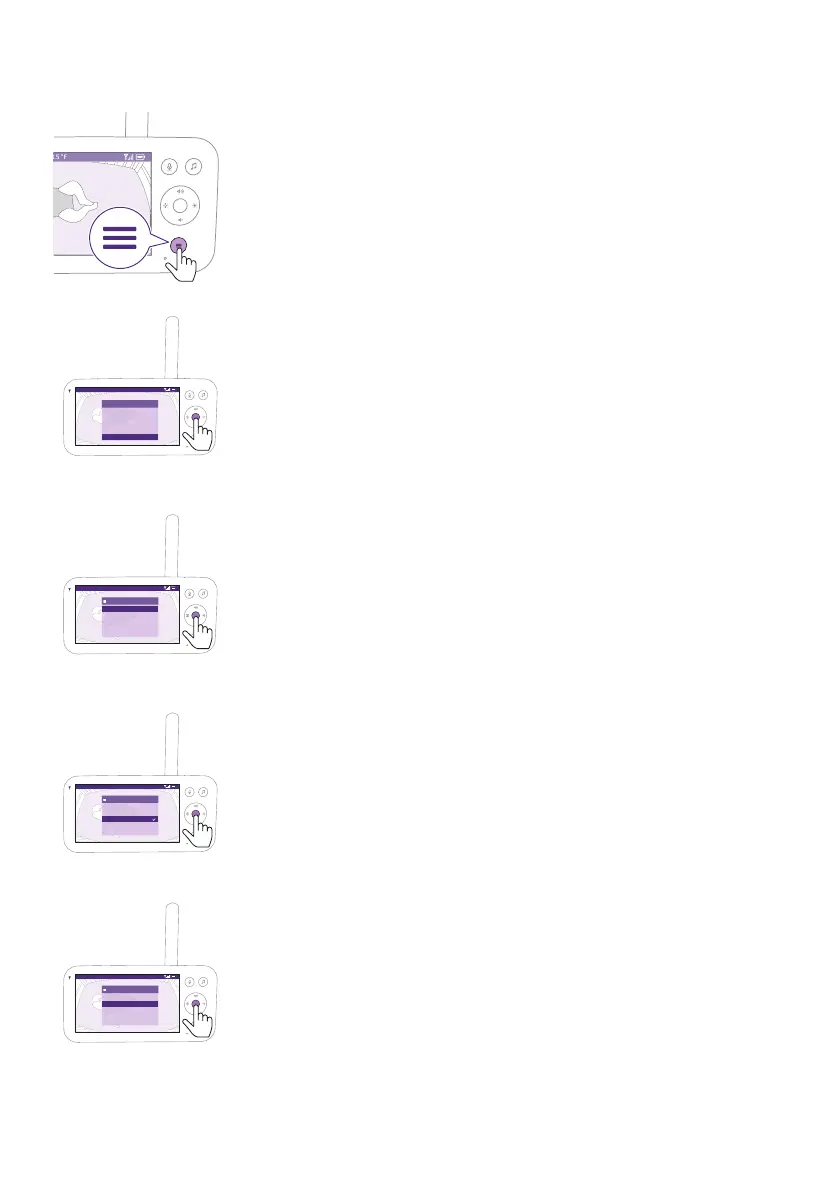
1 Press the menu button on the bottom right of the Parent Unit�
Video 68.5
o
F
>Settings
Temperature alert
Connection to Baby Unit
Nightlight
Zoom
Menu
2 Select ''Settings'' and press the conrm button to access the settings
menu�
Video 68.5
o
F
Settings
Language
>
Firmware
Licenses
Download the app
You can change the language setting of the Parent Unit�
1 Press the conrm button to access the list of languages.
2 Press the top or bottom part of the control button to scroll through all
the languages and then press the conrm button to select the desired
language�
Video 68.5
o
F
Select language
Čeština
Deutsch
English
Español
Français
3 Press the conrm button to save the new setting and return to the
main menu�
Video 68.5
o
F
Settings
Language
>
Firmware
Licenses
Download the app
You can check the current rmware version of the baby monitor.
1 Press the conrm button to enter the rmware menu.











 To Next Page