- 17 -
1
2
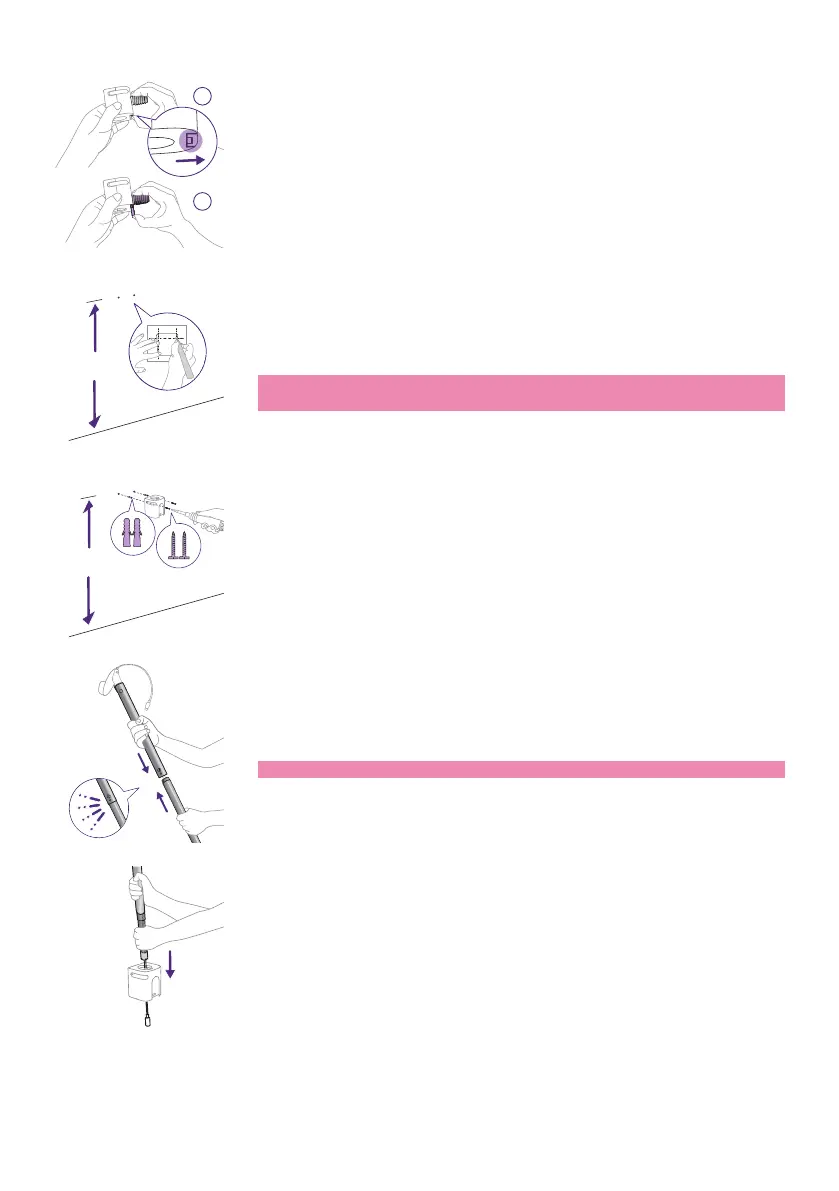
3 Remove the screw section of this inner piece by unlocking it with your
thumb and sliding it down and o.
You are now left with the piece that will be used as the wall mount�
1.1 m / 43 in
4 Find the wall mount template and use a ruler to measure 1.1 meters /
43 inches up from the oor and mark where the two screws should go.
Drill small holes into the wall and push in the anchors provided�
Tip: The wall mount template (see the ''Wall mount template''
chapter) can be found at the end of this user manual.
1.1 m / 43 in
5 Take the wall mount bracket and align the holes with the anchors�
Attach the wall mount bracket to the wall securely by using the screws
provided�
6 Take the two poles and push them together to make one longer pole�
Note: You will hear a small click when they are secure.
7 Then, with the power cord rst, insert the pole through the opening of
the clamp�














 To Next Page