EasyManua.ls Logo

Philips BDP1300 - User Manual

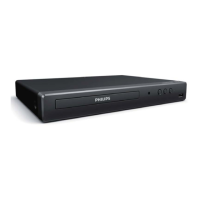
Philips BDP1300
28 pages
Print Icon
To Next Page IconTo Next Page
Loading...
BDP1300
For product support, visit
Para obtener asistencia técnica, visite
Pour en savoir plus sur l’assistance sur les produits, visitez le site
www. philips.com/support
Manuel d’utilisation
User manual
Manual del usuario
EN: For further assistance, call the customer support service in your country.
• To obtain assistance in the U.S.A., Canada, Puerto Rico, or the U.S. Virgin Islands, contact
Philips Customer Care Center at 1 (866) 226-6074
• To obtain assistance in Mexico, contact Philips Customer Care Center at 01 800 839 1989;
Mexico city: 5887-9736
ES: Para obtener mas informacion, llame al servicio de soporte al cliente de su pais.
Para obtener asistencia en los Estados Unidos, en Canada, Puerto Rico o en las Islas
Virgenes de los Estados Unidos, comuniquese con Centro de atencion al cliente de Philips
al 1 (866) 226-6074
Solo para Mexico CENTRO DE ATENCION A CLIENTES LADA, 01 800 839 1989 Solo
Para Mexico; Mexico city: 5887-9736
FR: Pour obtenir de l’aide supplementaire, communiquez avec le centre de service a la
clientele de votre pays.
Pour obtenir de l’aide aux Etats-Unis, au Canada, a Puerto Rico ou aux lles Vierges
americaines, communiquez avec le centre de service a la clientele Philips au : 1 (866) 226-6074
Pour obtenir l’aide au Mexique, entrez en contact avec le centre de soin de client de Philips a 01
800 839 1989; Mexico city: 5887-9736
For Product recycling information, please visit - www.recycle.philips.com
Para obtener información de productos de reciclaje, por favor visite - www.recycle.philips.com
Pour tout renseignement sur le recyclage des produits, veuillez visiter - www.recycle.philips.com
BDP1300_F7_UM_V2.0.indb 1 4/14/2015 5:17:00 PM


Questions and Answers

  • B
    bmcknightSep 8, 2025
    How to fix DivX subtitles do not display correctly Philips Blu-ray Player?
    • K
      kbrownSep 8, 2025
      If your DivX subtitles do not display correctly on your Philips Blu-ray Player, make sure that the subtitle file has the same name as the DivX video file and that the subtitle file has an extension name supported by this player (.srt, .sub, .txt, .ssa, or .smi).
  • D
    Devon RoySep 7, 2025
    Why no secondary audio output for Picture-in-Picture feature Philips Blu-ray Player?
    • M
      michaeljacksonSep 7, 2025
      If you're not getting secondary audio output for the Picture-in-Picture feature on your Philips Blu-ray Player, and [Bitstream] is selected under the [HDMI audio] or [Digital audio] menu, interactive sound like secondary sound for Picture-in-Picture feature is muted. De-select [Bitstream].
  • T
    Tiffany FoxAug 22, 2025
    What to do if no picture on HDMI connection Philips BDP1300 Blu-ray Player?
    • C
      Courtney VaughnAug 22, 2025
      If you're not getting any picture via HDMI connection on your Philips Blu-ray Player, first ensure the HDMI cable isn't faulty by replacing it with a new one. If that doesn't work, try pressing the button on the remote control, followed by pressing '731' on the numeric buttons to recover picture display. Auto recovery should also occur within 10 seconds. Also, if the player is connected to an unauthorized display device with an HDMI cable, the audio and video signals may not be output.
  • M
    maxwellphillipsSep 4, 2025
    What to do if cannot play DivX video files Philips BDP1300?
    • K
      Kelly MartinSep 4, 2025
      If your Philips Blu-ray Player isn't playing DivX video files, ensure that the DivX video file is complete and that the video file name extension is correct.
  • L
    Lynn RodriguezSep 3, 2025
    How to fix cannot read the contents of a connected USB storage Philips BDP1300 Blu-ray Player?
    • J
      Jennifer HarperSep 3, 2025
      If your Philips Blu-ray Player can't read the contents of a connected USB storage device, make sure the format of the USB storage device is compatible with the player and that the file system on the USB storage device is supported by the player. Also, for a USB HDD (a portable hard disc drive), an external power source may be needed.
  • S
    Scott TaylorSep 1, 2025
    Why the disc does not play high-definition video Philips Blu-ray Player?
    • E
      Eric WilsonSep 1, 2025
      If your Philips Blu-ray Player isn't playing high-definition video from a disc, make sure that the disc actually contains high-definition video content.
  • S
    sheila20Aug 31, 2025
    What to do if no audio output from loudspeakers Philips BDP1300 Blu-ray Player?
    • B
      benjamin79Aug 31, 2025
      If you're not getting audio output from the loudspeakers of your external audio device (like a home theater or amplifier) when using your Philips Blu-ray Player, switch the external audio device to the correct audio source input.
  • S
    Sharon Delacruz PhDAug 30, 2025
    How to fix buttons on Philips BDP1300 do not work?
    • L
      Laurie DavilaAug 30, 2025
      If the buttons on your Philips Blu-ray Player aren't working, disconnect the player from the power supply for a few minutes, and then reconnect it.
  • C
    Christopher NelsonAug 28, 2025
    Why no sound on HDMI connection Philips BDP1300?
    • M
      Marvin MooreAug 29, 2025
      If you're not getting any sound through the HDMI connection on your Philips Blu-ray Player, it might be because the connected device isn't HDCP compliant or is only DVI-compatible. This can prevent audio output.
  • J
    Jacqueline ButlerAug 27, 2025
    What to do if the buttons on my Philips Blu-ray Player do not work?
    • C
      christopherdonaldsonAug 27, 2025
      If the buttons on your Philips Blu-ray Player are not working, disconnect the player from the power supply for a few minutes, and then reconnect it.

Summary

Important Safety Instructions

Safety Symbol Explanations

Explains safety symbols indicating electrical shock risk and importance of reading literature.

Compliance and Notices

Using Your Blu-ray;DVD Player

Basic Playback Controls

Instructions for basic playback functions using the remote control.

Video and Audio Playback Options

Details on adjusting video and audio settings during playback.

BonusView Feature on Blu-ray

Explains how to use special features like commentaries on compatible Blu-ray discs.

Player Settings and Configuration

Picture Settings Adjustment

How to adjust picture display format, resolution, and color.

Updating Player Software

Software Update via USB

Detailed guide on downloading and installing software updates from a USB drive.

Product Specifications

Troubleshooting Guide

One Year Limited Warranty

Warranty Coverage and Exclusions

Defines warranty coverage, who is covered, exclusions, and limitations.

Philips BDP1300 Specifications

General IconGeneral
Depth199 mm
Width270 mm
Height41 mm
Weight1090 g
Full HDYes
Quantity1
Device typeBlu-Ray player
Aspect ratio4:3, 16:9, 21:9
Package typeCarton
Product colorBlack
Audio decodersDTS 2.0, Dolby Digital Plus, Dolby TrueHD
Package weight1320 g
Playback modesPause, Repeat, Slow, Zoom
DVD region code3
AC input voltage220-240 V
AC input frequency50 - 60 Hz
Blu-ray region codeA
Disc types supportedBD, BD-R, BD-RE, CD, CD-DA, CD-R, CD-RW, DVD, DVD+R, DVD+RW, DVD-R, DVD-RW
Supported video modes720p, 1080i, 1080p
Card reader integrated-
USB 2.0 ports quantityUSB 2.0 ports have a data transmission speed of 480 Mbps, and are backwards compatible with USB 1.1 ports. You can connect all kinds of peripheral devices to them.
Audio formats supportedAAC, MKA, MP3, PCM, WAV, WMA
Image formats supportedGIF, JPEG XR, JPG, PNG
Video formats supportedAVC, DIVX HD, H.264, M2TS, MPEG, MPEG1, MPEG2, MPEG4, MPG, XVID
Power consumption (standby)1 W
Power consumption (typical)11 W
Audio output channels- channels
Sound enhancement technologyNight mode
Disc playback modesRepeat interval, Repeat track
Ethernet LAN (RJ-45) ports0

Related product manuals