EasyManua.ls Logo

Philips BDP9500 - User Manual

Philips BDP9500
32 pages
Print Icon
To Next Page IconTo Next Page
Loading...
BDP9500
Register your product and get support at
www.philips.com/welcome
EN User manual

Other manuals for Philips BDP9500

Question and Answer IconNeed help?

Do you have a question about the Philips BDP9500 and is the answer not in the manual?

Summary

Important Product Information

Safety and Important Notices

Essential safety guidelines and warnings for using the product.

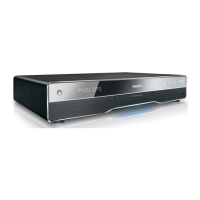
Your Philips Product Overview

Connecting Your Blu-ray Player

Connect Video and Audio Cables

Instructions for connecting the player to a TV using various cable types.

Connect Power Supply

Procedure for connecting the player to a power source.

Getting Started with Your Player

Setup Network Connection

Steps to configure the network connection for online services.

Playing Discs and Media

Play a Disc

Instructions for inserting and playing discs on the Blu-ray player.

Play from USB Device

How to play media files directly from a connected USB drive.

Control Video Playback

Controlling video playback using the remote control.

Play Music Tracks

Instructions for playing audio tracks and controlling music playback.

Play Photos and Slideshows

How to view photos and create slideshows.

Adjusting Player Settings

Troubleshooting Common Issues

Playback and Connectivity Issues

Resolving problems related to disc, file, USB, and EasyLink playback.

Summary

Important Product Information

Safety and Important Notices

Essential safety guidelines and warnings for using the product.

Your Philips Product Overview

Connecting Your Blu-ray Player

Connect Video and Audio Cables

Instructions for connecting the player to a TV using various cable types.

Connect Power Supply

Procedure for connecting the player to a power source.

Getting Started with Your Player

Setup Network Connection

Steps to configure the network connection for online services.

Playing Discs and Media

Play a Disc

Instructions for inserting and playing discs on the Blu-ray player.

Play from USB Device

How to play media files directly from a connected USB drive.

Control Video Playback

Controlling video playback using the remote control.

Play Music Tracks

Instructions for playing audio tracks and controlling music playback.

Play Photos and Slideshows

How to view photos and create slideshows.

Adjusting Player Settings

Troubleshooting Common Issues

Playback and Connectivity Issues

Resolving problems related to disc, file, USB, and EasyLink playback.

Philips BDP9500 Specifications

Picture and Display IconPicture and Display
aspect ratio21:9, 16:9, 4:3
D/A converter12 bit/150 MHz
picture enhancementHigh Def (720p, 1080i, 1080p)
Sound IconSound
sound systemDolby True HD, Dolby Digital Plus, DTS-HD Master Audio Essential, DTS
signal to noise ratio> 120 dB
dynamic range (1 kHz)> 100 dB
Power IconPower
power supply220-240 V, 50/60 Hz
power consumption25 W
standby power consumption< 0.25 W
Dimensions and Weight IconDimensions and Weight
product dimensions (W x H x D)437 x 91 x 268 mm
product weight4.2 kg
packaging dimensions (W x H x D)515 x 160 x 315 mm

Related product manuals