17
4 Select an option, then press OK.
5 Select a setting, then press OK.
To return to the previous menu, press •
BACK.
To exit the menu, press • .
[Audio]
Select an audio language for disc play.
[Subtitle]
Select a subtitle language for disc play.
[Disc Menu]
Select a language for disc menu.
Note
If the language you have set is not available on the disc, •
the disc uses its own default language.
For some discs, the subtitle/audio language can only be
•
changed from the disc menu.
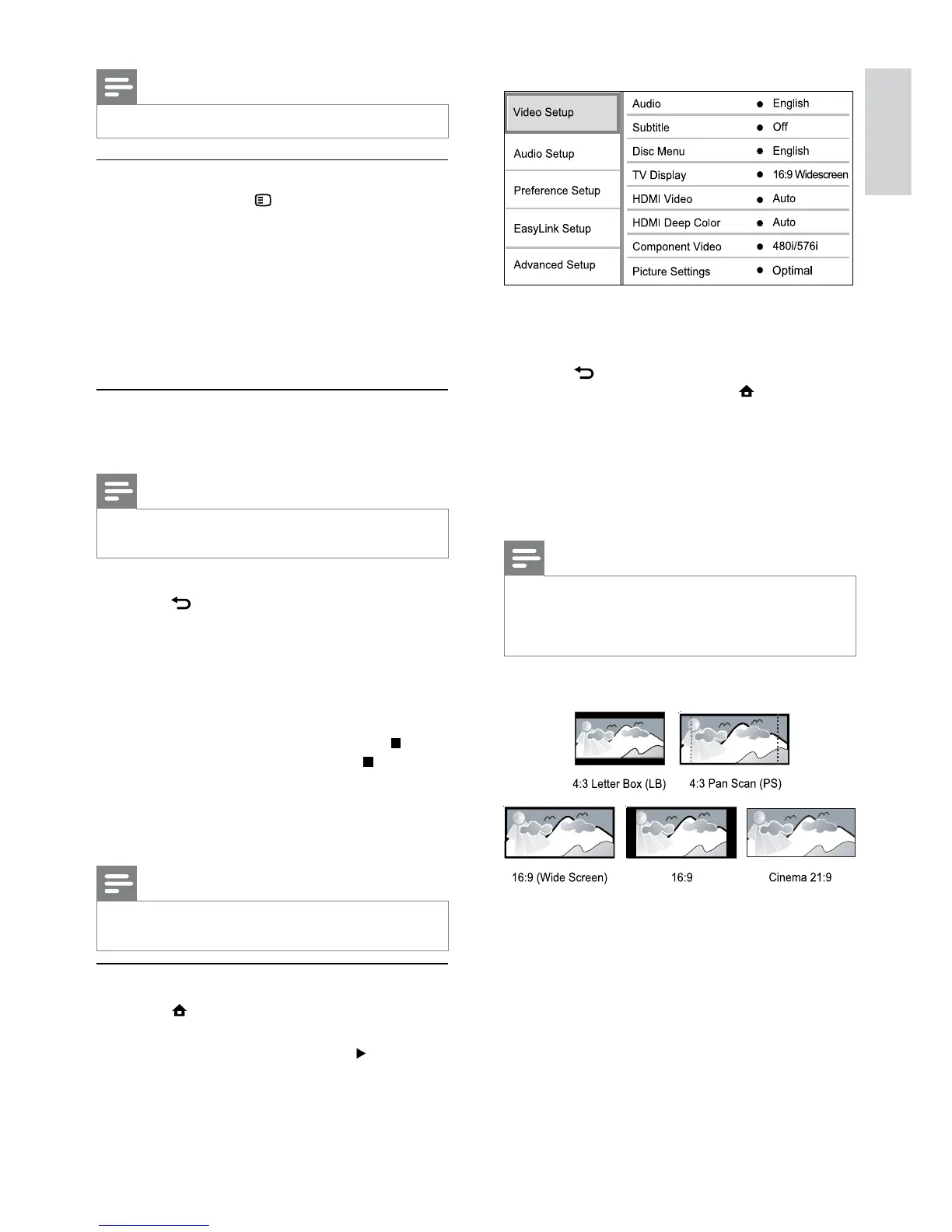
[TV Display]
Select a display format:
• [4:3 Letterbox] – For 4:3 screen TV: wide-
screen display with black bars on the top and
bottom of the screen.
• [4:3 Panscan] – For 4:3 screen TV: full-height
display with the trimmed sides.
• [16:9 Widescreen] – For wide-screen TV:
display picture at ratio 16:9.
• [16:9] – For 16:9 screen TV: display picture at
ratio 4:3 for a disc with 4:3 ratio, with black
bars on the left and right side of the screen.
Note
Some operations may not work with some discs or files. •
Set slideshow interval and animation
1
During play, press OPTIONS.
The play options menu is displayed. »
2 Select [Duration per slide] in the menu, then
press OK.
3 Select a duration, then press OK.
4 Select [Slide Animation] in the menu, then
press OK.
5 Select a type of animation effect, then press
OK.
Play musical slideshow
Create a musical slideshow to play simultaneously
MP3/WMA music files and JPEG photo files.
Note
To create a musical slideshow, you must store the MP3/ •
WMA and JPEG files on the same disc or USB device.
1 Play MP3/WMA music.
2 Press BACK to return to the main menu.
3 Navigate to enter a photo folder, then press
OK to start slideshow play.
Slideshow begins and continues till the end »
of the photo folder.
Audio continues to play until the end of »
the disc.
To stop the slideshow play, press•
.
To stop the music play, press• again.
6 Adjust settings
Note
If the setup option is grayed out, it means the setting •
cannot be changed at the current state.
Video setup
1 Press .
2 Select [Settings], then press OK.
3 Select [Video Setup], then press .
English
EN


 To Next Page