8
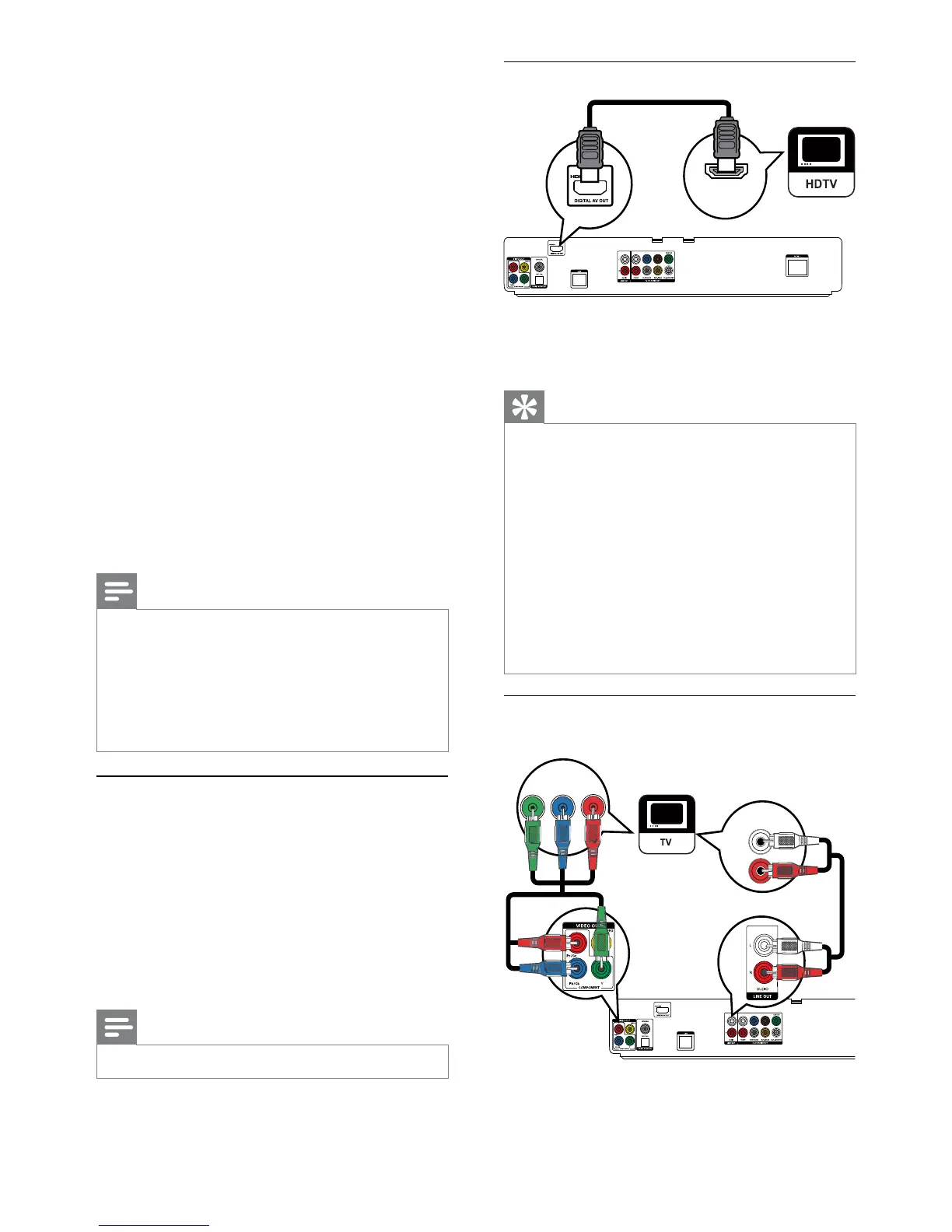
Option 1: Connect to the HDMI jack
1 Connect an HDMI cable (not supplied) to:
the • HDMI jack on this product.
the HDMI input jack on the TV. •
Tip
If the TV has a DVI connector only, connect via an HDMI/DVI •
adaptor. Connect an audio cable for sound output.
You can optimize the video output. Press the • HDMI
button repeatedly to select the best resolution the TV
can support.
If this product connects to a TV compatible with 1080p
•
or 1080p/24Hz, Philips recommends HDMI category 2
cable, also known as High Speed HDMI cable, for optimal
video and audio output.
To play the digital video images of a BD-video or DVD-
•
video via an HDMI connection, it is necessary that both this
product and the display device (or an AV receiver/amplifier)
support a copyright protection system called HDCP (high-
bandwidth digital content protection system).
This type of connection provides best picture quality.
•
Option 2: Connect to the component
video jack
1 Connect the component video cables
(not supplied) to:
the • Y Pb/Cb Pr/Cr jacks on this product.
HDMI IN
PbY
Pr
AUDIO IN
Access options for the current activity or •
selection.
w Color buttons
• BD: Select tasks or options.
x HDMI
Select the video resolution of HDMI output.•
y REPEAT
Select repeat play or shuffle play.•
3 Connect
Make the following connections to use this product.
Basic connections:
Video•
Audio•
Power•
Optional connections:
Route audio to other devices•
HDMI-compliant AV receiver/amplifier•
Multi-channel AV amplifier/receiver•
Digital AV amplifier/receiver•
Analog stereo system•
USB device•
LAN (network)•
Note
Refer to the type plate at the back or bottom of the •
product for identification and supply ratings.
Before you make or change any connections, ensure that
•
all devices are disconnected from the power outlet.
Different types of connectors can be used to connect •
this product, depending on availability and your needs. A
comprehensive interactive guide to help you connect your
product is available at www.connectivityguide.philips.com.
Connect video/audio cables
Connect this product to TV to view disc play.
Select the best video connection that the TV can
support.
• Option 1: Connect to the HDMI jack (for a
HDMI, DVI or HDCP-compliant TV).
• Option 2: Connect to the component video jacks
(for a standard TV or Progressive Scan TV).
• Option 3: Connect to the composite video
jack (for a standard TV).
Note
You must connect this product directly to a TV. •
EN


 To Next Page