10
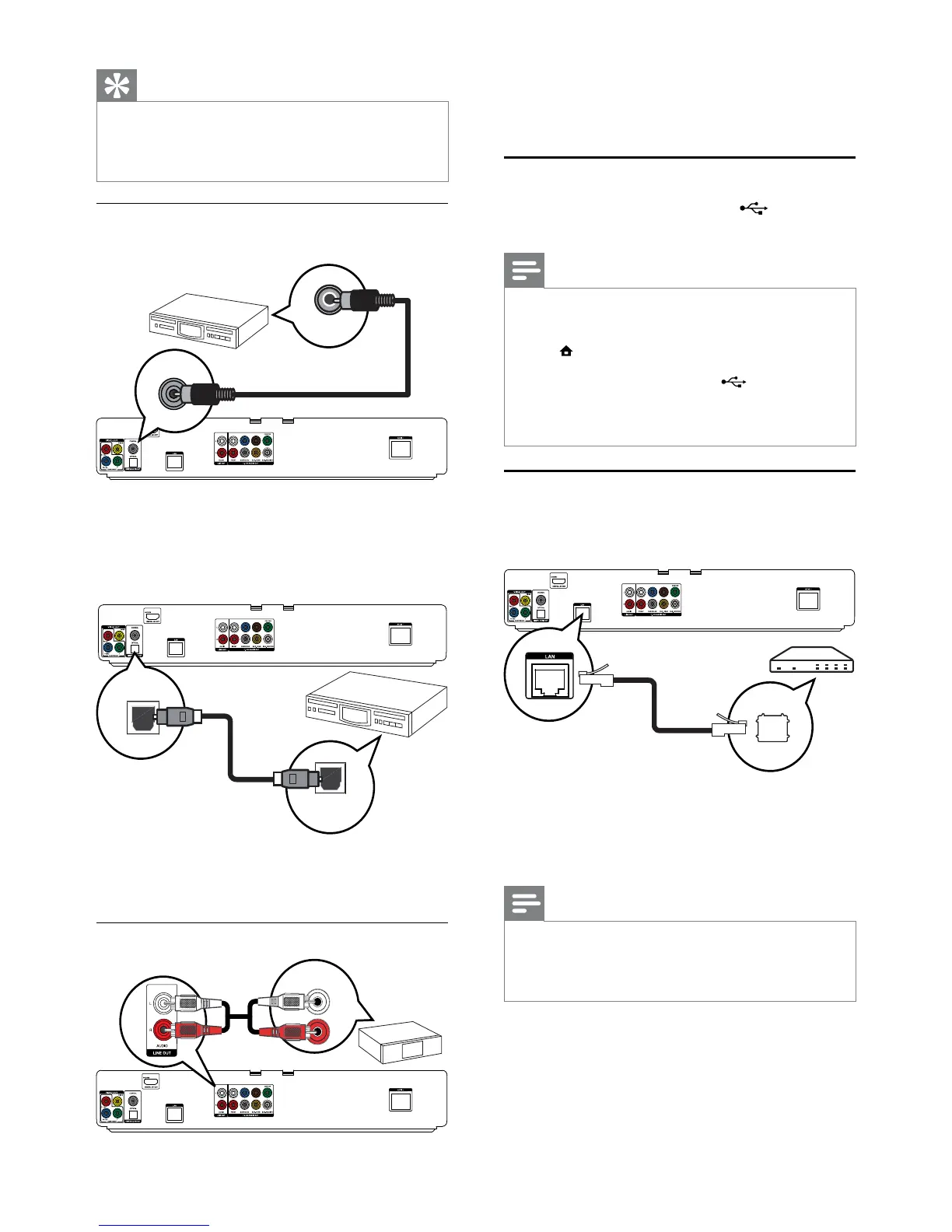
1 Connect the audio cables to:
the • AUDIO L/R-LINE OUT jacks on this
product.
the AUDIO input jacks on the device.•
Connect USB device
1 Connect a USB device to the (USB) jack
on this product.
Note
This product can only play/view MP3, WMA/WMV9, •
DivX (Ultra) or JPEG files that are stored on such
devices.
Press
• , select [USB] in the menu to access the content
and play the files.
Connect a USB device only to the
• jack on this
product.
Philips does not guarantee 100% compatibility with all
•
USB devices.
Connect network
Connect this product to the network to enjoy
software updates and BD-Live bonus content.
1 Connect the network cable (not supplied) to:
the • LAN jack on this product.
the LAN jack on the broadband modem •
or router.
Note
Internet access to Philips website for software update •
may not be allowed, depending on the router you use
or the Internet Service Provider’s policy. Contact your
Internet Service Provider for more information.
Tip
To connect 5.1-channel AV receiver/amplifier, do not •
connect the SURROUND L/R jacks.
You can optimize the speaker output (see “Adjust
•
settings” > [Audio Setup] > [Speaker Setup]).
Connect to digital AV receiver/amplifier
Connect to coaxial jack
1 Connect a coaxial cable (not supplied) to:
the • COAXIAL jack on this product.
the COAXIAL/DIGITAL input jack on •
the device.
Connect to optical jack
1 Connect an optical cable (not supplied) to:
the • OPTICAL jack on this product.
the OPTICAL/DIGITAL input jack on the device.•
Connect analogue stereo system
COAXIAL
COAXIAL
OPTICAL
OPTICAL
AUDIO IN
EN


 To Next Page