19
English
EN
3 Change settings
This section helps you change the settings of
this player.
Note
• You cannot change a menu option that is grayed out.
• To return to the previous menu, press BACK. To
exit the menu, press
.
Picture
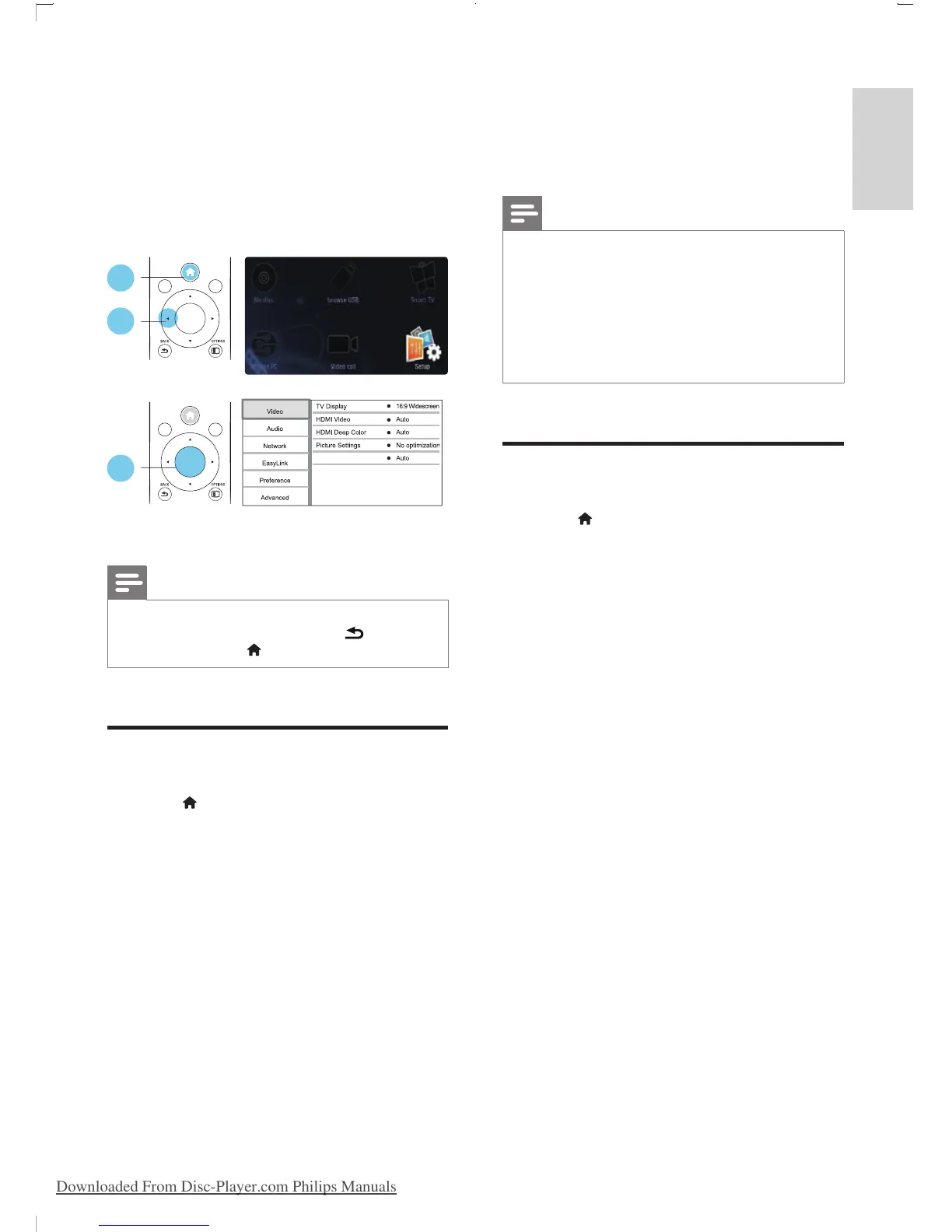
1 Press .
2 Select [Setup] > [Video] to access the
video setup options.
• [TV display]: Select a picture display
format to t the TV screen.
• [HDMI video]: Select an HDMI video
resolution.
• [HDMI Deep Color]: Display colors
with more shades and hues when the
video content is recorded in Deep
Color and the TV supports this feature.
• [Picture settings]: Select the most
optimum picture setting (powered by
CinemaPerfect HD).
1
2
3
Watch 3D video
OK
DISC MENU
POP
-
UP
MENU
TOP
MENU
OK
DISC MENU
POP
-
UP
MENU
TOP
MENU
• [Watch 3D video]: Set to 3D or 2D
output when playing a Blu-ray 3D disc.
The player must be connected to a 3D
TV through HDMI.
Note
• If you change a setting, make sure that the TV supports
the new setting.
• For settings related to HDMI, the TV must be
connected through HDMI.
• For the composite connection (via the VIDEO
connector), select a video resolution of 480i/576i
or 480p/576p under [HDMI video] to enable video
output.
Sound
1 Press .
2 Select [Setup] > [Audio] to access the
audio setup options.
• [Night mode]: Select quiet or full
dynamic sound. Night mode decreases
the volume of loud sound and
increases the volume of soft sound
(such as speech).
• [Neo 6]: Enable or disable a surround
sound effect which is converted from
2.0 channel audio.
• [HDMI (MAIN) audio]: Select an audio
format for sound output when this
player is connected to a TV through
HDMI OUT (MAIN) connector.
• [HDMI (AVR) audio]: Select an audio
format for sound output when this
player is connected to a AV receiver
through HDMI OUT (AV RECEIVER)
connector ("AVR" is short for "AV
Receiver").
• [Digital Audio]: Select an audio format
for the sound output when this
player is connected through a digital
connector (COAXIAL or OPTICAL).
• [PCM Downsampling]: Set the
sampling rate for PCM audio output
BDP9700_98_UM_V1.0.indb 19 2012/9/27 16:48:29
Downloaded From Disc-Player.com Philips Manuals


 To Next Page