User Manual BDS4223V
20
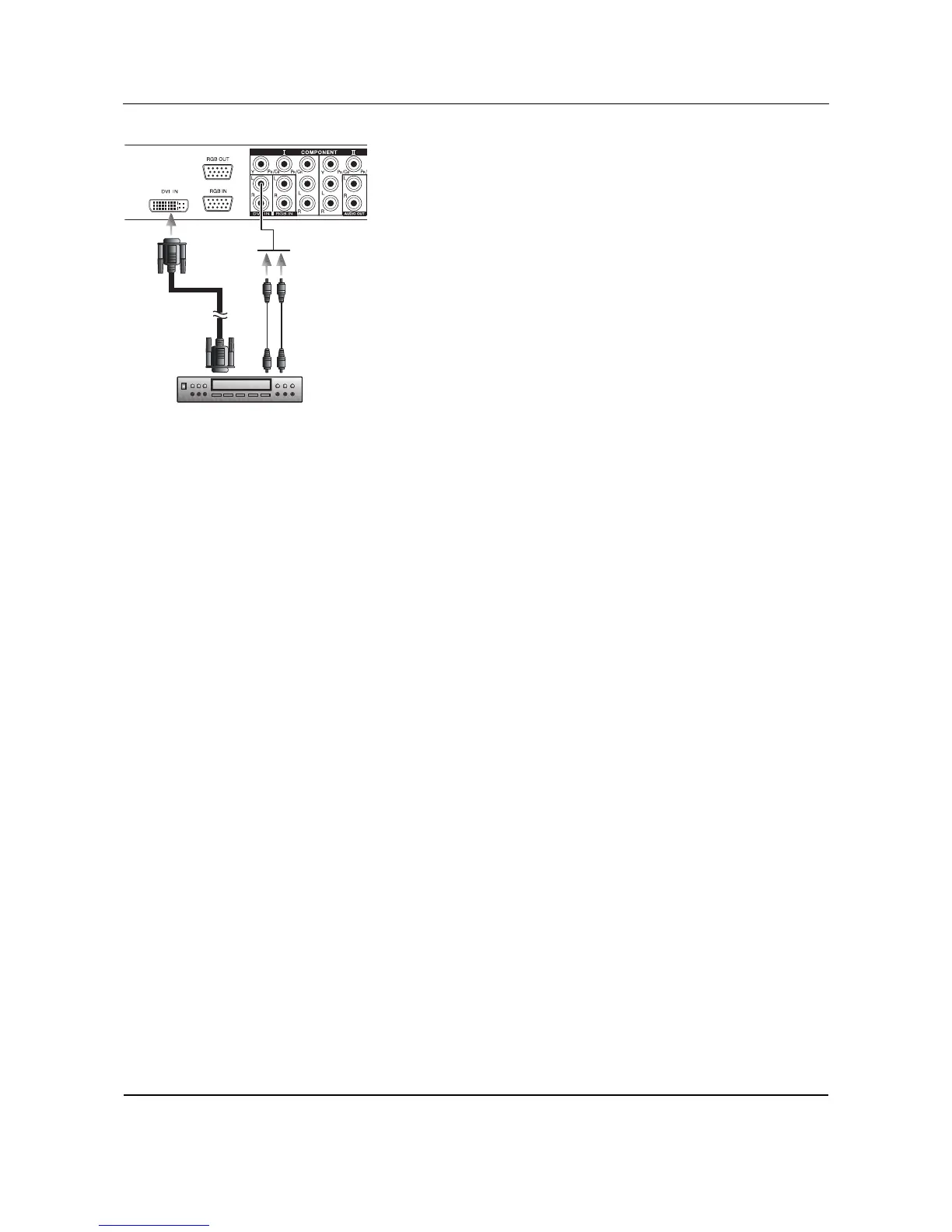
Using DVI Input
1 Connect the DVI-D connector from the back of the HDTV set top
box to the DVI-IN Connector located on the back of the monitor.
2 Connect the red (R) and white (L) audio-out jacks from the HDTV
set top box to the R and L audio-in jacks located next to the DVI-D
connector.
Notes:
■ Some HDTV Set-top boxes may not have a DVI output. Use the
Component Video input or RGB in method if this is the case.
■ Upon connecting your HDTV Set-top box to the DVI input of the
monitor, it may be necessary to adjust various picture settings on the
monitor to correctly match the output of the HDTV Set-top box.
This is caused by the different video timings set by various HDTV
Set-top box manufacturers.
Audio L/R
(2xRCA cables)
DVI+HDCP
(1xDVI-D cable)
HDTV SET-TOP BOX









 To Next Page