User Manual BDS4223V
17
5. CONNECTION TO EXTERNAL EQUIPMENT
5.1 CONNECTING A VCR
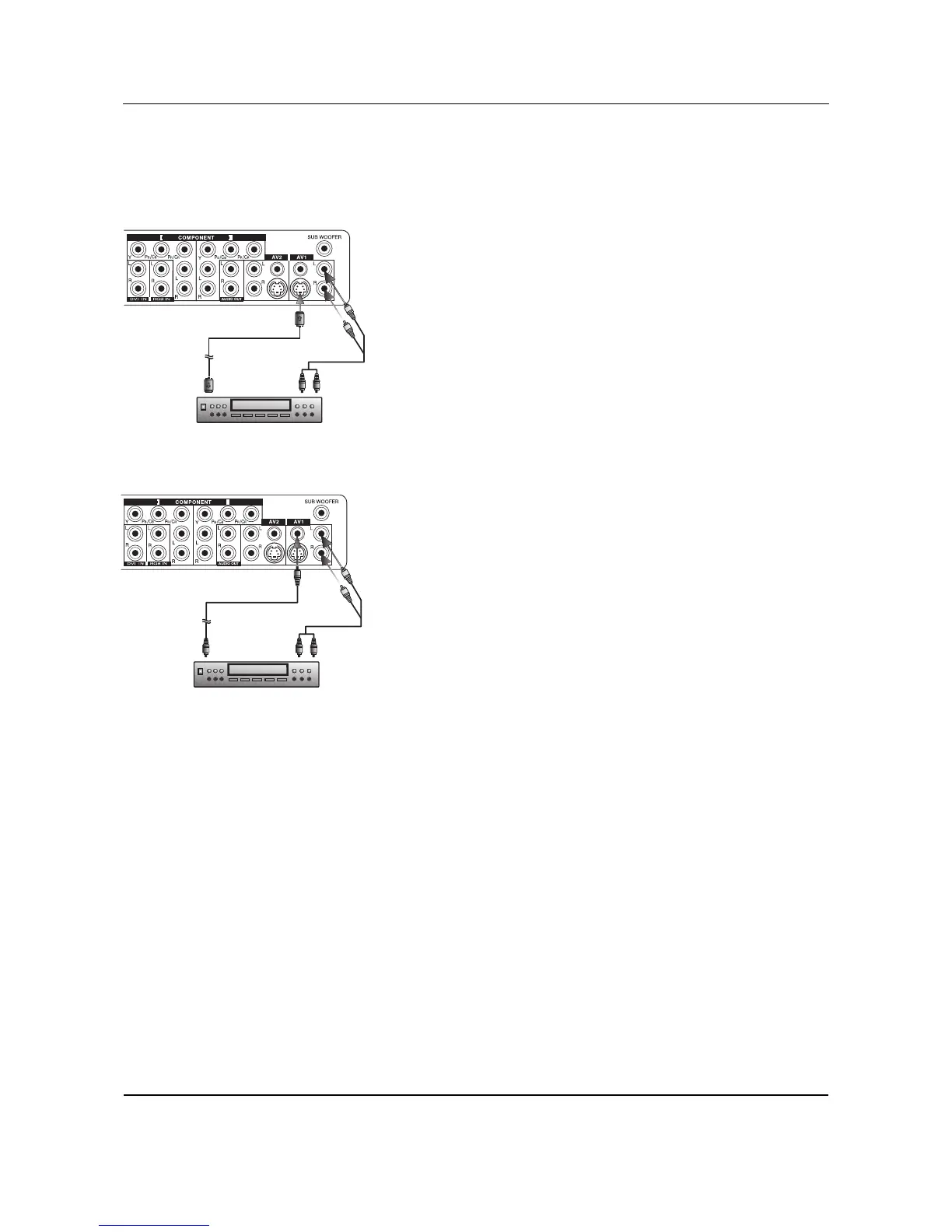
Using S-Video Input
1 Connect the S-Video (4-pin DIN) connector from the VCR to the
"S-VIDEO" input on the back of monitor.
2 Connect the red (R) and white (L) audio jacks from the VCR to the
R and L audio-in jacks located next to the "S-VIDEO" connector.
Note:
There are two sets of S-Video inputs provided. You can use either set to
connect your VCR.
Using Composite (AV) Video Input
1 Connect the "yellow" (video) connector from the VCR to the yellow
"VIDEO 1" input on the back of monitor.
2 Connect the red (R) and white (L) audio jacks from the VCR to the
R and L audio-in jacks located next to the yellow "VIDEO 1"
connector.
Note:
There are two sets of composite inputs provided. You can use either set
to connect your VCR.
VCR
S-Video
(4-Pin-DIN)
Audio L/R
(2xRCA cables)
VCR
Video
(RCA cable)
Audio L/R
(2xRCA cables)










 To Next Page