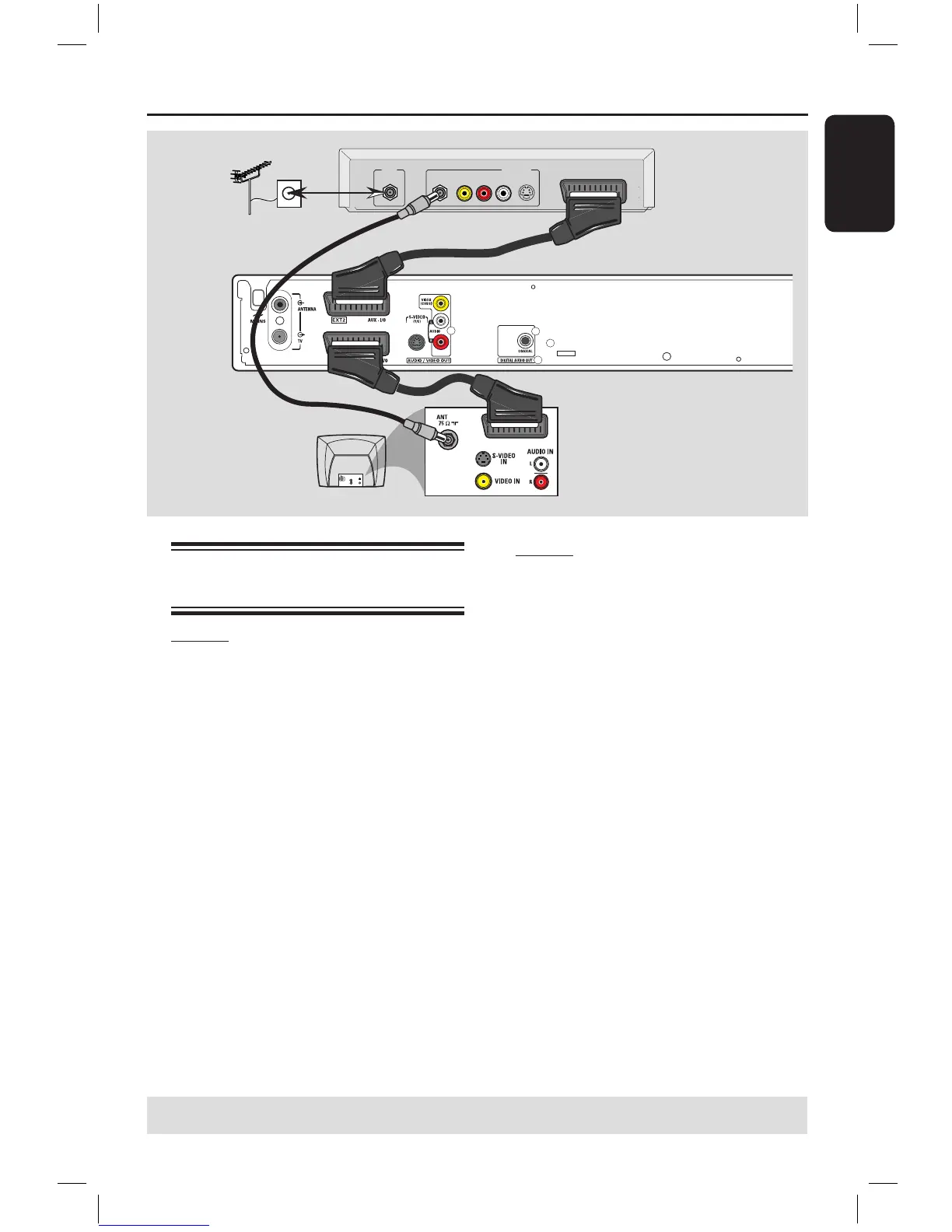
Optional Connections
A
B
C
Antenna/ cable
TV signals
Connecting to a Cable Box or
Satellite Receiver
Option 1
If your Cable Box/Satellite Receiver
has only an antenna output socket
(RF OUT or TO TV),
refer to “Connecting the antenna cables”
on page 12 for the complete connection
to your TV.
Option 2
If your Cable Box/Satellite Receiver
has Scart output socket
A Keep the existing antenna connection
from the Cable Box/Satellite Receiver to
your TV.
B Use the scart cable to connect the EXT1
TO TV-I/O socket on the DVD
recorder to the corresponding SCART
input socket on the TV.
C Use another scart cable to connect the
EXT2 AUX-I/O socket on the DVD
recorder to the Scart output socket
(possibly labelled as TV OUT or TO TV)
on the Cable Box/Satellite Receiver.
To start playback, select the TV channel
directly on the Cable Box/Satellite
Receiver. The DVD recorder will
automatically send the video/audio signals
from the EXT2 AUX-I/O socket to the
EXT1 TO TV-I/O socket. You will see
the picture from the additional device on
your TV, even if the DVD recorder is
turned off.



 To Next Page