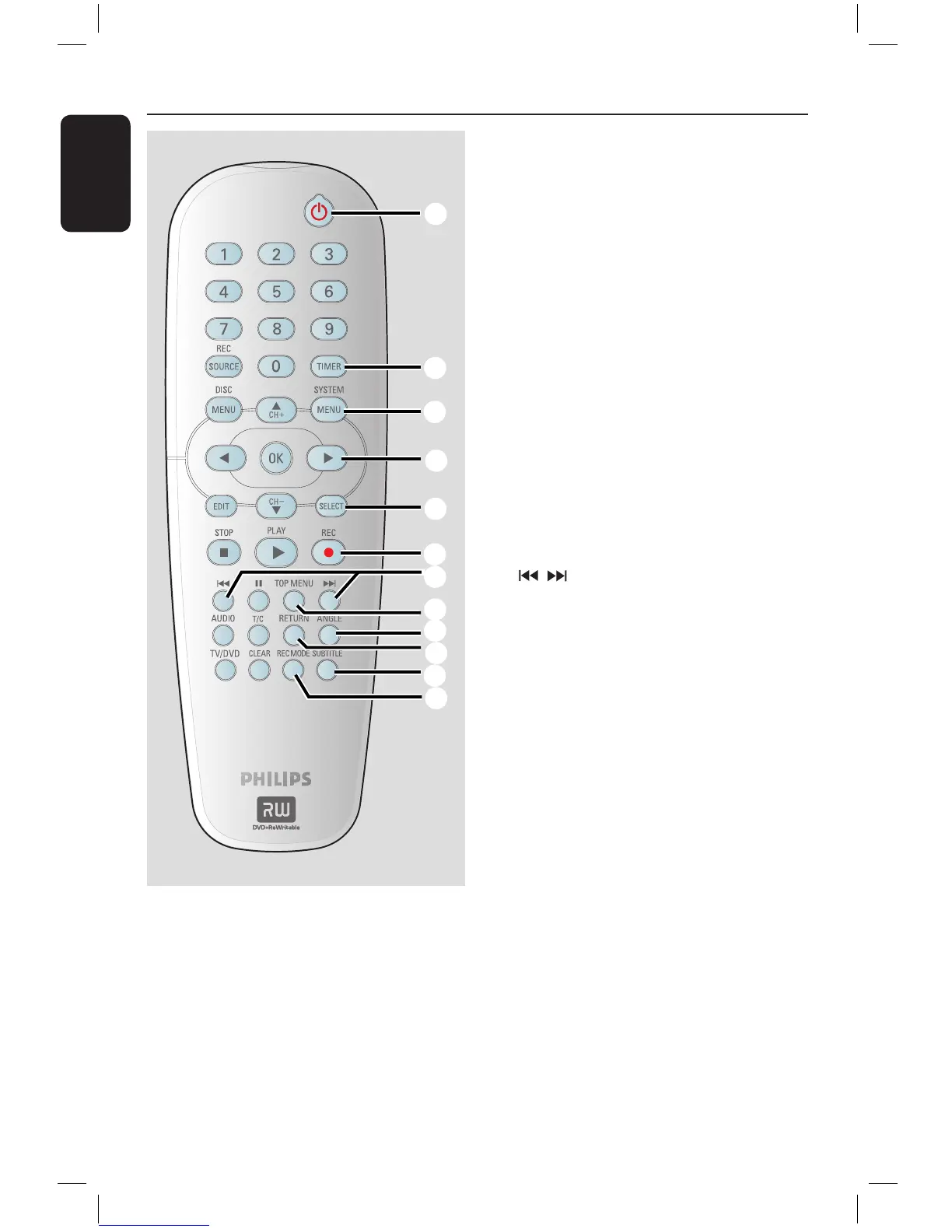
a STANDBY-ON 2
– Turns on the DVD recorder or to
standby mode.
b TIMER
– Enters/exits the timer recording menu.
c SYSTEM-MENU
– Enters/exits the system menu.
d : Cursor buttons for moving to the
left or right, do a forward/reverse search.
: Cursor buttons for moving up/
down or changing the recorder’s TV
tuner channel.
e SELECT
– Selects a track/chapter/file in the
programme menu.
f REC
– Starts recording the current TV channel
or the current video input source.
g
– Skips to previous or next Chapter/Track.
h TOP MENU (For DVD+R/+RW discs only)
– Enters the disc editing menu.
i ANGLE
– Selects a DVD disc camera angle
(if available).
j RETURN
– Returns to the previous menu of a video
CD (VCD) or some DVDs.
k SUBTITLE
– Selects a DVD subtitle language.
l REC MODE
– Toggles between recording modes :
1, 2, 4 and 6 hour mode.
This determines the quality of the
recording and the amount/length of time
you can record on a DVD+R/+RW.
16861_dvdr3305_05_eng5.indd 20 2005-06-29 4:09:22 PM



 To Next Page