Remote Control (continued)
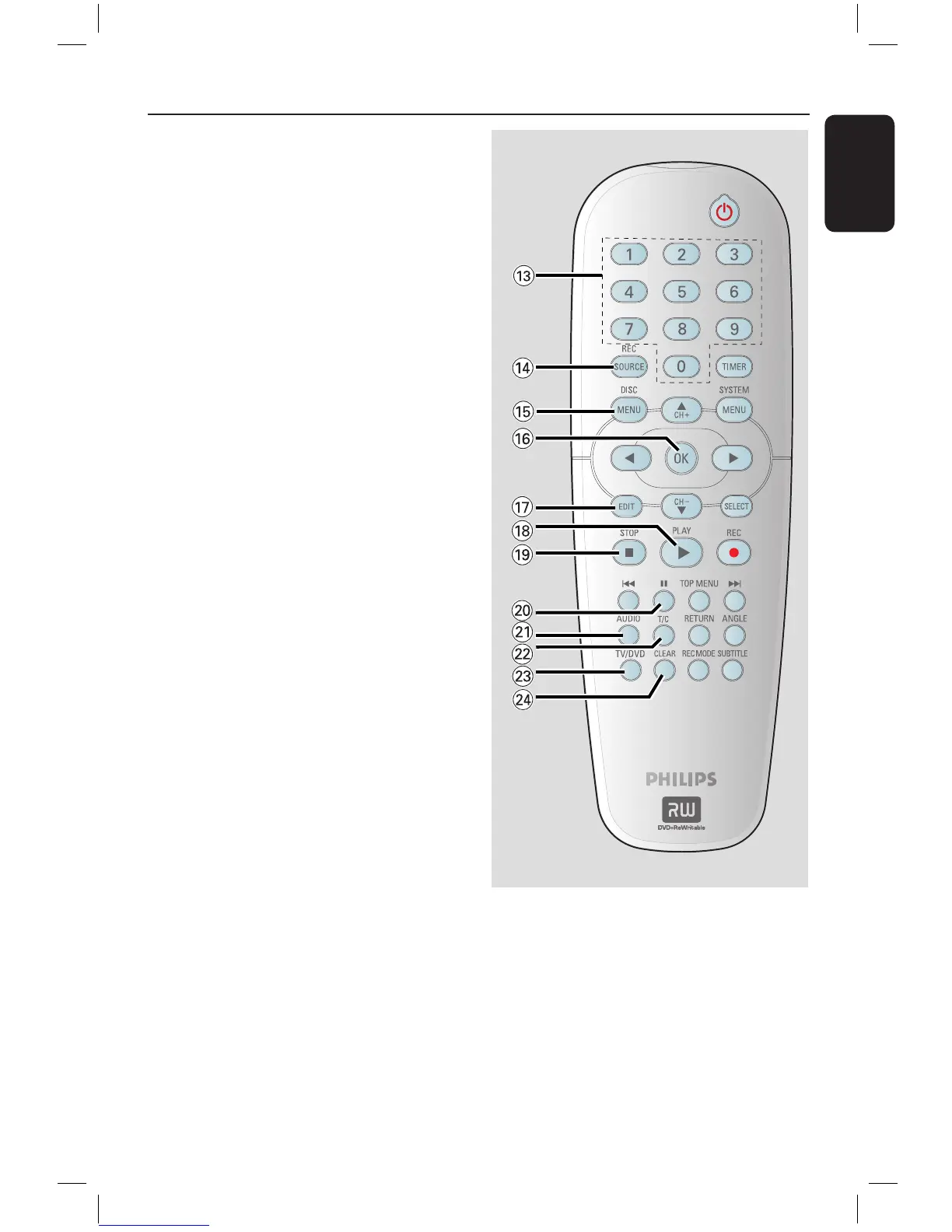
m Numeric keypad
– Selects a chapter/track number to play.
– Selects the recorder’s preset TV tuner
channel.
n REC SOURCE
– Selects the recorder’s input source.
o DISC-MENU
– Access DVD disc menu or Index Picture
screen of a DVD+R/+RW.
– Access VCD disc menu when PBC is
turned on.
p OK
– Stores/confirms an entry.
– Confirms a selection.
q EDIT (For DVD+R/+RW discs only)
– Enters/exits the video editing menu.
r PLAY
É
– Plays a disc.
s STOP
– Stops playback/recording.
– Holding down the button will open/close
the disc tray.
t
Å
– Pauses the playback or recording.
– Press repeatedly to advance a paused
picture one frame at a time.
u AUDIO
– Selects an audio language (DVD, VCD) or
an audio channel.
v T/C (Title/Chapter)
– Enters/exits the T/C menu.
w TV/DVD
– Switch between playback from the
additional devices (connected via the EXT2
AUX I/O socket) and playback from the
DVD recorder.
x CLEAR
– Clears a track/chapter/file in the
programme menu.
– Clears a timer entry.
16861_dvdr3305_05_eng5.indd 21 2005-06-29 4:09:24 PM



 To Next Page