Optional Connections (continued)
B
OR
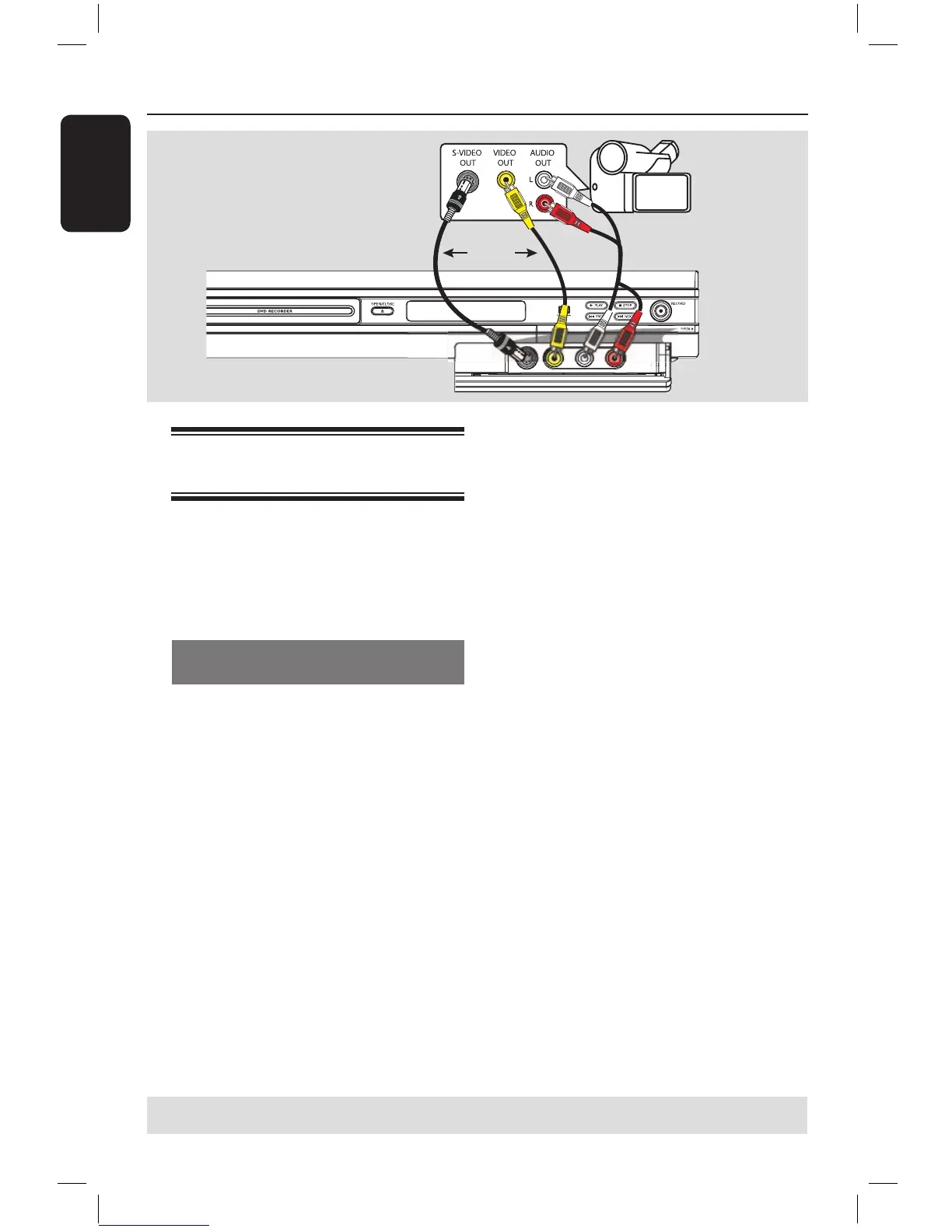
Connecting a camcorder to
the front sockets
You can use the front sockets to copy
camcorder recordings. These sockets are
located behind the flap on the right hand
side which provides convenient
connections for a camcorder.
Using S-VIDEO In or VIDEO In
socket
Use the S-VIDEO connection if you have
a Hi8 or S-VHS(C) camcorder. It
provides better picture quality.
Alternatively, you can use VIDEO
connection if your camcorder has only a
single video output (Composite Video,
CVBS).
A Connect the S-VIDEO or VIDEO
socket at the front panel of the DVD
recorder to the corresponding S-VHS or
Video output socket on the camcorder.
B Use an audio cable (red/white ends) to
connect the AUDIO L/R sockets at the
front panel of the DVD recorder to the
audio output sockets on the camcorder.
Before you start operating, press REC
SOURCE on the remote control
repeatedly to select ‘Front S-VIDEO’ or
‘Front CVBS’ as the input channel,
depending on your connections.
For recording, see pages 27~29.
A
TIPS: Before making or changing any connections, make sure that all the devices are disconnected
from the power outlet.
16861_dvdr3305_05_eng5.indd 18 2005-06-29 4:09:19 PM



 To Next Page