13EN
2 Using a high speed HDMI cable,
connect the HDMI out (eARC/ARC) -
To TV connector on your soundbar to
the HDMI ARC connector on the TV.
Note
•
Your TV must support the HDMI-CEC and ARC
function. HDMI-CEC and ARC must be set to On.
• The setting method of HDMI-CEC and ARC may
dier depending on the TV. For details about
ARC function, please refer to your TV owner’s
manual.
• Make sure to use the HDMI cables can support
the ARC function.
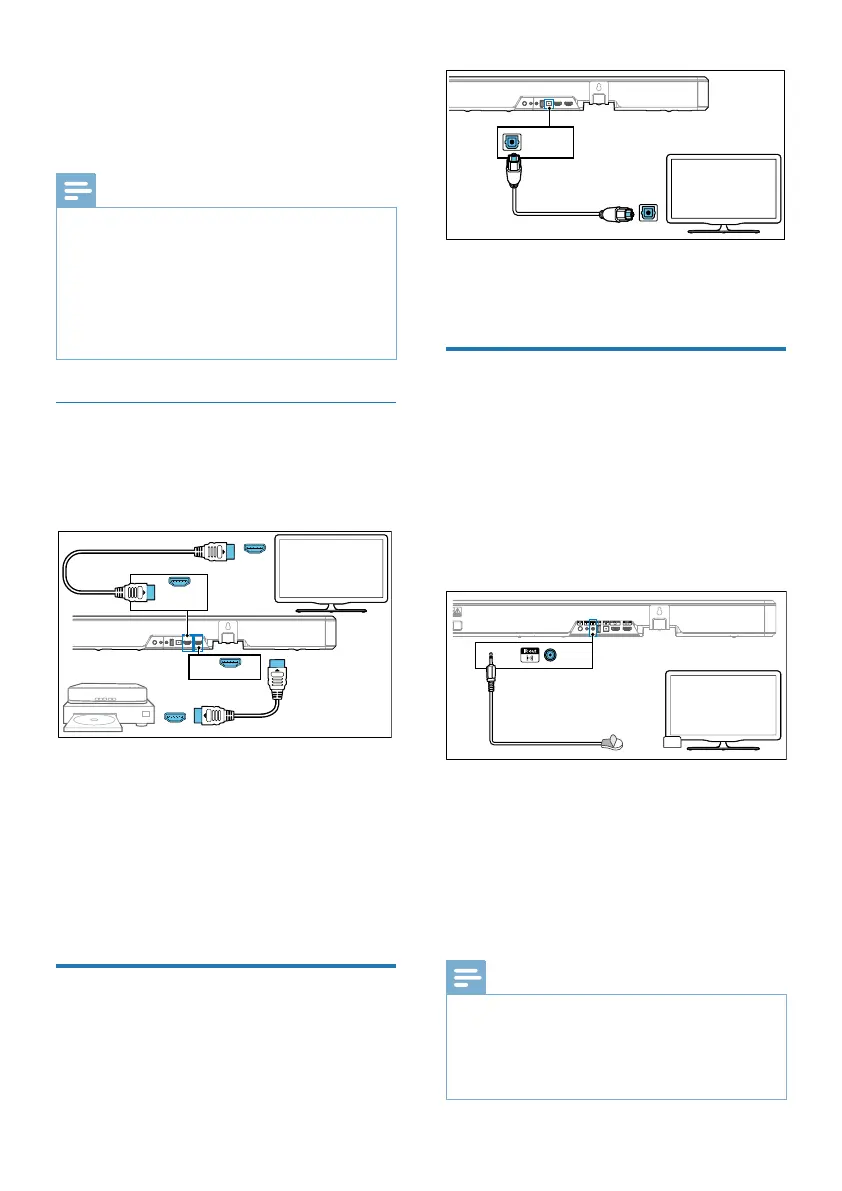
Option 2: Standard HDMI
If your TV is not HDMI ARC-compliant,
connect your soundbar to the TV
through a standard HDMI connection.
HDMI in
HDMI out
Blu-ray Player/DVD Player
/Recorder/Set-top Box...
TV
HDMI out
(eARC/ARC)
HDMI in
HDMI (eARC/ARC)
HDMI out
(eARC/ARC)
TV
Optical out
Optical
TV
1 Use an HDMI cable to connect
the soundbar’s HDMI in socket to
your external devices (e.g. games
consoles, DVD players and Blu-ray).
2 Use an HDMI cable to connect the
soundbar’s HDMI out (eARC/ARC)
socket to the TV’s HDMI in socket.
Connect to Optical Socket
1 Using an optical cable, connect the
Optical connector on your soundbar
to the Optical out connector on the
TV or other device.
HDMI in
HDMI out
Blu-ray Player/DVD Player
/Recorder/Set-top Box...
TV
HDMI out
(eARC/ARC)
HDMI in
HDMI (eARC/ARC)
HDMI out
(eARC/ARC)
TV
Optical out
Optical
TV
• The digital optical connector might
be labeled Spdif or Spdif out.
Connect the IR pass-
through cable
If the soundbar blocks the IR receiver of
the TV when placing directly in front of
it, you can connect the soundbar and TV
with the supplied IR pass-through cable
so that it can receive signal from the
remote control of your TV.
IRout
Micin
IR out
1 Connect the 2.5mm end of the IR
pass-through cable to the IR OUT
connector on your soundbar.
2 Then, place the other end with the IR
blaster close to the TV sensor.
For information, check the user
manual of your TV.
Note
•
Before you start using IR pass-through, make sure
the TV’s remote sensing area is completely blocked.
• If you nd that the TV’s remote control receiver
is not blocked and still works, you can cancel the
connection of the IR pass-through cable.



 To Next Page