21EN
IR ou t
Mic i n
Mic in
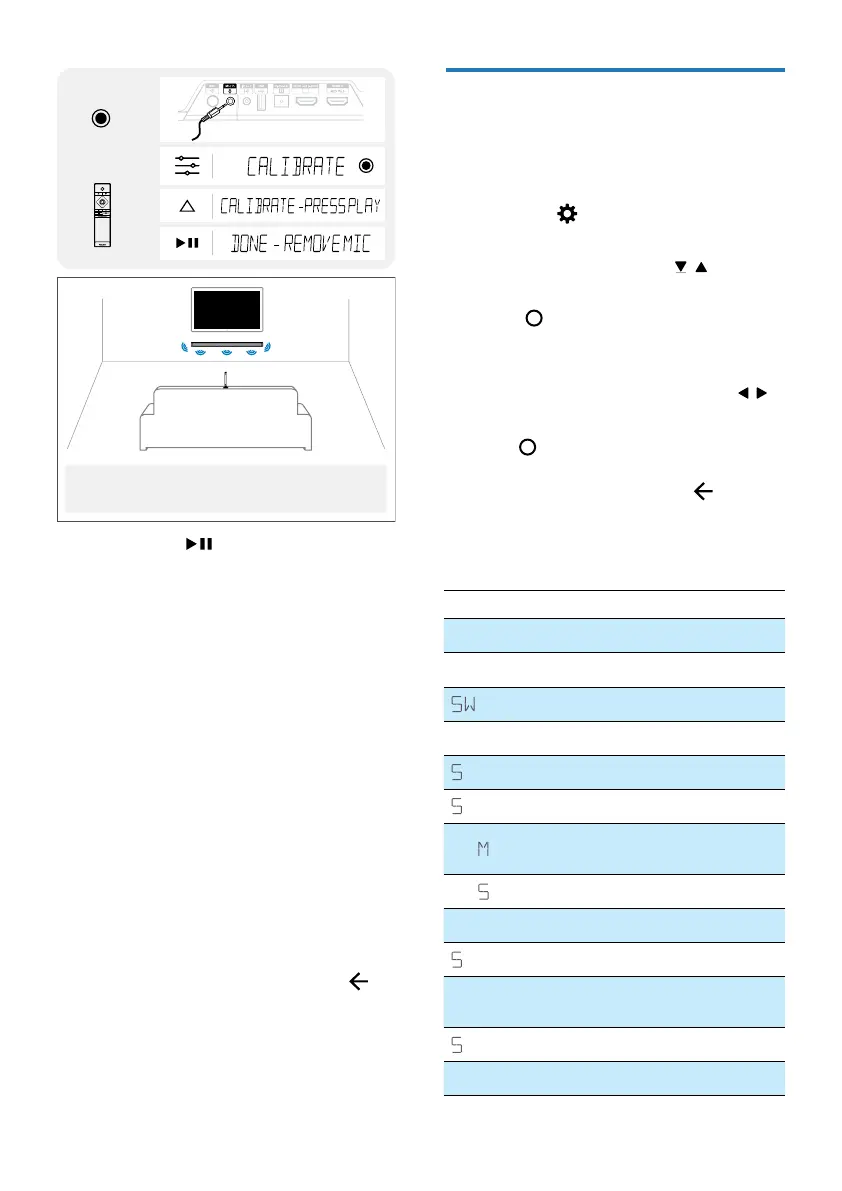
Insert Mic
Audio settings
Set calibration
Point the microphone up and place it where the viewer's head is when seated
facing the screen. (Don't place it too low, or too close to the speakers, and it
shouldn't be placed upside down on the headrest of a sofa (the fabric absorbs
some sound waves and can distort the measurements).
3 Upon press to start calibration,
test tones will be played according to
dierent congurations.
» Once calibration is done, display
“DONE – REMOVE MIC”.
4 When a full auto calibration
setup process has completed,
the calibrated parameters can be
enabled/disabled via menu.
• ON: The last calibrated
parameters shall be applied
• OFF: All calibrated parameters
shall be disabled. The last
parameters shall be remembered.
Exit Auto Calibration Setup
Auto calibration setup can be cancelled
via 2 ways:
• Unplug MIC from MIC IN.
• While MIC is still inserted, Press
(Exit) on the remote control. Stop
playing back test tones for each
channel.
Setup Menu
The unit allows you to congure
advanced settings to provide you with an
even better experience.
1 Press the (MENU) button on the
remote control to open the menu.
2 Select the content with / (Down /
Up) on the remote controller.
3 Press (Enter) to conrm your
selection.
4 Change the initial values for each
of the settings with the cursors
/
(Left / Right).
5 Press (Enter) to confirm your selection.
• To return to the previous screen/
exit the settings, press
(Exit).
• If no button is pressed within
10 seconds, the system will
automatically exit the menu.
Display Description
FL XX
Front Left Speaker
FR XX
Front Right Speaker
XX
Subwoofer
CT XX
Center Speaker
L XX
Side Left Speaker
R XX
Side Right Speaker
DI
Set display and light ring
brightness
DI P XX
Auto turn o display
LIGHT
ATMOS Light ring control
TNBY XX
Auto-standby ON/OFF
BT PAIR
Start Bluetooth pairing
(Only in BT mode)
UB PAIR
Start Subwoofer pairing
UPGRADE
Update rmware via USB



 To Next Page