14 EN
Connect to Power
WARNING!
•
Risk of product damage! Make sure that the
power supply voltage corresponds to the
voltage printed on the back or the underside of
the product.
• Risk of electric shock! When you unplug the
power cord, always pull the plug from the
socket. Never pull the cord.
• Before connecting the AC power cord, ensure
you have completed all other connections.
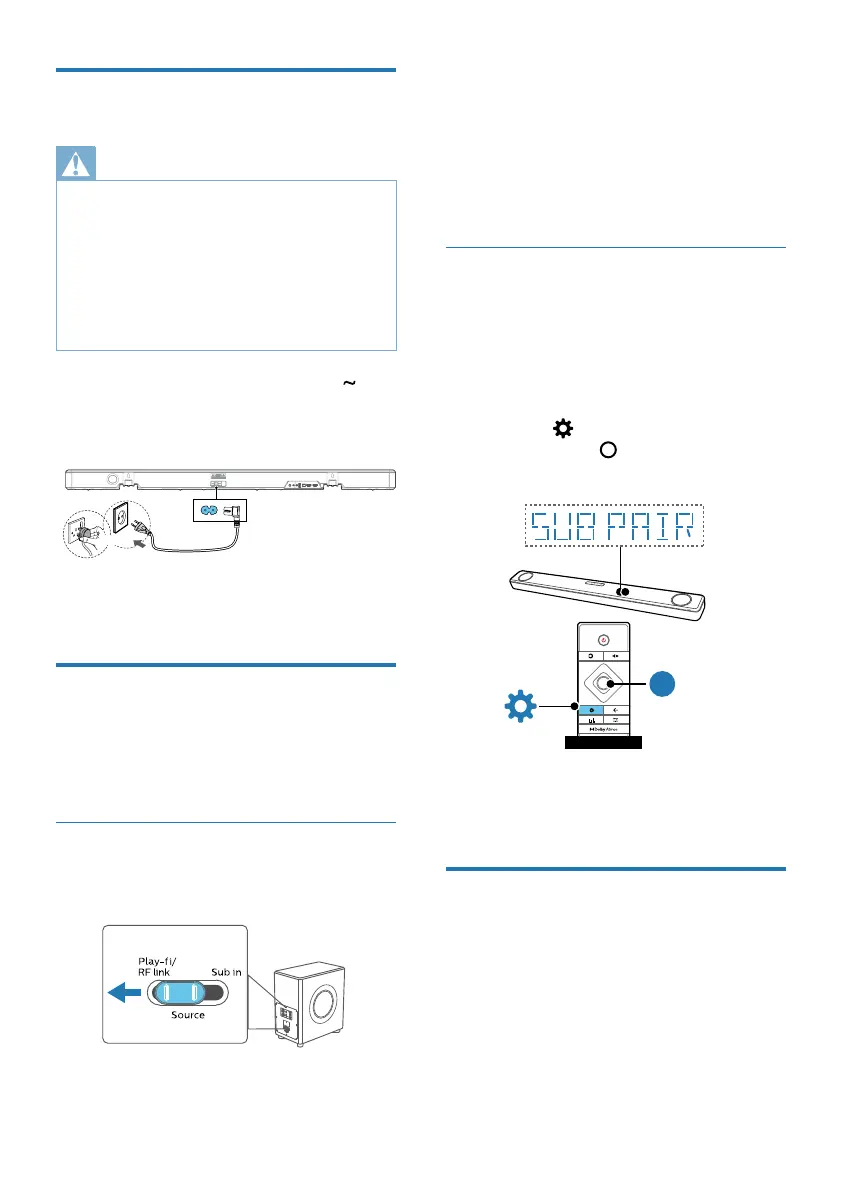
Connect the mains cable to the AC
Socket of the unit and then into a mains
socket.
or
• Power cord quantity and plug type
vary by regions.
Pairing with Subwoofer
(FW1) via proprietary RF link
FB1 soundbar can pair with FW1 (not
supplied) Play-Fi wireless subwoofer.
Automatic pairing
1 Switch FW1 subwoofer source to
Play-/RF link source.
3
4
1 2
Fast blink Slow pulse
<
Wi-Fi
Wi-Fi
8 sec
Two tone
2 Both soundbar and subwoofer are on.
The soundbar will discover and pair
with the subwoofer in pairing mode.
» If pairing succeeds, soundbar
display shows “PAIRED”.
» If pairing fails, soundbar display
shows “CHECK SUBWOOFER”.
Manual pairing
If pairing fails, To perform manual pairing
of soundbar and subwoofer:
1 Unplug the subwoofer from the
power outlet and power it up again.
2 Goto soundbar settings menu.
» Press
> select “SUB PAIR” >
Then press
(Enter) to conrm
the subwoofer pairing mode.
SU B P AIR
FB1 SoundBar
FB1 SoundBar
(Green) Fast blink
(Green) Solid
3 The soundbar will discover and pair
with the subwoofer in pairing mode.
Connect to Wi-Fi
(Wireless Operation)
(For iOS and Android version)
By connecting this unit and mobile phones,
tablets (such as iPad, iPhone, iPod touch,
Android phones, etc.) to the same Wi-Fi
network, you can then use the Philips Sound
app powered by DTS Play- to control the
soundbar to listen to audio les.



 To Next Page