17EN
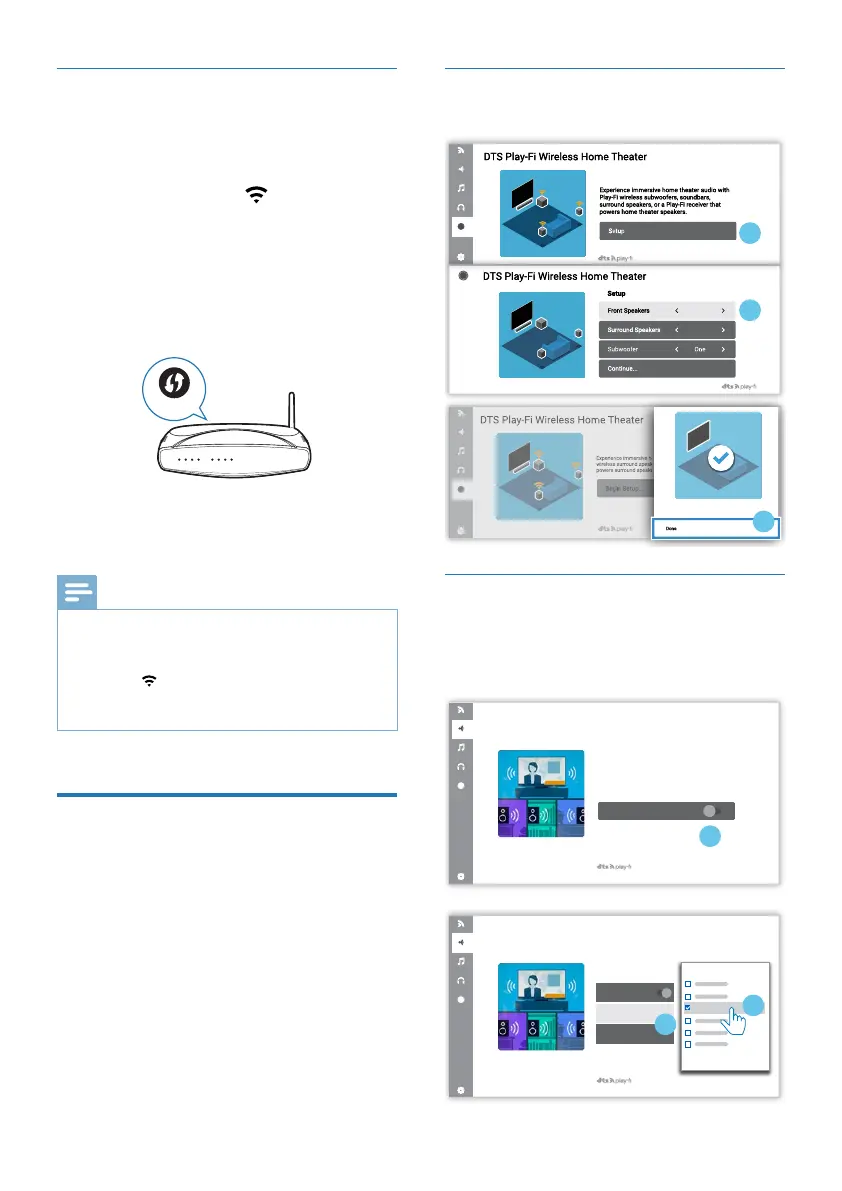
Surround sound Setup
Follow the on-screen setup.
1
The home theater speakers are now
independent speakers.
3
2
Two
One
TV Audio Setup
You can also stream the TV’s audio to
your home speakers wirelessly. Follow
the on-screen setup.
Stream this TV's audio to wireless speakes
throughout your home.
Learn more about DTS Play-Fi enabled
speakers at play-�.com
Connect Speakers
1
DTS Play-Fi TV Audio
Connect Speakers
Select Speakers
Volume
Play-Fi Speaker
2
3FB1
DTS Play-Fi TV Audio
FB1
WPS mode
If your router has Wi-Fi Protected Setup
(WPS), you can set up the connection
without entering a password.
1 Press and hold the (Wi-Fi) button
for 3 seconds on the soundbar. You
will hear a tone and the Wi-Fi light
will begin double blink.
2 Press the WPS button on your router.
The button is normally marked with
this WPS logo.
WPS
3 After successful Wi-Fi connection,
the Wi-Fi light indicator will stop
pulsing and turn solid.
Note
•
WPS is not a standard feature on all routers.
If your router does not have WPS then use
Standard Wi-Fi Setup.
• Press the (Wi-Fi) button once if you want to
exit the WPS mode or it will automatically exit
after 2 minutes.
Connect the soundbar to
Philips Play- enabled TV
1 Power up your DTS Play- TV
connected to the internet.
» TV sound is muted.
2 Enter the Settings menu on TV.
» Settings > Sound > DTS Play-



 To Next Page