6 Philips · GoPix 1 GPX1100
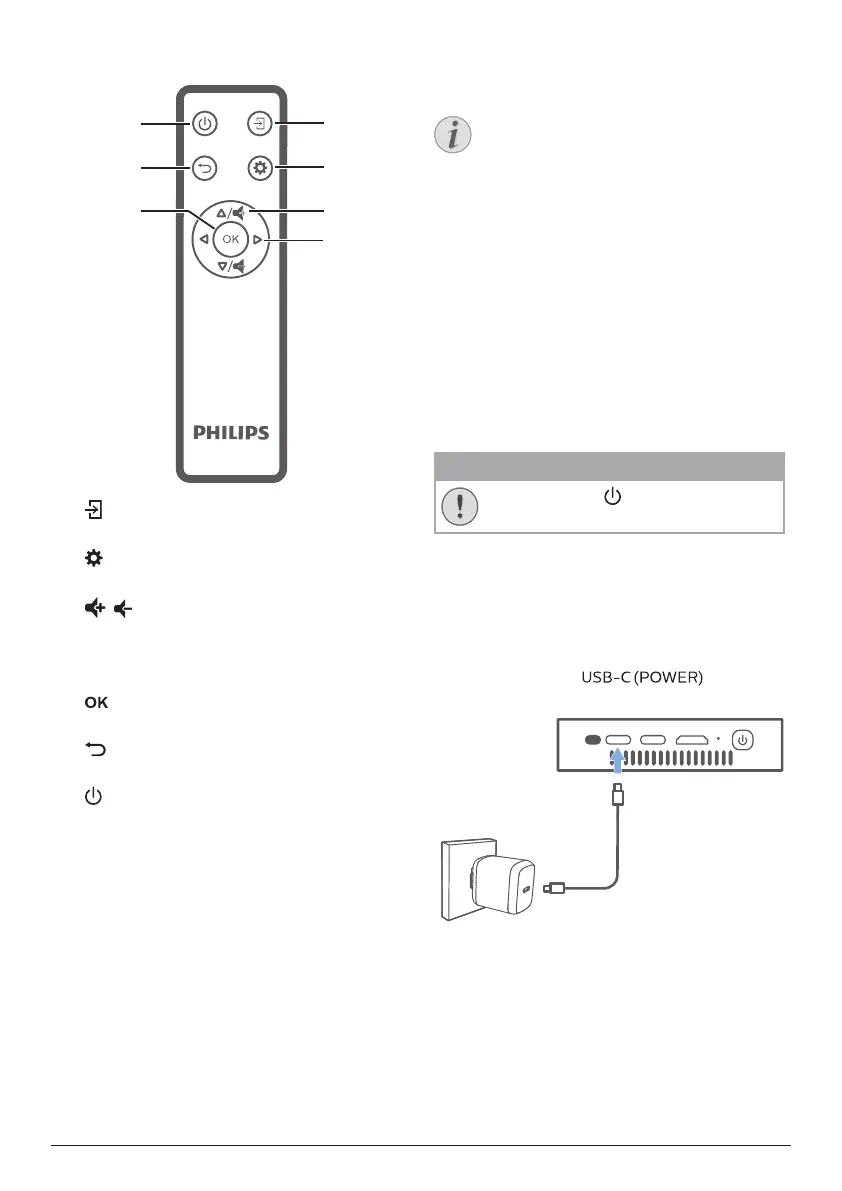
Remote control
f
g
e
a
b
d
c
a
Select an input source.
b
Access the settings menu.
c
/
Increase or decrease volume.
d
Navigation buttons
Navigate menu options.
e
Confirm a selection or entry.
f
Return to a previous menu screen.
g
• Press and hold for 1 second to switch
the projector on.
• Press twice to switch the projector off.
3 Operation
Notice
You need to connect the projector to
an HDMI or USB-C device, so that the
projection screen can show images (see
Connect, page 9).
Place the projector
Place the projector on a flat surface in front of
the projection surface.
You can also install the projector in different
configurations (see Placement options, page
8).
Connect power supply
The projector can be operated by either
external power or built-in battery.
CAUTION!
Always use the button to turn the
projector on or off.
Operation by external power
To charge and supply power for the projector,
you’ll need a USB-C PD charger (not included).
1 Connect the USB-C cable to the USB-C
port on a fast charger, and the other end of
the cable to the connector
on the projector.
USB-C
Power
USB-C
Video
Mini
HDMI
2 Plug the fast charger into the wall outlet.
The LED on the projector turns red.
Operation by built-in battery
The projector can be also operated on built-in
battery for portability.



 To Next Page