
 Need help?
Do you have a question about the Philips HF3670 and is the answer not in the manual?
Instructions to reduce risks of burns, fire, electric shock, or injury.
Precautions for dropping, shocks, and surface stability.
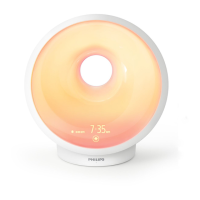
Overview of numbered items referring to the product's illustration.
Purpose of the Sleep & Wake-Up Light for natural wake-up and relaxation.
How light prepares the body for waking and its impact on mood and energy.
Step-by-step guide for setting up Wi-Fi connection via the SleepMapper app.
Details on sensors measuring light, humidity, temperature, and sound for sleep conditions.
Instructions for initial setup using the appliance's wizard without the mobile app.
How to select and set various functions like wake-up profiles, lamp, and sound.
Procedure for saving personalized settings and profiles on the appliance.
Setting the alarm time and selecting specific days of the week for the alarm.
Adjusting the simulated sunrise light intensity from 25 levels.
Setting the duration of the light's gradual increase for waking up.
How to use the snooze function and its duration settings.
How to use the device as a dimmable bedside lamp and adjust brightness.
How to set the clock time and toggle between 12/24 hour format.
Turning Wi-Fi on/off and reconnecting to networks.
Setting display brightness from level 1 to 6, with auto-adjustment feature.
Turning off the display completely after a period of inactivity.
Tuning into FM radio stations and presets.
Gradual decrease of light color and intensity to simulate sunset.
Explanation of the belly breathing technique for relaxation and how to perform it.
Tracking time in bed and activating the bedtime function.
Using the USB port to charge a mobile phone.
Instructions for cleaning the appliance and proper storage methods.
Information on recycling and proper disposal of the product.
Details on the satisfaction guarantee, return process, and refund.
Information on the product's warranty coverage and terms.
Resolving issues related to connecting the appliance to Wi-Fi and the app.
Troubleshooting common issues like unresponsive controls, lamp, or sound.
Compliance with standards regarding exposure to electromagnetic fields.
Regulatory information related to FCC and Industry Canada compliance.
Specifications for the power adapter, including voltage, current, and dimensions.
Specifications for the primary appliance unit, including type, power, and dimensions.
Details about the available ports on the appliance.
Specifications for light output levels and color temperature.
Operating frequency, modulation type, and RF output power for Wi-Fi.
Recommended temperature, humidity, and pressure for operation.
 General
| Type | Wake-up light |
|---|---|
| Model | HF3670 |
| Category | Lighting Equipment |
| Light Source | LED |
| Brightness | Adjustable |
| Brightness Levels | 20 |
| Sunrise Simulation | Yes |
| Sunset Simulation | Yes |
| Number of Sounds | 5 |
| FM Radio | Yes |
| Snooze Function | Yes |
| Display Type | Digital |
| Light Therapy | Yes |
| Dimming | Yes |
| Adjustable Arm | No |
| Material | Plastic |
| Alarm Sounds | Natural sounds |
| Power Source | AC mains |








 To Next Page