This is a safety feature when you leave your house for a vacation or long trip. Away Mode restricts
all User PIN Codes until the Master PIN Code is entered on the touchscreen. When the lock is
unlocked by the Thumb Turn, an alarm will sound for 1 minute.
It can be programmed in Master Mode on the lock or via the Z-Wave system's user interface (if applicable).
By entering the Master PIN Code on the touchscreen, you can disable the alarm and the Away Mode.
Away Mode
Press and hold the Privacy Button on the Interior Assembly for 3 seconds to activate the Privacy
Mode. This will restrict all User PIN Code access. Privacy Mode will be disabled automatically after
unlocking the door with the Thumb Turn or the Master PIN Code.
Privacy Mode
3 How to Use
Feature De�nitions
Required for programming and adjusting settings. The Master PIN Code can be used to unlock the
deadbolt in Away Mode and Privacy Mode. The default Master PIN Code (12345678) must be
changed immediately by programming on the lock (Programming instructions refer to page 15.)
Master PIN Code
Unlock with your PIN codes, keys, or unlock through your smartphone. The PIN codes can be
programmed in Master Mode on the lock.
3 Ways to Unlock
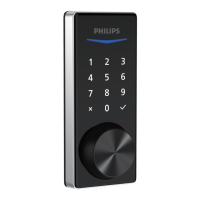
Lock the door by simply pressing and holding any key on the touchscreen for 2s.
One-Touch Locking
After 10 unsuccessful attempts to enter a PIN code, the touchscreen will shut down and be
unusable for 3 minutes.
Wrong Code Entry Limit
"Low battery. Please replace batteries as soon as possible". Replace the low batteries with four new
AA alkaline batteries.
Low Battery Alarm
The unit will automatically lock after it has been unlocked. This feature is disabled by default. It can
be programmed in Master Mode on the lock or via the Z-Wave system's user interface (if applicable)
for a time delay between 30 and 180 seconds.
Auto-Lock
The sounds can be muted when pressing the touchscreen. However, you will still hear low battery
warnings and system alerts. It can be programmed in Master Mode on the lock or via the Z-Wave
system's user interface (if applicable).
Silent Mode
12


 To Next Page
 Loading...