Service Modes, Error Codes and Fault Finding
EN 42 L01.1U AC5.
5. Service Modes, Error Codes and Fault Finding
Index:
1. Test Points.
2. Service Modes.
3. Problems and Solving Tips (related to CSM).
4. ComPair.
5. Error Codes.
6. The Blinking LED Procedure.
7. Protections.
8. Repair Tips.
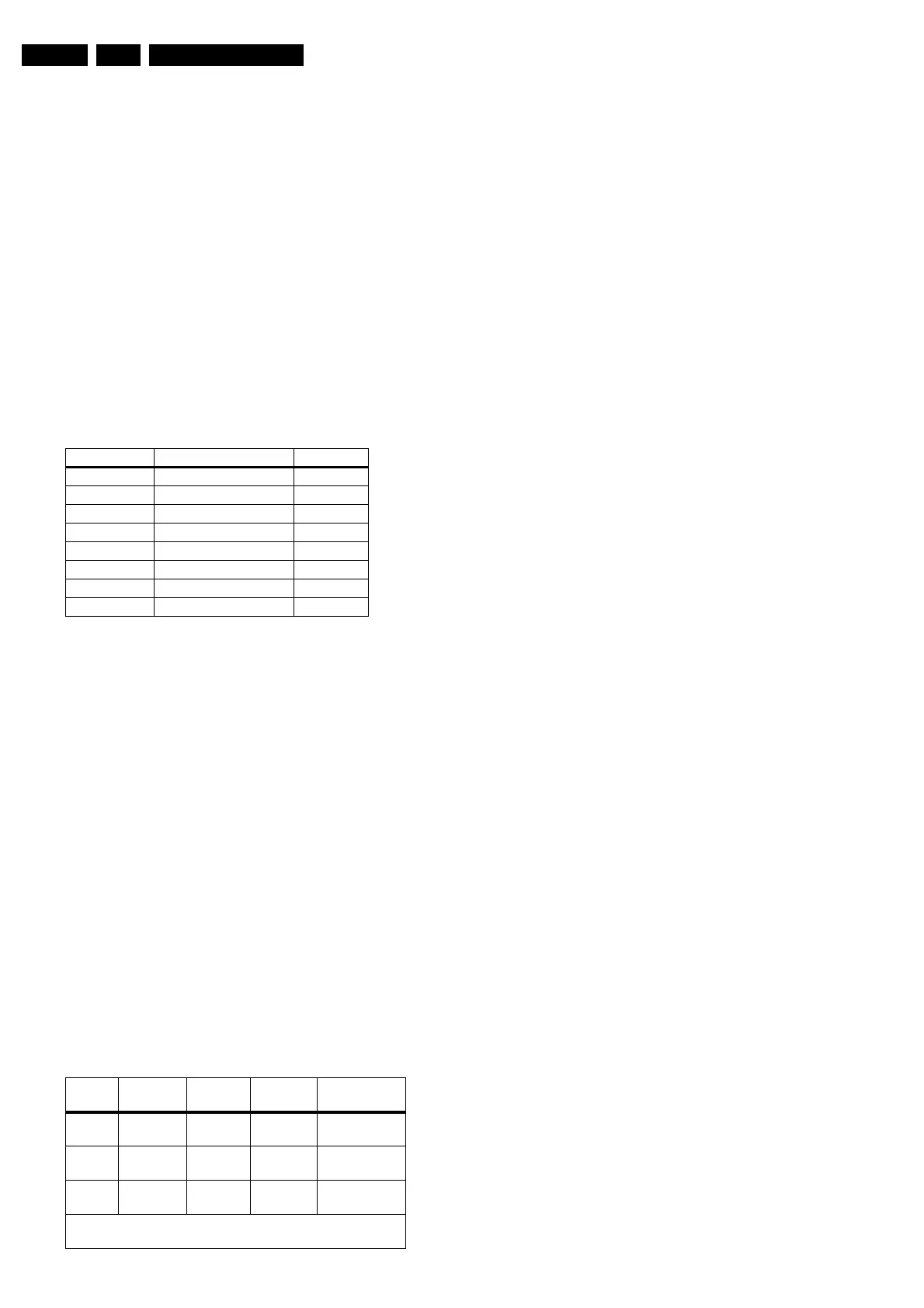
5.1 Test Points
The chassis is equipped with test points printed on the circuit
board assemblies. These test points refer to the functional
blocks:
Table 5-1 Test point overview
The numbering is in a logical sequence for diagnostics. Always
start diagnosing within a functional block in the sequence of the
relevant test points for that block.
Perform measurements under the following conditions:
• Television set in Service Default Alignment Mode.
• Video input: Color bar signal.
• Audio input: 3 kHz left channel, 1 kHz right channel.
5.2 Service Modes
Service Default Alignment Mode (SDAM) offers several
features for the service technician, while the Customer Service
Mode (CSM) is used for communication between the servicer
and the customer.
The L01.1U AC chassis also offers the option of using
ComPair, a hardware interface between a computer and the TV
chassis. It offers the abilities of structured troubleshooting,
error code reading, and software version readout for all L01.1U
AC chassis.
Minimum requirements for ComPair: a Pentium processor, a
Windows OS, and a CD-ROM drive (see also “ComPair”
section).
Table 5-2 Software cluster overview
5.2.1 Service Default Alignment Mode (SDAM)
Purpose
• To create a predefined setting for measurements to be
made.
• To override software protections.
• To start the blinking LED procedure.
• To change option settings.
• To display / clear the error code buffer.
• To perform alignments.
Specifications
• Tuning frequency: 61.25 MHz (channel 3).
• Color system: NTSC M.
• All picture settings at 50% (brightness, color contrast, hue).
• Bass, treble and balance at 50 %; volume at 25 %.
• All service-unfriendly modes (if present) are disabled. The
service unfriendly modes are:
– Timer / Sleep timer.
– Child / parental lock.
– Blue mute.
– Hotel / hospital mode.
– Auto shut off (when no 'IDENT' video signal is received
for 15 minutes).
– Skipping of non-favorite presets / channels.
– Auto-storage of personal presets.
– Auto user menu time-out.
– Auto Volume Leveling (AVL).
• Run timer (maximum four digits displayed)
• Software version
• Option settings
• Error buffer reading and erasing
• Software alignments
How to enter
To enter SDAM, use one of the following methods:
• Press the following key sequence on the remote control
transmitter: '0 6 2 5 9 6' directly followed by the 'MENU'
button (do not allow the display to time out between entries
while keying the sequence).
• Short jumper wires 9631 and 9641 on the family board (see
Fig. 8-1) and apply AC power. Then press the power button
(remove the short after start-up).
Caution: Entering SDAM by shorting wires 9631 and 9641
will override the +8V-protection. Do this only for a short
period. When doing this, the service-technician must know
exactly what he is doing, as it could damage the television
set.
• Or via ComPair (with the ComPair 'Tools' RC7150 Service
Remote, it should be possible to enter SDAM via the
ComPair interface).
After entering SDAM, the following screen is visible, with S in
the upper right corner of the screen to indicate that the
television is in Service Default Alignment Mode.
Test point Cuircuit Diagram
A1-A2-A3-.... Audio processing A8, A9 / A11
C1-C2-C3-.... Control A7
F1-F2-F3-.... Frame drive and output A3
I1-I2-I3-.... Tuner & IF A4
L1-L2-L3-... Line drive and output A2
P1-P2-P3-.... Power supply A1
S1-S2-S3-.... Synchronisation A6
V1-V2-V3-.... Video processing A5, B1
SW
Cluster
SW name UOC type UOC Di-
versity
Special Fea-
tures
L3LUS1 L01US2x.y TDA9587 64K ROM
Size
Stereo dBx,
Comb Filter
L3LUN1 L01UN4x.y TDA9588 64K ROM
Size
Stereo non-
dBx
L3LUN2 L01UN5x.y TDA9577 55K ROM
Size
Stereo non-
dBx
Abbreviations in Software name: U = USA (NAFTA), M = Mo-
no, N = Stereo non-dBx and S = Stereo dBx.
www.freeservicemanuals.info
Published in Heiloo Holland



 To Next Page