Mechanical Instructions
EN 10 LC8.1E LB4.
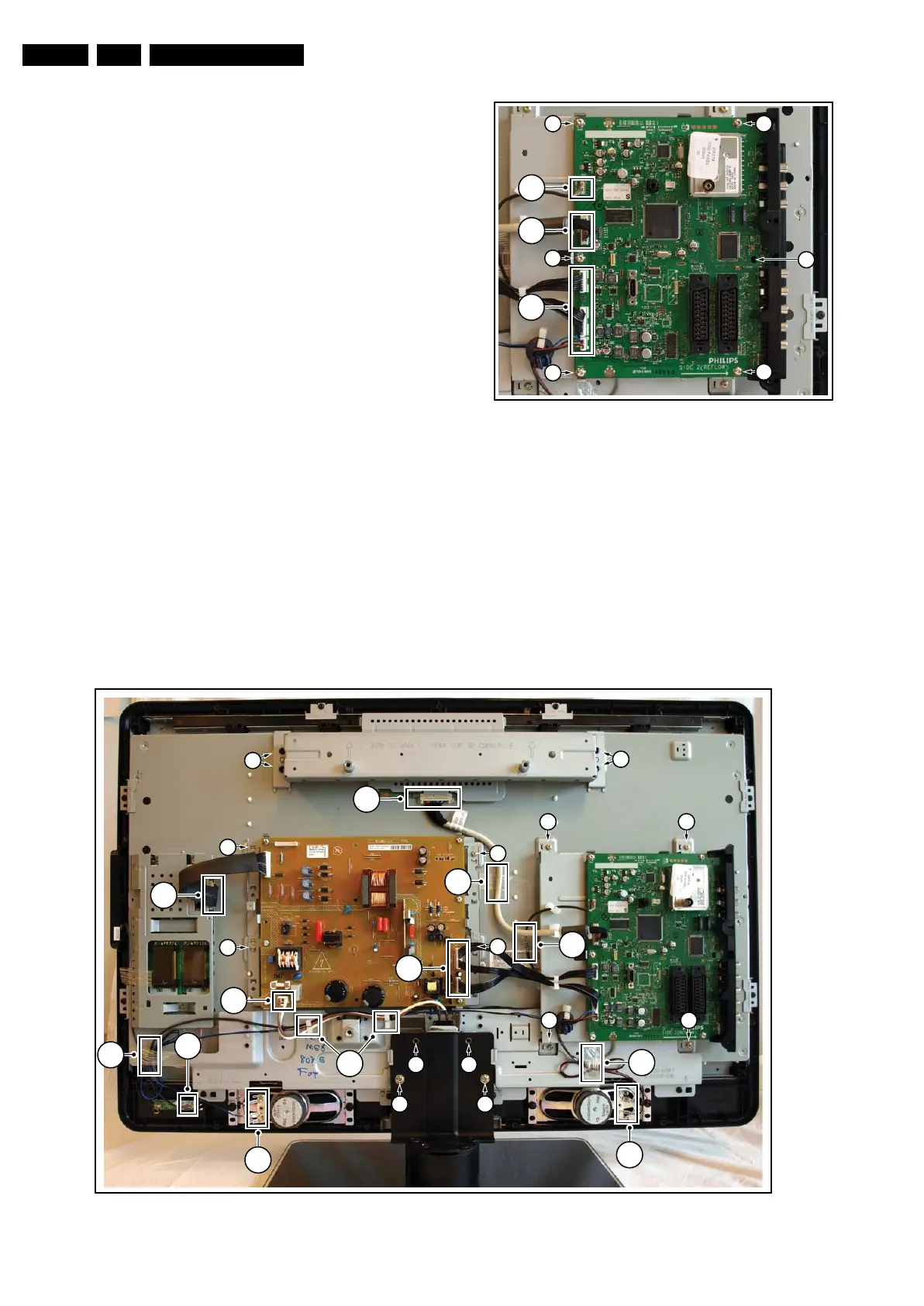
4.3.6 Small Signal Board (SSB)
Refer to next figure for details.
Caution: it is mandatory to remount all different screws at their
original position during re-assembly. Failure to do so may result
in damaging the SSB.
1. Unplug the LVDS connector [1].
Caution: be careful, as this is a very fragile connector!
2. Unplug the connectors [2].
3. Remove the screws [3].
4. The SSB can now be taken out of the set, together with the
side cover.
5. To remove the side cover, push back the clamp [4] using a
screw driver.
6. Pull the cover sidewards from the SSB.
Figure 4-8 Small Signal Board
4.3.7 LCD Panel
Refer to next figures for details.
1. Remove the stand [1].
2. Unplug the LVDS connector [2].
3. Unplug connectors [3] from
– Main Power Supply Panel
– Speakers
– IR & LED Panel.
4. Remove any adhesive tape [4] that prevents cables being
removed from the set.
5. Remove all cables from clamps [5] that prevents them from
being removed from the set.
6. Remove the VESA stand [6].
7. Remove the Main Power Supply Panel together with it’s
subframe [7].
8. Remove the Small Signal Board together with it’s
subframe [8].
9. Remove the subframe that holds the stand [9].
10. Remove the clamps that secure the LCD Panel [10] and
take the panel out.
Figure 4-9 LCD Panel -1-
4
3
3
3
3
3
2
(
3x
)
2
1
I_18170_051.eps
310708
7
7
7
7
1 1
11
8
8 8
8
6
6
5
2
3
(
2x)
3
3
3
4
3
4
4
4
3
I_18170_052.eps
310708



 To Next Page