EasyManua.ls Logo

Philips PCL304 - Configurations; System Upgrades; Expanded Memory

Philips PCL304
82 pages
Print Icon
To Next Page IconTo Next Page
To Previous Page IconTo Previous Page
Loading...
3.
CONFIGURATIONS
This
chapter
describes
the
upgrade
options
and
the
pos-
sible
memory
configurations
of
the
system.
3.1
System
Upgrades
Options
that
can
be
ordered
to
upgrade
the
system
are
the
following:
Description
80C387SX
numeric
co-processor
2MB
SIMM
(80ns)
4MB
SIMM
(80ns)
3.2
Memory
configurations
The
notebook
has
standard
1MB
(=
1024KB)
of
RAM
on
board
and
this
can
be
expanded
up
to
SMB.
Generally,
DOS
can
only
use
the
first
640KB
of
RAM
(base
memory),
and
memory
above
640KB
can
be
treated
in
dif-
ferent
ways.
*
Extended
Memory:
This
is
a
simple
continuation
of
Base
1MB
memory.
less
using
special
programs
or
utilities,
most
of
the
soft-
ware
applications
will
be
unable
to
address
this
memory.
*
Expanded
Memory:
Extended
memory
can
be
transformed
into
Expanded
memory
(LIM
EMS
4.0).
This
is
a
tecnique
of
forming
a
"window"
in
the
Base
me-
mory
through
which
some
programs
can
see
“pages”
of
data
in
Expanded
memory.
The
program
can
therefore
address
all
RAM.
*
Shadow
RAM:
Shadow
RAM
applies
only
to
the
first
384K
of
extended
memory
(standard
notebooks).
Instead
of
using
this
spa-
ce
as
extended
or
expanded
memory,
the
system
and/or
VGA
BIOS
can
be
copied
to
this
space.
It
will
lead
to
some
performance
gain,
especially
in
appli-
cations
which
make
extensive
calls
on
the
BIOS.
Refer
to
the
documentation
of
the
software
(program)
to
be
installed
to
decide
which
option
to
choose.
Summarizing:
Enter
the
total
amount
of
RAM
in
the
system
under
the
item
Memory
Size.
If
only
1MB
RAM
is
available,
then
the
spare
384KB
can
be
designated
as
Shadow
RAM,
EMS
memory,
or
Extended
Memory
RAM
beyond
1MB,
may
be
allocated
as
Extended
or
Ex-
panded,
or
a
mixture
of
both.
Only
use
whole
numbers
of
megabytes
when
dividing
RAM.
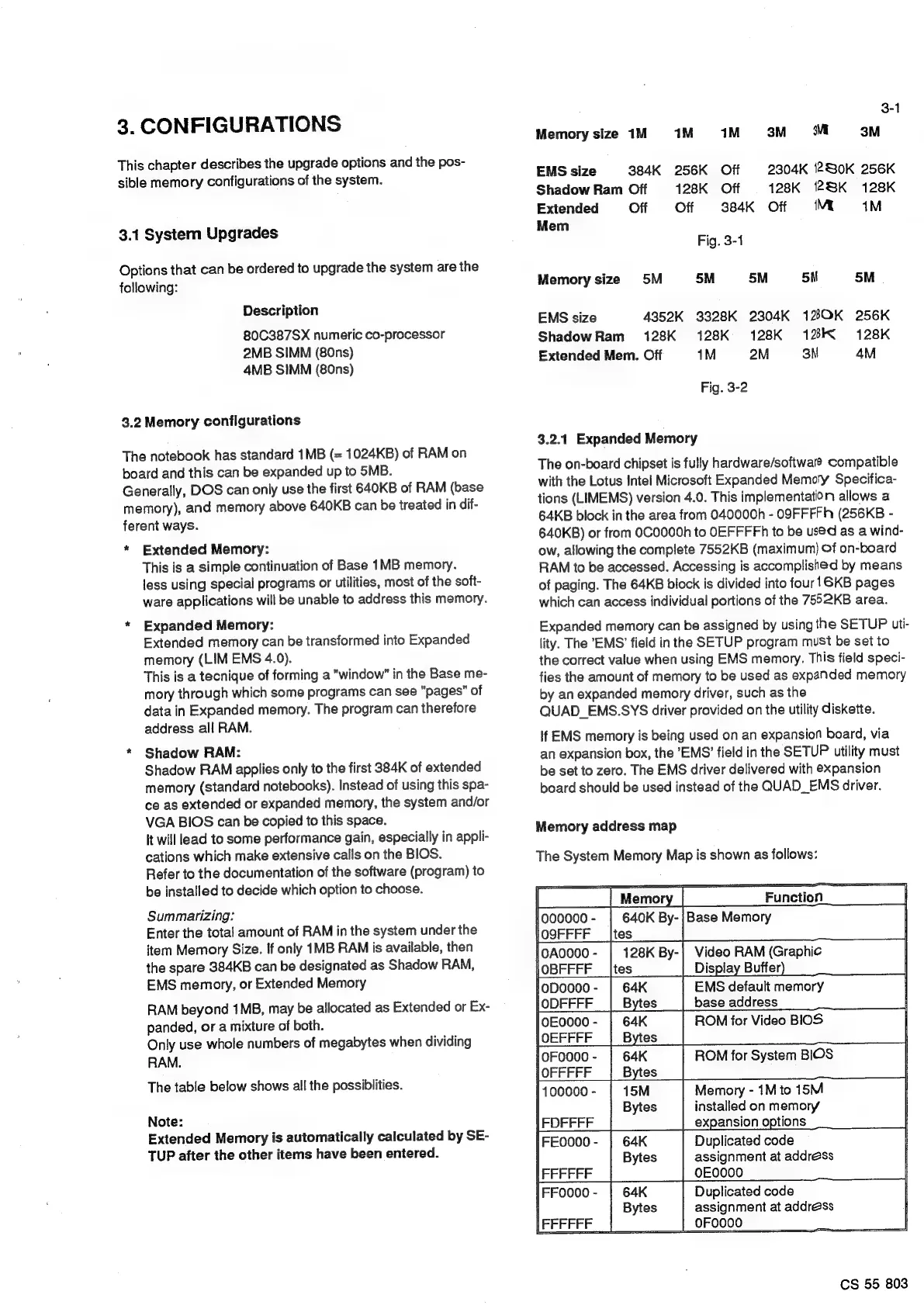
The
table
below
shows
all
the
possiblities.
Note:
Extended
Memory
is
automatically
calculated
by
SE-
TUP
after
the
other
items
have
been
entered.
3-1
Memory
size
1M
1M
1M
3M
MM
3M
EMS
size
384K
256K
Off
2304K
280K
256K
Shadow
Ram
Off
128K
Off
128K
28K
128K
Extended
Off Off
384K
Off
Mi
1M
Mem
Fig.
3-1
Memory
size
5M
5M 5M
5M
5M
EMS
size
4352K
3328K
2304K
120K
256K
ShadowRam
128K
128K
128K
12K
128K
Extended
Mem.
Off
1M
2M
3M
4M
Fig.
3-2
3.2.1
Expanded
Memory
The
on-board
chipset
is
fully
hardware/softwal@
compatible
with
the
Lotus
Intel
Microsoft
Expanded
Memory
Specifica-
tions
(LIMEMS)
version
4.0.
This
implementation
allows
a
64KB
block
in
the
area
from
040000h
-
O9FFFFH
(256KB
-
640KB)
or
from
0C0000h
to
OEFFFFh
to
be
used
as
a
wind-
ow,
allowing
the
complete
7552KB
(maximum)
Of
on-board
RAM
to
be
accessed.
Accessing
is
accomplished
by
means
of
paging.
The
64KB
block
is
divided
into
four!
6KB
pages
which
can
access
individual
portions
of
the
7552KB
area.
Expanded
memory
can
be
assigned
by
using
the
SETUP
uti-
lity.
The
EMS’
field
in
the
SETUP
program
must
be
set
to
the
correct
value
when
using
EMS
memory.
This
field
speci-
fies
the
amount
of
memory
to
be
used
as
expanded
memory
by
an
expanded
memory
driver,
such
as
the
QUAD_EMS.SYS
driver
provided
on
the
utility
diskette.
if
EMS
memory
is
being
used
on
an
expansion
board,
via
an
expansion
box,
the
EMS’
field
in
the
SETUP
utility
must
be
set
to
zero.
The
EMS
driver
delivered
with
expansion
board
should
be
used
instead
of
the
QUAD_EMS
driver.
Memory
address
map
The
System
Memory
Map
is
shown
as
follows:
lO9FFFF
__|tes
|
eee
128K
By-|
Video
RAM
(Graphic
|
|OBFFFF
_
|tes
Display
Buffer,
a
ea
EMS
default
memory
ODFFFF
Bytes
base
address
peso
eas
|
ROM
for
Video
BIOS
OEFFFF
Bytes
pee
64K
ROM
for
System
BIOS
|
OFF
FFF
Bytes
|
100000-
|
15M
Memory
-
1M
to
15M
Bytes
installed
on
memory
|
FDFFFF
expansion
options
[FEoo00-
|
64K
Duplicated
code
Bytes
assignment
at
address
FFFFFF
OEO000
|FFOO0O-
|
64K
Duplicated
code
Bytes
[FEFFFF
assignment
at
address
[FFFFFF
|
___|__OF
0000
ET
CS
55
803

Related product manuals