EasyManua.ls Logo

Philips PCL304 - Keyboard Removal; Powerboard Removal; Motherboard Removal; Harddisk Removal

Philips PCL304
82 pages
Print Icon
To Next Page IconTo Next Page
To Previous Page IconTo Previous Page
Loading...
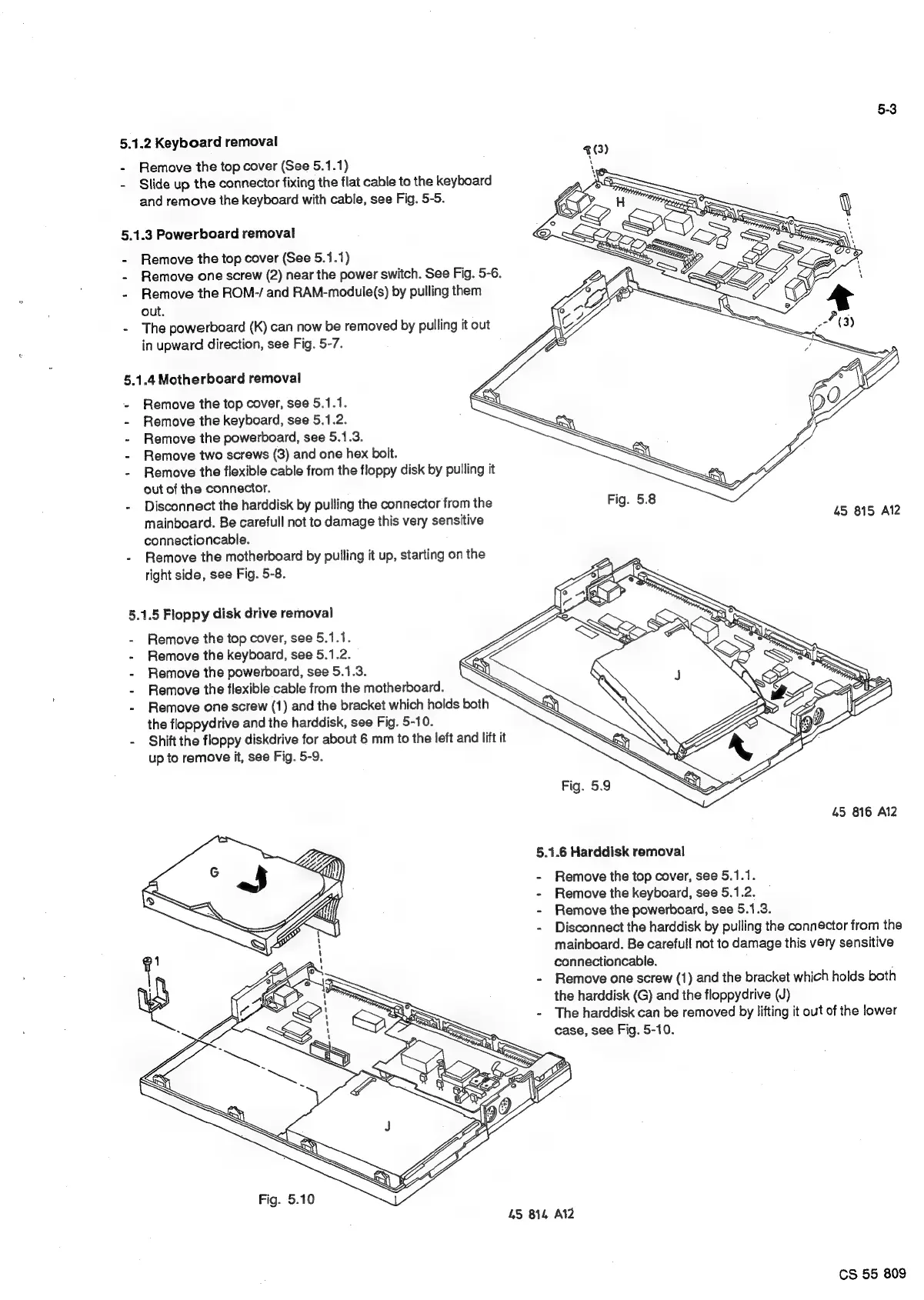
5.1.2
Keyboard
removal
-
Remove
the
top
cover
(See
5.1.1)
a
-
Slide
up
the
connector
fixing
the
flat
cable
to
the
keyboard
NN
and
remove
the
keyboard
with
cable,
see
Fig.
5-5.
5.1.3
Powerboard
removal
-
Remove
the
top
cover
(See
5.1.1)
-
Remove
one
screw
(2)
near
the
power
switch.
See
Fig.
5-6.
-
Remove
the
ROM-/
and
RAM-module(s)
by
pulling
them
out.
-
The
powerboard
(K)
can
now
be
removed
by
pulling
it
out
in
upward
direction,
see
Fig.
5-7.
5.1.4
Motherboard
removal
-
Remove
the
top
cover,
see
5.1.1.
-
Remove
the
keyboard,
see
5.1.2.
-
Remove
the
powerboard,
see
5.1.3.
-
Remove
two
screws
(3)
and one
hex
bolt.
-
Remove
the
flexible
cable
from
the
floppy
disk
by
pulling
it
out
of
the
connector.
-
Disconnect
the
harddisk
by
pulling
the
connector
from
the
Fig.
5.8
mainboard.
Be
carefull
not
to
damage
this
very
sensitive
45
815
Al2
connectioncable.
-
Remove
the
motherboard
by
pulling
it
up,
starting
on
the
right
side,
see
Fig.
5-8.
5.1.5
Floppy
disk
drive
removai
-
Remove
the
top
cover,
see
5.1.1.
-
Remove
the
keyboard,
see
5.1.2.
-
Remove
the
powerboard,
see
5.1.3.
-
Remove
the
flexible
cable
from
the
motherboard.
-
Remove
one
screw
(1)
and
the
bracket
which
holds
both
the
floppydrive
and
the
harddisk,
see
Fig.
5-10.
-
Shift
the
floppy
diskdrive
for
about
6
mm
to
the
left
and
lift
it
up
to
remove
it,
see
Fig.
5-9.
45
816
Al2
5.1.6
Harddisk
removal
Remove
the
top
cover,
see
5.1.1.
Remove
the
keyboard,
see
5.1.2.
Remove
the
powerboard,
see
5.1.3.
Disconnect
the
harddisk
by
pulling
the
connector
from
the
mainboard.
Be
carefull
not
to
damage
this
very
sensitive
connectioncable.
Remove
one
screw
(1)
and
the
bracket
which
holds
both
the
harddisk
(G)
and
the
floppydrive
(J)
The
harddisk
can
be
removed
by
lifting
it
out
of
the
lower
case,
see
Fig.
5-10.
Fig.
5.10
45
814
Al2
CS
55
809

Related product manuals