EasyManua.ls Logo

Philips PCL304 - Top Cover Removal

Philips PCL304
82 pages
Print Icon
To Next Page IconTo Next Page
To Previous Page IconTo Previous Page
Loading...
5
SYSTEM
UNIT
DISASSEMBLY
5.1
Assembly/disassembly
5.1.1
Top
cover
removal
Before
removing
the
top
cover
of
the
set,
be
sure
to
discon-
nect
the
connector
of
the
battery
charger
at
the
rearside
of
the
set.
Also
be
sure
that
the
battery
is
removed.
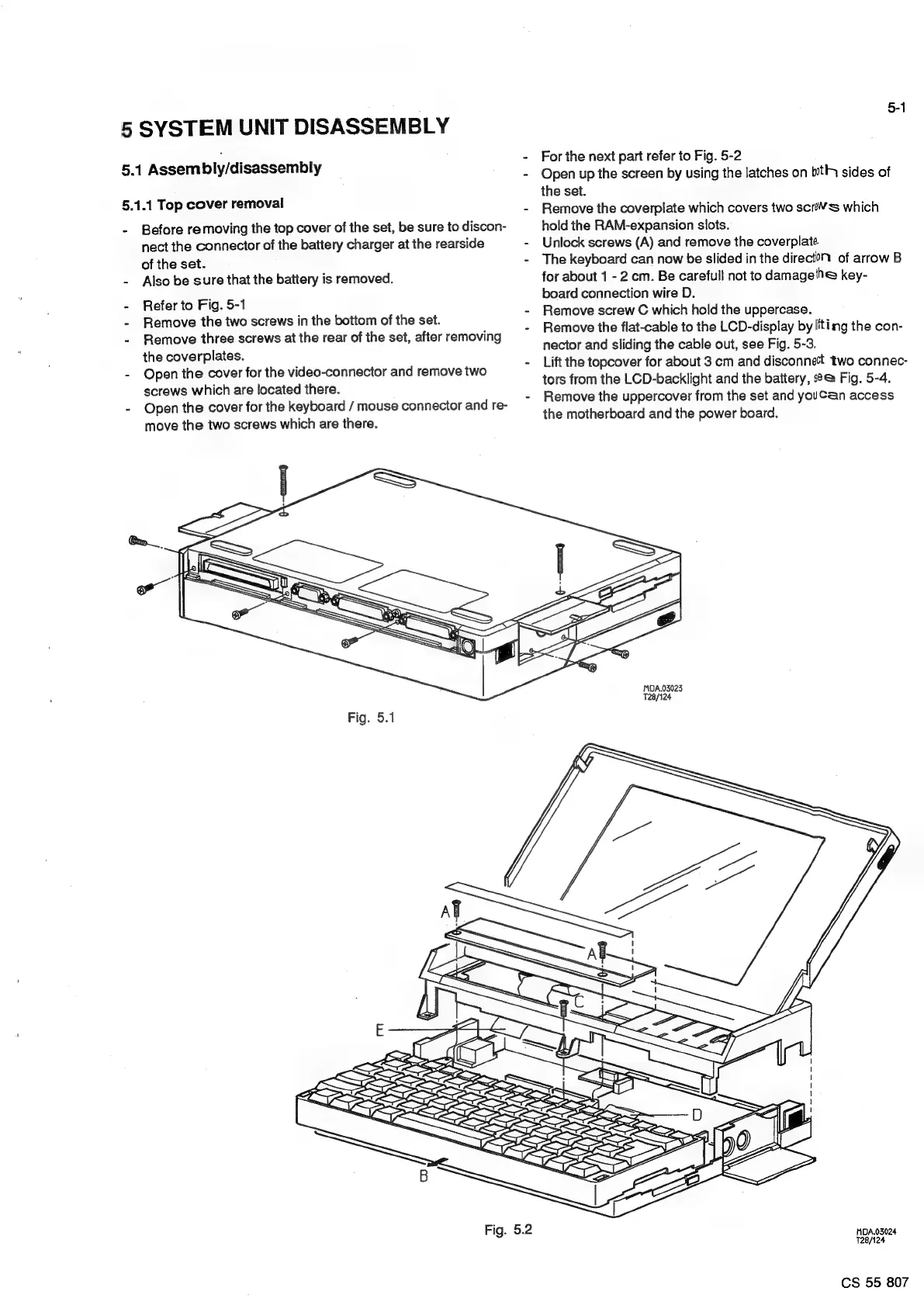
Refer
to
Fig.
5-1
Remove
the
two
screws
in
the
bottom
of
the
set.
Remove
three
screws
at
the
rear
of
the
set,
after
removing
the
coverplates.
Open
the
cover
for
the
video-connector
and
remove
two
screws
which
are
located
there.
Open
the
cover
for
the
keyboard
/
mouse
connector
and
re-
move
the
two
screws
which
are
there.
Fig.
5.1
5-1
For
the
next
part
refer
to
Fig.
5-2
Open
up
the
screen
by
using
the
latches
on
tly
sides
of
the
set.
Remove
the
coverplate
which
covers
two
scr’¥s
which
hold
the
RAM-expansion
slots.
Unlock
screws
(A)
and
remove
the
coverplate.
The
keyboard
can
now
be
slided
in
the
direct?
of
arrow
B
for
about
1
-
2
cm.
Be
carefull
not
to
damagelhe
key-
board
connection
wire
D.
Remove
screw
C
which
hold
the
uppercase.
Remove
the
flat-cable
to
the
LCD-display
by
liting
the
con-
nector
and
sliding
the
cable
out,
see
Fig.
5-3.
Lift
the
topcover
for
about
3
cm
and
disconnect
two
connec-
tors
from
the
LCD-backlight
and
the
battery,
s°@
Fig.
5-4.
Remove
the
uppercover
from
the
set
and
youCan
access
the
motherboard
and
the
power
board.
MDA.03023
728/124
Fig.
5.2
MDA.03024
T28/124
CS
55
807

Related product manuals