Digital TV Playback (Depending on model) 33
9 Digital TV Playback
(Depending on model)
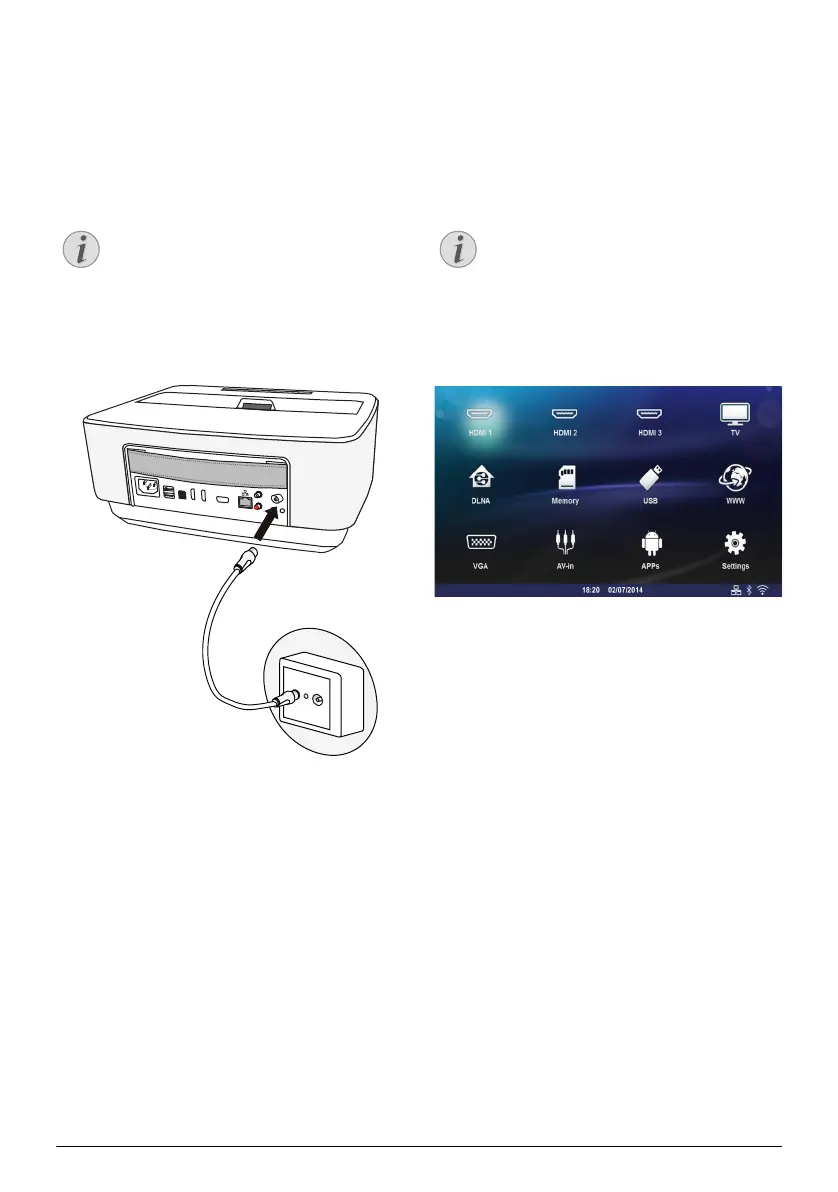
Connecting the Aerial
1 Connect the aerial to the aerial socket.
First Playback
When the DVB-T function is first started, the automatic
channel search must be started.
1 Switch the device on using the on/off key.
2 The main menu appears.
3 Connect the aerial (see Connecting the Aerial,
page 33).
4 Use the navigation keys to select TV.
5 Confirm with .
6 Use / to highlight a setting and use the À/
Á
to select a value.
- Select the country.
- Select the level of the parental control.
- Enter the PIN code for channel lock or parental
control. Enter the code with 4 digits (0000 is not
accepted) and enter again the same code to con
-
firm.
7 Press OK to confirm the settings and continue the
installation.
The channel search starts automatically.
8 At the end of the search, press .
Your TV is now set. You can start watching and enjoy-
ing all your channels.
Aerial Size and Orientation
In some regions it is necessary to connect a
larger aerial in order to grant the reception.
In some countries it is necessary to point the
aerial horizontally in order to grant the recep
-
tion.
PHILIPS
VGA
1
2
S/PDIF
OPTICAL
AUDIO
OUT
TRIG
OUT
AV
IN
L
R
Navigation Keys
All the keys shown are buttons on the remote
control.
Screeneo_User-Manual_HDP16x0_V1-1_EN-US_253634032-A.book Page 33 Jeudi, 18. décembre 2014 8:56 08



 To Next Page