Overview 9
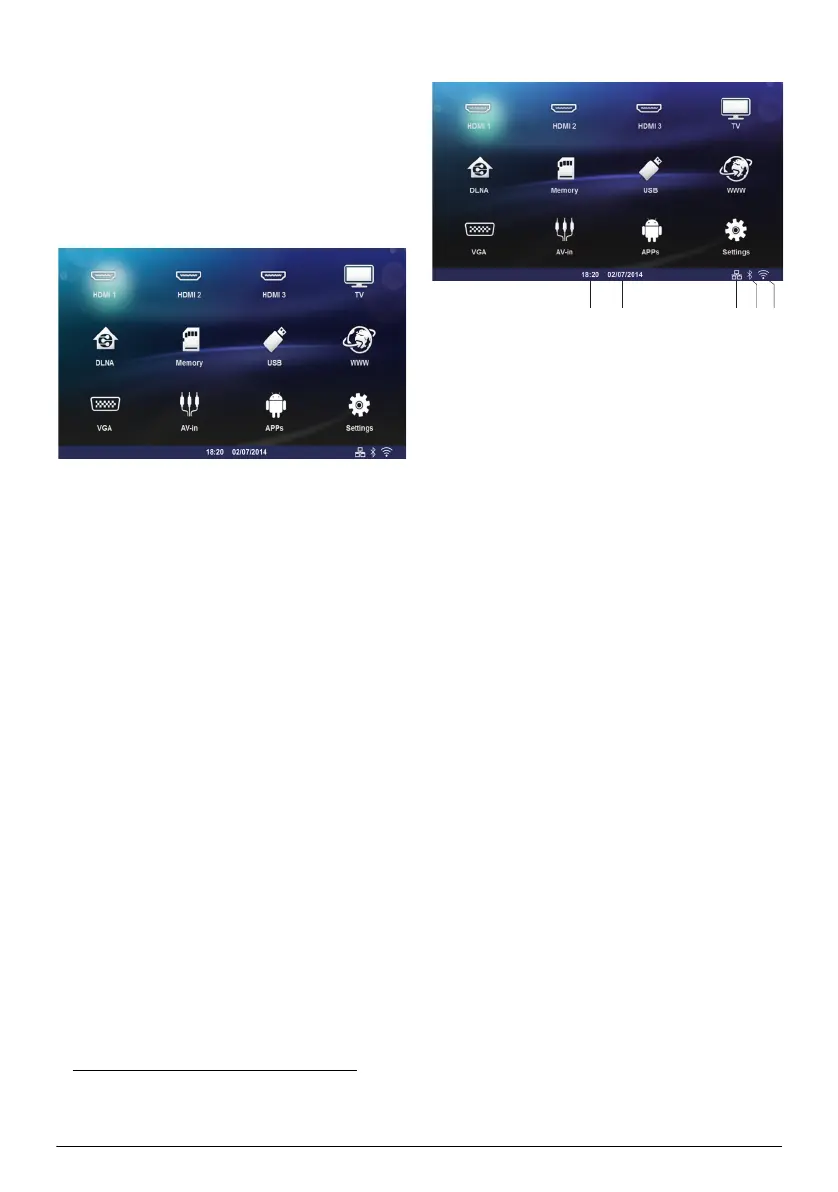
Overview of the Menu
Functions
1 After switching on the device the main menu
appears.
2 Select the desired menu using the navigation keys
/, À/Á.
3 Confirm with OK.
4 By pressing the u key you will return to the main
menu.
HDMI 1, 2, & 3 – Switch to the external video input
HDMI.
TV
1
– Television
DLNA – Displays the list of the devices found on the
Network.
Memory – Display the content of the internal mem-
ory and the inserted memory SD-Card (movies, pic-
tures, musics, folderview).
USB – Display the content of the connected USB
media (movies, pictures, musics, folderview).
WWW – Open an Internet web browser.
VGA – Switch to the Personal computer input.
A/V-in – Switch to the Audio Video input.
APPs – Call the android operating system.
Settings – Configure settings for the wished used of
the device.
Symbols in the Statusbar
1 – Time
2 – Date
3 – LAN status display
4 – Bluetooth status display
5 – WiFi status display
1.Depending on the device model, TV can be
replaced by BT speaker.
ab dce
Screeneo_User-Manual_HDP16x0_V1-1_EN-US_253634032-A.book Page 9 Jeudi, 18. décembre 2014 8:56 08















 To Next Page