14 Philips · Screeneo U3
Bluetooth re-connection
The projector is re-connected to the last
connected speaker automatically when the
connected speaker is turned on.
Unpair the paired Bluetooth speaker
1 If a Bluetooth speaker is paired with the
projector, a tag is created under Remote
& accessories to show the name of paired
Blueooth speaker.
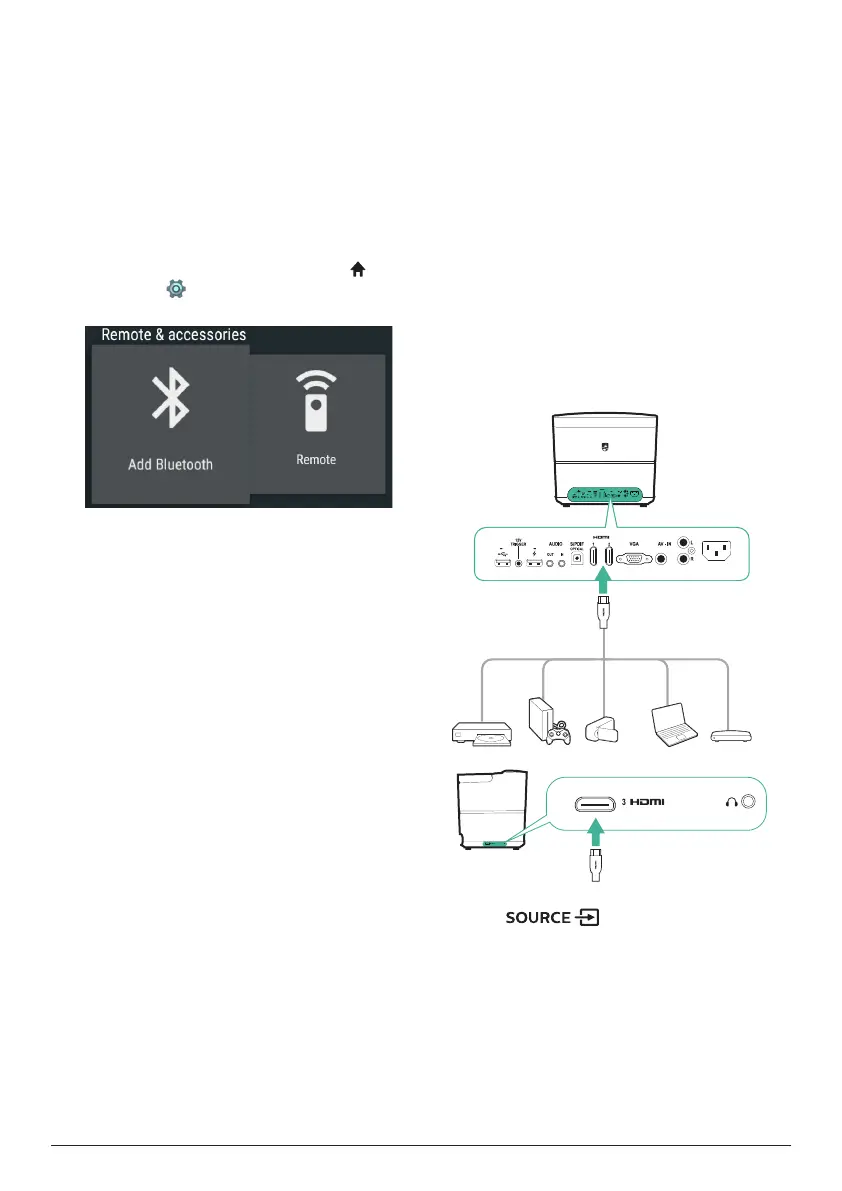
• To check the tag for the paired Blueooth
speaker, on the home screen (press ),
access the
settings
, and go to Remote &
accessories.
2 Under Remote & accessories, select the tag
for the paired Bluetooth speaker to access
the Unpair option.
3 Then select Unpair to remove the tag from
the list. The paired Bluetooth speaker is
unpaired.
Connection to a second Bluetooth speaker
1 Unpair the currently connected Bluetooth
speaker. Or manually disable Bluetooth on
the currently connected Bluetooth speaker.
2 Then pair the projector with a second
Blueooth speaker.
5 Connect to
playback devices
Connect to devices through
HDMI
Connect a playback device (e.g. a Blu-ray
player, gaming console, camcorder, digital
camera or PC) to the projector through HDMI
connection. With this connection, images are
shown on the projection screen, and audio is
played on the projector.
1 Using an HDMI cable, connect the HDMI
(1/2/3) connector on the rear or side panel
of the projector to the HDMI output on the
playback device.
5V 0.
5V 0.5 A
5V-1A
5V·2A
5V 1A
2 Press to access and select
HDMI 1, HDMI 2 or HDMI 3 input source.















 To Next Page