6 Philips · Screeneo U3
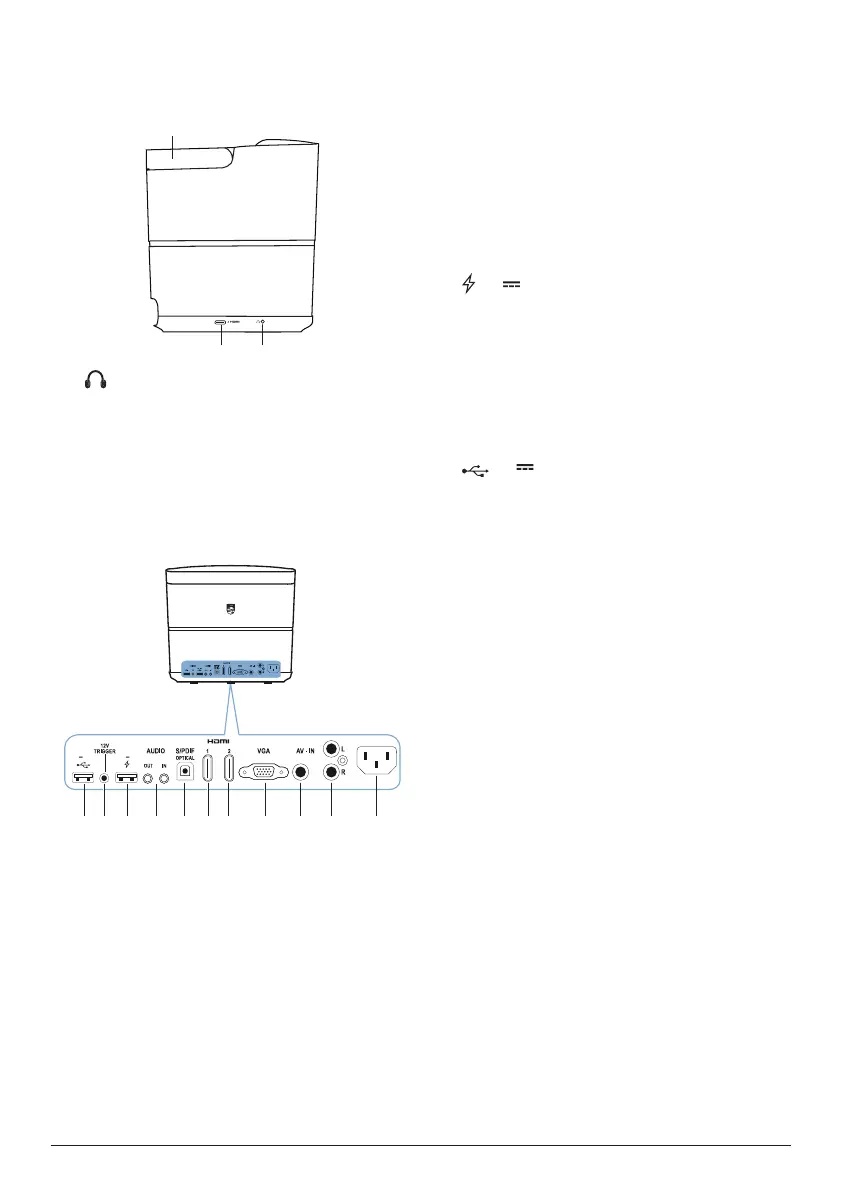
Side view
Open the connector cover on the bottom of the
left side panel to access the connectors.
a
3.5 mm audio output; connect to external
speakers or headphones.
b
HDMI 3 connector
Connect to an HDMI output on a playback
device.
c
Handle
Rear view
abcdefghijk
5V 0.5A
5V-1A
5V 1A
a
Power socket
Connect to the power supply.
b
Audio in L/R
Connect to the analogue audio output on a
playback device.
c
Video in
Connect to the composite video output on
a playback device.
d
VGA port
Connect to the VGA port on a computer.
e
HDMI 2 connector
Connect to an HDMI output on a playback
device.
f
HDMI 1 connector
Connect to an HDMI output on a playback
device.
g
S/PDIF connector
Connect to an optical input on an audio
system.
h
AUDIO IN
3.5 mm audio input; works only through
VGA connection.
AUDIO OUT
3.5 mm audio output; connect to external
speakers or headphones.
i
5V 1A
• Used for charging a device (e.g. a
smartphone or tablet).
• Used for projector system update.
• Cannot access data files on a connected
USB device; not used for media play.
j
TRIGGER connector
Connect to the trigger input on a projector
screen for automatic control of the screen.
k
5V 0�5A
• Access data files on a connected USB
device, used for media play.
• Used for Android system update.















 To Next Page