Overview 7
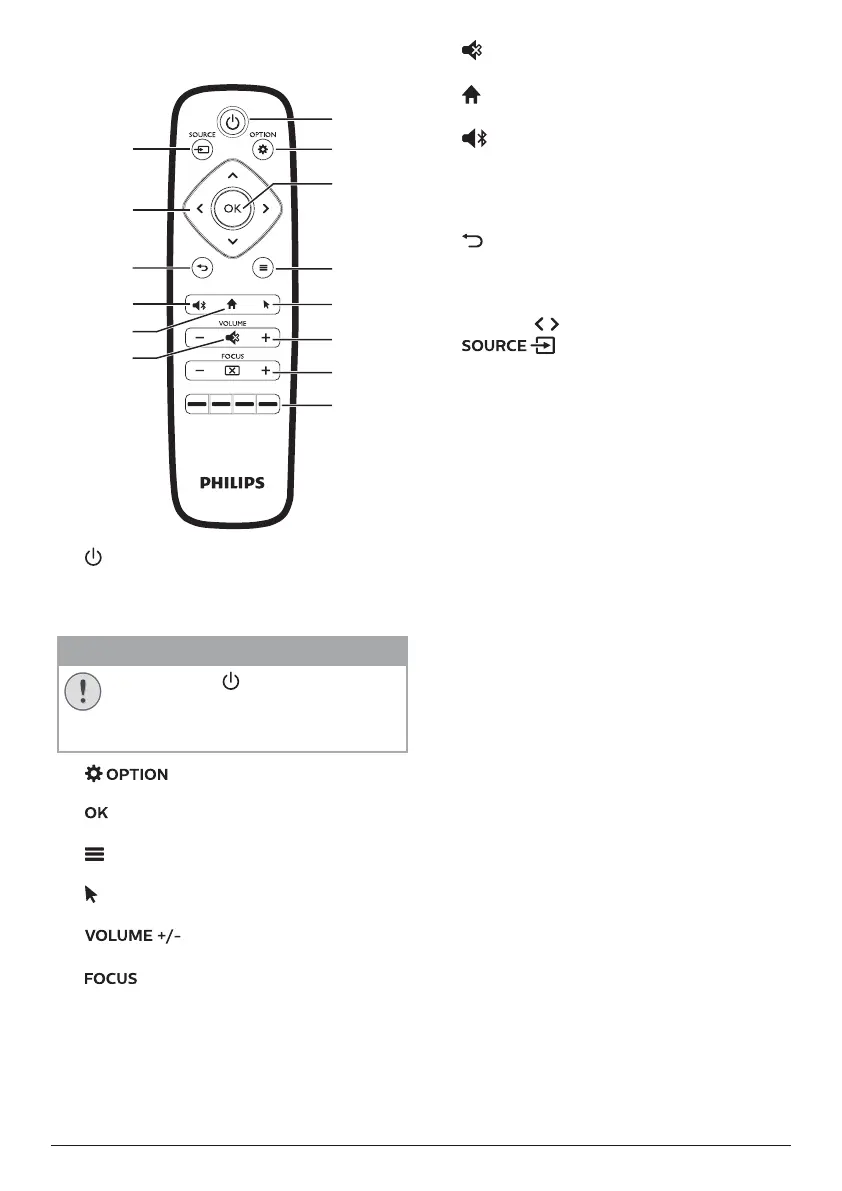
Remote control
a
b
d
e
f
g
h
c
l
m
n
k
j
i
a
• Press once to switch the projector on
• Press twice within one second to switch
the projector to standby.
CAUTION!
Always use the button to turn off the
projector. T
his is essential to allow the
necessary cooling-down time for the
UHP lamp!
b
Access the projector system settings.
c
Confirm a selection or entry.
d
(Android menu button)
When browsing apps, access more options.
e
Enable or disable on-screen pointer.
f
Increase or decrease volume.
g
Adjust image sharpness.
h
Color buttons
Select tasks or options when using
application services.
i
Mute or restore volume.
j
Access the home screen.
k
• Switch the projector to Bluetooth mode.
• Disconnect the currently connected
Bluetooth device to connect another
Bluettooth device.
l
Return to a previous menu screen.
m
Navigation buttons
• Navigate menu options.
• Press / to change a selection.
n
Access and select an input source.















 To Next Page