EasyManua.ls Logo

Philips SE245 - Copy a Redial Number to the Phonebook; Delete a Redial List Entry; Delete Entire Redial List

Philips SE245
56 pages
Print Icon
To Next Page IconTo Next Page
To Previous Page IconTo Previous Page
Loading...
28
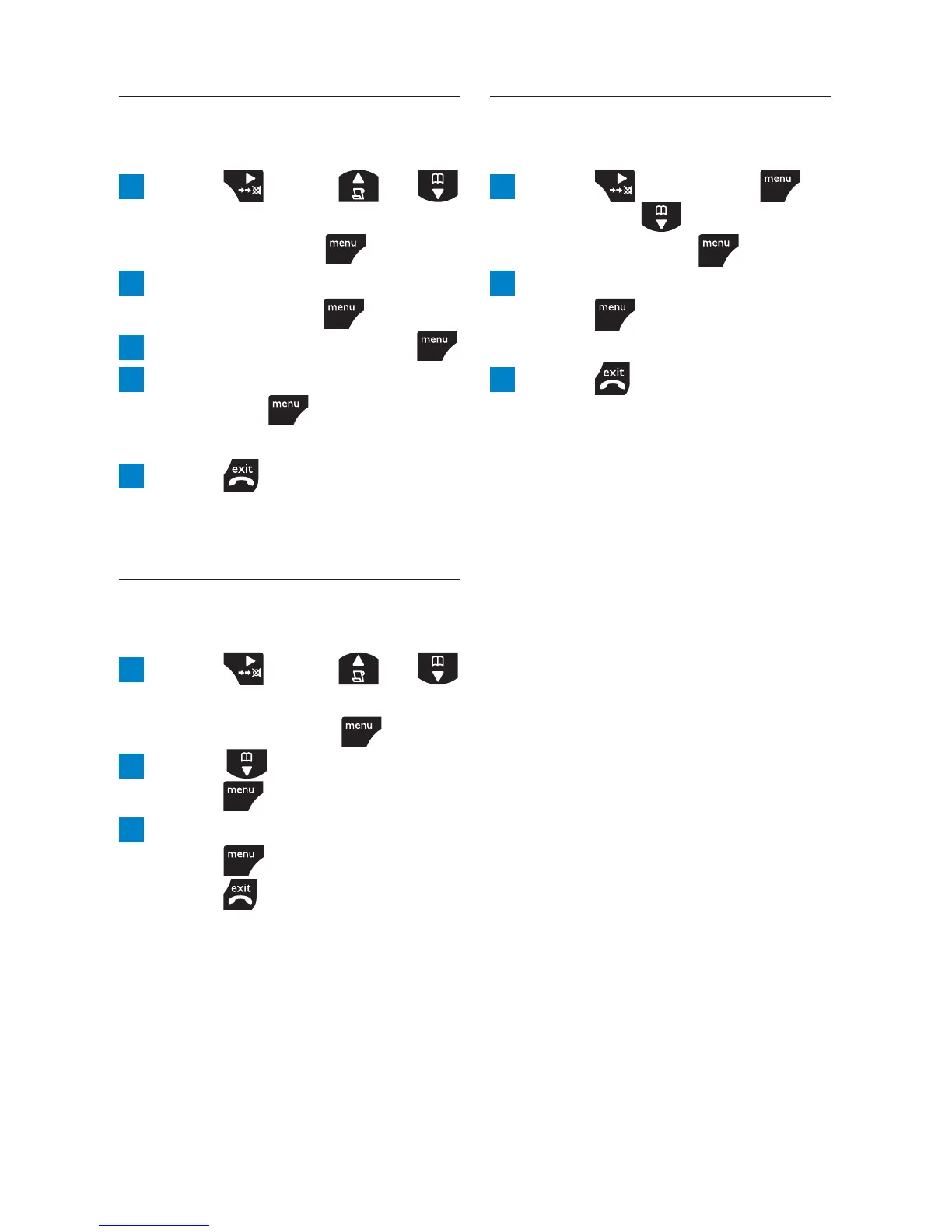
6.2.4 Delete entire redial
list
1 Press then press
and scroll
to
DELETE
ALL
then press .
2 Display shows
CONFIRM?
.
Press to confi rm.
EMPTY
is displayed.
3 Press to return to
standby.
6.2.2 Copy a redial number
to the phonebook
1 Press , scroll or
to the entry you want to
copy and press
.
2 Display shows
SAVE
NUMBER
. Press .
3 Enter a name and press .
4 Edit the number if required
and press
.
SAVED
is displayed.
5 Press to return to
standby.
6.2.3 Delete a redial list
entry
1 Press , scroll or
to the entry you want to
delete and press
.
2 Scroll to
DELETE
and
press
.
3 Display shows
CONFIRM?
.
Press
to confi rm, then
press
to return to
standby.
Caller ID and Call log

Table of Contents

Related product manuals