8 EN
Connect a storage device
Caution
Do not remove a storage device from the PhotoFrame •
when fi les are transferring from or to the storage device.
You can play JPEG photos in one of the
following storage device which is connected to
the PhotoFrame:
Secure Digital (SD)•
Secure Digital (SDHC)•
Multimedia Card (MMC)•
xD card (xD)•
Memory Stick (MS)•
Memory Stick Pro (with adaptor)•
USB memory drive•
However, we do not guarantee the
operations for all types of memory card
media.
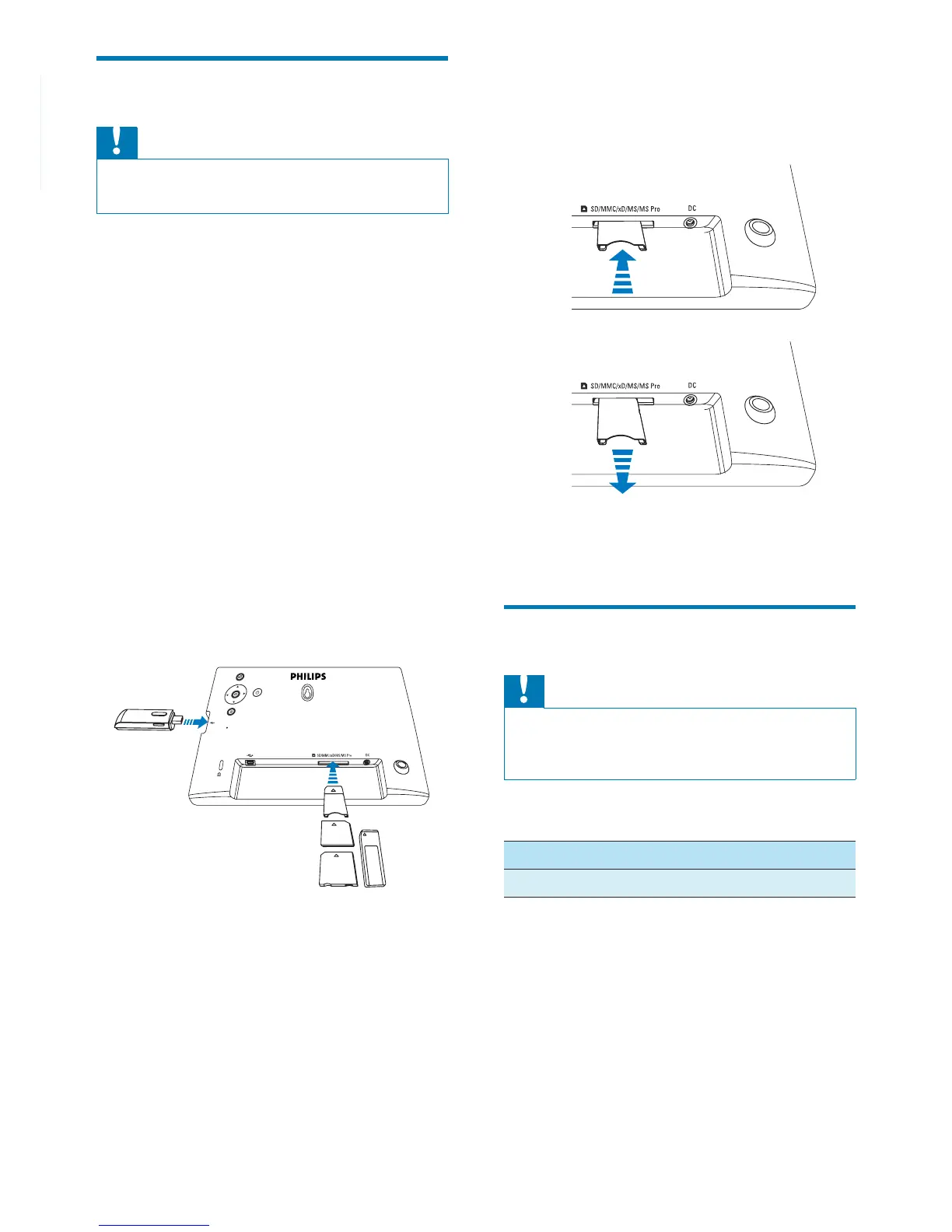
1 For xD/SD/MMC/MS/MS Pro card, insert it
into the slot until you hear a “CLICK”.
For USB memory drive, insert it into •
the slot fi rmly.
Photos in the storage device are •
displayed in slideshow mode.
To remove a storage device:
For xD/SD/MMC/MS/MS Pro card, push •
the card inward and then pull it out.
For USB memory drive, pull it out from •
the PhotoFrame.
Connect a PC/Mac
Caution
Do not disconnect the PhotoFrame from the PC when •
fi les are transferring between the PhotoFrame and the
PC/Mac.
System requirements:
PC Mac
Windows® XP, Vista Mac OS® X
a
b



 To Next Page