14
When using earbuds with the Phonak TV Connector
To connect the earbuds with the TV Connector follow
these steps:
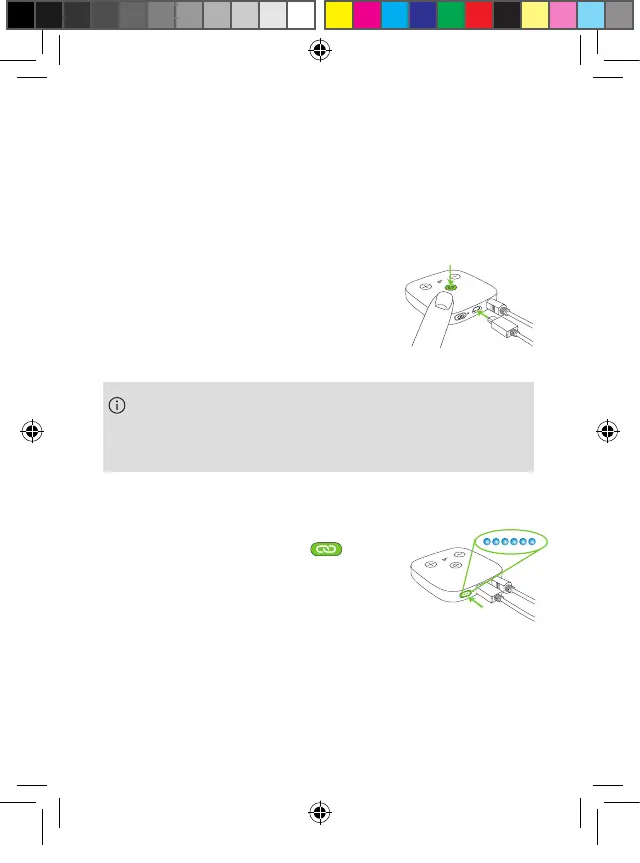
1. Make sure the TV Connector is
properly connected to the TV or
sound source and switch it on.
a Put the earbuds in pairing mode as described in
chapter 3.2.
b Press the pairing button
on the back of the Phonak TV
Connector. You will see a blue
blinking indicator light.
c Wait until the indicator lights on both the TV
Connector and the charging case stop blinking.
If you purchased the Phonak Earbuds and TV
Connector in separate packages, follow steps a to c
below to connect them for the first time:
PH_User_Guide_Earbuds_TWE21_92x125_GB_V1.00_029-3338-02.indd 14PH_User_Guide_Earbuds_TWE21_92x125_GB_V1.00_029-3338-02.indd 14 2021-05-11 8:49:13 AM2021-05-11 8:49:13 AM



 To Next Page